- Click here
PRECAUTION
Note:After turning the ignition switch off, waiting time may be required before disconnecting the cable from the battery terminal. Therefore, make sure to read the disconnecting the cable from the battery terminal notice before proceeding with work (Click here).
- Click here
DISCONNECT CABLE FROM NEGATIVE BATTERY TERMINAL
CAUTION:Wait at least 90 seconds after disconnecting the cable from the negative (-) battery terminal to disable the SRS system.
Note:When disconnecting the cable, some systems need to be initialized after the cable is reconnected (Click here).
-
Click here
REMOVE DOOR SCUFF PLATE ASSEMBLY LH (for LHD)
-
Put protective tape around the door scuff plate.
-
Using a screwdriver, detach the 4 clips, 10 claws and 2 guides and remove the door scuff plate.
Tip:Tape the screwdriver tip before use.
Table 1. Text in Illustration *1 Protective Tape
-
-
Click here
REMOVE COWL SIDE TRIM BOARD LH (for LHD)
-
Remove the clip.
-
Detach the clip and claw and remove the cowl side trim board.
-
-
Click here
REMOVE INSTRUMENT SIDE PANEL LH (for LHD)
-
Put protective tape around the instrument side panel.
Table 2. Text in Illustration *1 Protective Tape -
Using a moulding remover, detach the 5 clips, claw and 3 guides and remove the instrument side panel.
-
-
Click here
REMOVE INSTRUMENT CLUSTER FINISH PANEL ORNAMENT (for LHD)
-
Put protective tape around the instrument cluster finish panel ornament.
Table 3. Text in Illustration *1 Protective Tape -
Using a moulding remover, detach the 3 clips and remove the instrument cluster finish panel ornament.
-
- Click here
REMOVE NO. 1 INSTRUMENT PANEL UNDER COVER SUB-ASSEMBLY (for LHD)
Tip:Use the same procedure described for the No. 2 instrument panel finish panel cushion.
-
Click here
REMOVE INSTRUMENT PANEL FINISH PLATE GARNISH (for RHD)
-
Detach the 4 clips.
-
Disconnect each connector and remove the instrument panel finish plate garnish.
-
-
Click here
REMOVE DOOR SCUFF PLATE ASSEMBLY RH (for RHD)
-
Put protective tape around the door scuff plate assembly RH.
-
Using a screwdriver, detach the 4 clips, 10 claws and 2 guides and remove the door scuff plate assembly RH.
Tip:Tape the screwdriver tip before use.
Table 4. Text in Illustration *1 Protective Tape
-
-
Click here
REMOVE COWL SIDE TRIM BOARD RH (for RHD)
-
Remove the clip.
-
Detach the clip and claw and remove the cowl side trim board RH.
-
-
Click here
REMOVE INSTRUMENT SIDE PANEL RH (for RHD)
-
Put protective tape around the instrument side panel.
Table 5. Text in Illustration *1 Protective Tape -
Using a moulding remover, detach the 5 clips, claw, and 3 guides.
-
Disconnect the connector and remove the instrument side panel.
-
- Click here
REMOVE NO. 2 INSTRUMENT PANEL UNDER COVER SUB-ASSEMBLY (for RHD)
-
Attach the 3 clips and 2 guides to install the No. 2 instrument panel under cover.
-
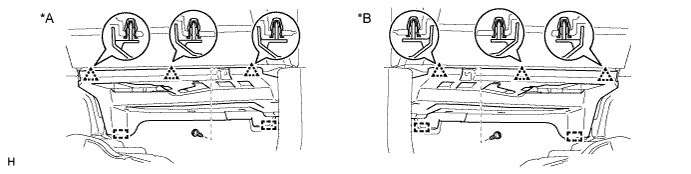
Install the screw.
Table 6. Text in Illustration *A for LHD *B for RHD
-
-
Click here
REMOVE LOWER INSTRUMENT PANEL FINISH PANEL ASSEMBLY
-
Detach the 4 clips.
-
Disconnect each connector and remove the instrument panel finish panel.
-
-
Click here
REMOVE LOWER INSTRUMENT PANEL FINISH PANEL SUB-ASSEMBLY
-
Using a screwdriver, detach the 2 claws and open the cover.
Tip:Tape the screwdriver tip before use.
Table 7. Text in Illustration *1 Protective Tape -
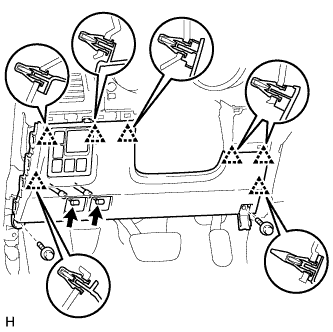
w/o Knee Airbag:
-
Remove the 2 bolts <C>.
-
Detach the 7 clips.
-
Disconnect each connector and each cable and remove the lower instrument panel finish panel.
-
-
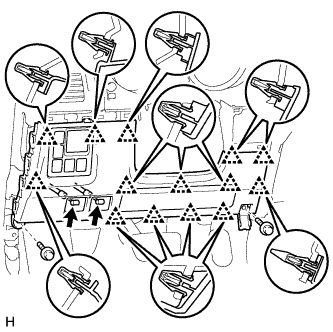
w/ Knee Airbag:
-
Remove the 2 bolts <C>.
-
Detach the 14 clips.
-
Disconnect each connector and each cable and remove the lower instrument panel finish panel.
-
-
- Click here
REMOVE LOWER NO. 1 INSTRUMENT PANEL AIRBAG ASSEMBLY
-
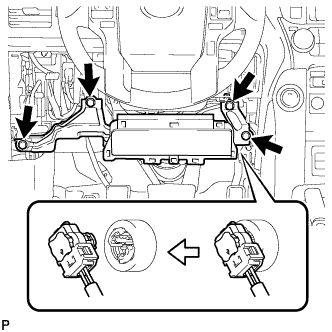
Remove the 4 bolts and airbag assembly.
-
Disconnect the connector.
Note:When handling the airbag connector, take care not to damage the airbag wire harness.
-
- Click here
REMOVE INTEGRATION CONTROL AND PANEL ASSEMBLY
-
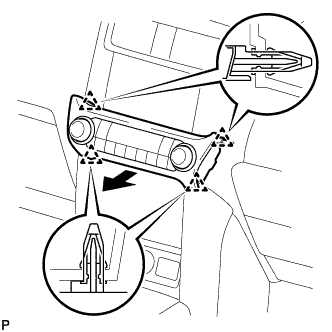
Detach the 4 clips.
-
Disconnect the connector and remove the integration control and panel assembly.
-
-
Click here
REMOVE CENTER INSTRUMENT CLUSTER FINISH PANEL ASSEMBLY (w/o Navigation System)
-
Detach the 10 clips and remove the center instrument cluster finish panel.
-
Disconnect each connector.
-
-
Click here
REMOVE RADIO TUNER OPENING COVER (w/o Audio)
-
Remove the 4 bolts and radio tuner opening cover.
-
- Click here
REMOVE RADIO RECEIVER ASSEMBLY (w/ Radio Receiver)
-
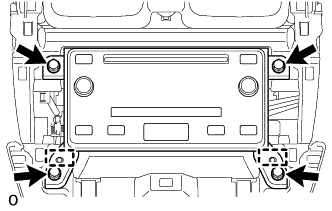
Remove the 4 bolts.
-
Pull the radio receiver assembly to detach the 2 guides on the backside of the radio receiver assembly.
-
Disconnect each connector and remove the radio receiver assembly.
-
- Click here
REMOVE DISPLAY AND NAVIGATION MODULE DISPLAY (w/ Navigation System)
-
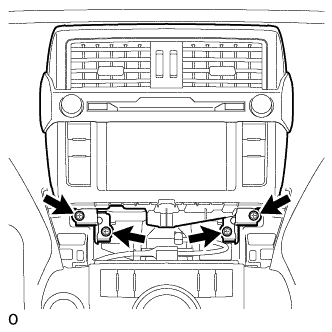
Remove the 4 bolts.
-
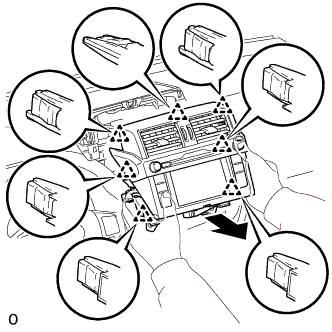
Pull the navigation receiver assembly to detach the 7 clips on the backside of the navigation receiver assembly.
-
Disconnect each connector and remove the navigation receiver assembly.
-
-
Click here
REMOVE NO. 1 CLEARANCE WARNING BUZZER
-
Disconnect the connector.
-
Detach the clamp and remove the No. 1 clearance warning buzzer.
-