LUGGAGE COMPARTMENT DOOR DISASSEMBLY

-
REMOVE LUGGAGE COMPARTMENT DOOR COVER
-
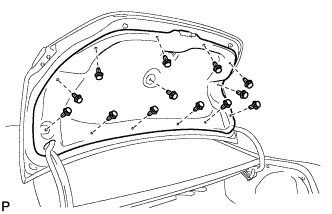
Remove the 13 clips and luggage compartment door cover.
-
-
REMOVE LUGGAGE COMPARTMENT DOOR CUSHION
-
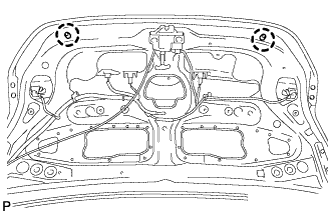
Disengage the 2 claws and remove the 2 luggage compartment door panel cushions.
-
-
REMOVE LUGGAGE COMPARTMENT DOOR LOCK ASSEMBLY (w/ Wireless Door Lock Control System)
-
Disconnect the connector.
-
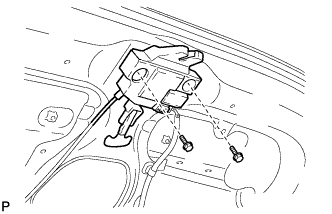
Remove the 2 bolts and disengage the luggage compartment door lock assembly.
-
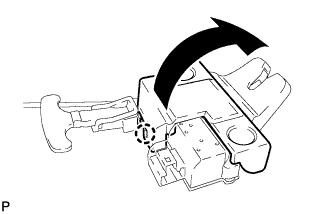
Disengage the claw as shown in the illustration.
-
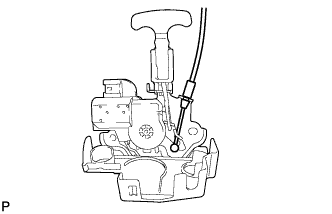
Disengage the luggage door lock control cable sub-assembly and remove the luggage compartment door lock assembly.
-
-
REMOVE LUGGAGE COMPARTMENT DOOR LOCK ASSEMBLY (w/o Wireless Door Lock Control System)
-
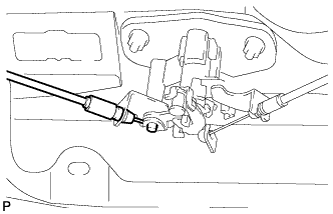
Disconnect the luggage door lock control cable sub-assembly.
-
Disconnect the connector.
-
Remove the 2 bolts and luggage compartment door lock assembly.
-
-
REMOVE LUGGAGE COMPARTMENT DOOR LOCK CYLINDER ASSEMBLY (w/o Wireless Door Lock Control System)
-
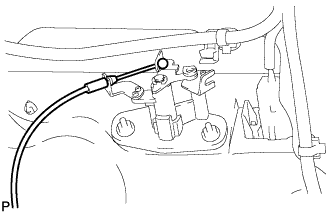
Disconnect the luggage door lock control cable sub-assembly.
-
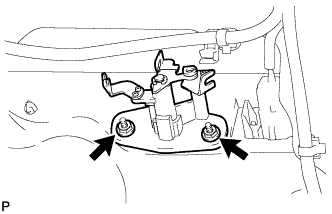
Remove the 2 nuts and luggage compartment door lock cylinder assembly.
-
-
REMOVE REAR SPOILER SUB-ASSEMBLY (w/ Rear Spoiler)
Tech Tips
When removing the rear spoiler sub-assembly, heat the vehicle body and rear spoiler sub-assembly using a heat light.
Heating Temperature Item Temperature Vehicle Body 40 to 60°C (104 to 140°F) Rear Spoiler 20 to 30°C (68 to 86°F) Note
Do not heat the vehicle body, rear spoiler sub-assembly excessively.
-
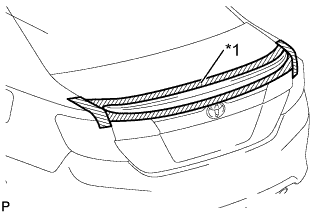
Text in Illustration *1 Protective Tape Put protective tape around the rear spoiler sub-assembly.
-
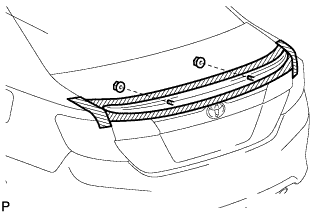
Remove the 2 nuts.
-
Insert a piano wire between the vehicle body and rear spoiler sub-assembly.
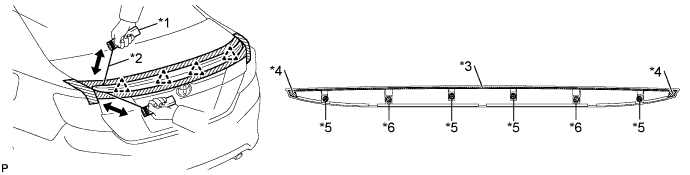
Text in Illustration *1 Wooden Block *2 Piano Wire *3 No. 1 Rear Spoiler Protector *4 No. 2 Rear Spoiler Protector *5 Clip *6 Stud Bolt -
Tie objects that can serve as handles (for example, wooden blocks) to both wire ends.
-
Pull the piano wire and scrape off the No. 1 rear spoiler protector and 2 No. 2 rear spoiler protectors that holds the rear spoiler sub-assembly to the vehicle body.
Note
Be careful not to damage the vehicle body.
-
Disengage the 4 clips and remove the rear spoiler sub-assembly.
-
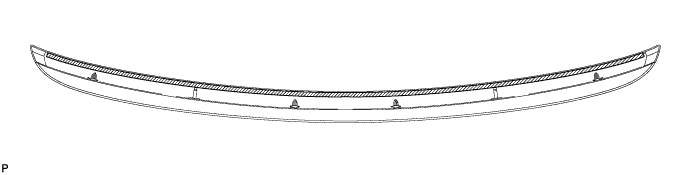
Remove the No. 1 rear spoiler protector.
-
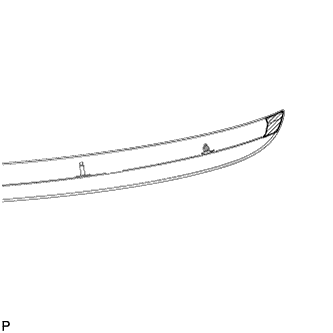
Remove the No. 2 rear spoiler protector.
Tech Tips
Use the same procedure for the RH side and LH side.
-
Remove the 4 clips from the rear spoiler.
-
Remove the 2 gaskets from the rear spoiler.
-
When replacing the rear spoiler with a new one:
-
Remove the 2 stud bolts from the rear spoiler.
-
-
-
REMOVE LUGGAGE COMPARTMENT DOOR OUTSIDE GARNISH SUB-ASSEMBLY
-
w/ Smart Key System:
-
Disconnect the connector.
-
-
w/ Wireless Door Lock Control System:
-
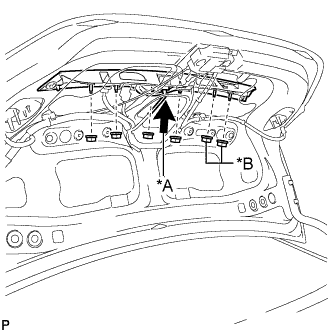
Text in Illustration *A w/ Smart Key System *B w/ Wireless Door Lock Control System Remove the 6 nuts.
-
-
w/o Wireless Door Lock Control System:
-
Remove the 4 nuts.
-
-
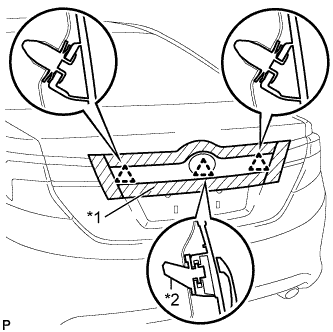
Text in Illustration *1 Protective Tape *2 Back Door Outside Garnish Clip Put protective tape around the luggage compartment door outside garnish sub-assembly.
-
Disengage the 3 clips and remove the luggage compartment door outside garnish sub-assembly.
-
Remove the clip (back door outside garnish clip) and 2 clips from the luggage compartment door outside garnish sub-assembly.
-
Remove the 6 gaskets from the luggage compartment door outside garnish sub-assembly.
-
-
REMOVE REAR TELEVISION CAMERA ASSEMBLY (w/ Rear Monitor)
-
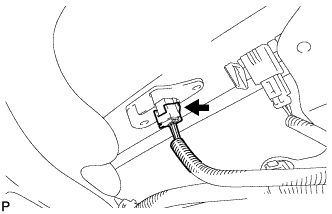
Disconnect the connector.
-
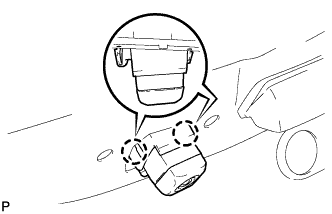
Disengage the 2 claws to remove the rear television camera assembly.
-
-
REMOVE LICENSE PLATE LIGHT ASSEMBLY LH
-
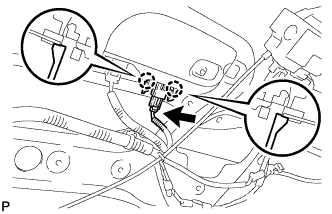
Disconnect the connector.
-
Disengage the 2 claws and remove the license plate light assembly.
-
-
REMOVE LICENSE PLATE LIGHT ASSEMBLY RH
Tech Tips
Use the same procedure for the RH side and LH side.
-
REMOVE REAR LIGHT ASSEMBLY LH
-
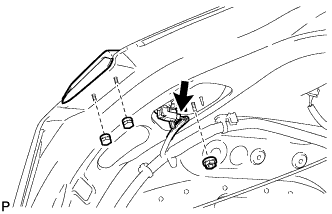
Disconnect the connector.
-
Remove the 3 nuts and rear light assembly.
-
-
REMOVE REAR LIGHT ASSEMBLY RH
Tech Tips
Use the same procedure as for the LH side.