REMOTE ENGINE STARTER SYSTEM REGISTRATION

-
DESCRIPTION OF REGISTRATION
-
Registering a remote engine starter ID between the certification ECU (smart key ECU assembly) and remote engine starter ECU enables the remote engine starter function to be operated.
-
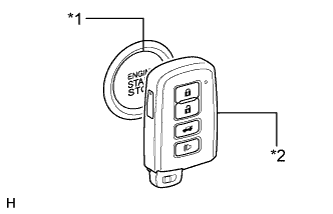
Text in Illustration *1 Engine Switch *2 Electrical Key Transmitter Sub-assembly Registration is needed when the certification ECU (smart key ECU assembly) or remote engine starter ECU is replaced with a new one.
Note
When the certification ECU (smart key ECU assembly) is replaced, refer to the Registration of engine immobiliser system first Click here.
Tech Tips
This vehicle does not have a key slot. Therefore, touch the logo of the electrical key transmitter sub-assembly to the engine switch as shown in the illustration.
-
-
REGISTRATION OF REMOTE ENGINE STARTER ID
-
Remote engine starter ID registration:
Tech Tips
In the chart below, the numbers in the "Procedure" column (1, 2, 3, etc.) indicate the step numbers. Perform the steps in numerical order.
Process Procedure 1. Start of registration
-
Connect the Techstream to DLC3
-
While holding the registered key, turn the engine switch on (IG)
-
Turn the Techstream on
-
Enter the following menus: Smart Key / Utility / ECU Communication ID Registration / Remote Engine Starter
2. Confirmation of registered key*
-
Touch the logo of registered key to the engine switch (for details, refer to Description of Registration)
-
Confirm that the wireless door lock buzzer sounds once (short beep)
3. Erasure of ECU code
-
Perform operation according to prompts on the Techstream screen
4. End of registration
-
Finish remote engine starter ID registration
-
*: Perform this process for one of the keys registered to the vehicle. Finish the procedure within 30 seconds. If the procedure is not finished within the specified time, perform the registration from process 1 again.
-
If "Smart Key System" is canceled, registration cannot be performed Click here.
-
-