ENGINE IMMOBILISER SYSTEM (w/o Smart Key System) REGISTRATION

-
DESCRIPTION OF CODE REGISTRATION
-
w/ Wireless Door Lock Control System:
The key has 2 codes: the key code (immobiliser code) and the wireless code. Both of these codes need to be registered. For the wireless code registration procedures, refer to Wireless Door Lock Control System (w/o Smart Key System) Click here.
-
-
KEY REGISTRATION PROCEDURES WHEN ADDING OR REPLACING KEY OR WHEN KEY IS LOST
Tech Tips
-
The following procedures require the use of the Techstream:
-
- New key code registration
-
- Additional key code registration
-
- Key code erasure
-
A maximum of 8 key codes can be registered.
Customer Request/Condition Registration Procedure Condition Procedure Refer to Registering additional key Customer must bring at least 1 key. 1. Register additional keys as necessary (additional key code registration). PROCEDURE "B"
-
Replacing a key
-
Making a lost key unusable
Tech Tips
After key code erasure, any remaining keys that are not registered at this time cannot be used. Therefore, after key code erasure, register all remaining keys.
Customer must bring at least 1 key. 1. Using remaining key, clear all registered keys except one (key code erasure). PROCEDURE "C" 2. Register additional keys as necessary (additional key code registration). PROCEDURE "B" All keys are lost - 1. Reset all keys (all keys ID erasure (key code reset)). PROCEDURE "D" 2. Register all keys new key ID registration. PROCEDURE "A" -
-
PART REPLACEMENT AND KEY REGISTRATION PROCEDURES
-
The following table shows ECU replacement and key registration procedures for cases in which an ECU has been determined to be malfunctioning during troubleshooting of the engine immobiliser system.
Tech Tips
-
The following procedures require the use of the Techstream:
-
- New key code registration
-
- Additional key code registration
-
- Key code erasure
-
A maximum of 8 key codes can be registered.
Malfunctioning ECU Procedure Refer to Transponder key ECU assembly 1. Replace transponder key ECU assembly. 2. Reregister all keys. PROCEDURE "A" 3. Register ECU communication ID. PROCEDURE "E" ECM 1. Replace ECM. (for 2AR-FE) 2. Register ECU communication ID. PROCEDURE "F" Transponder key ECU assembly and ECM 1. Replace transponder key ECU assembly. 2. Replace ECM. (for 2AR-FE) 3. Reregister all keys. PROCEDURE "A" 4. Register ECU communication ID. PROCEDURE "F" -
-
-
KEY REGISTRATION (PROCEDURE "A")
-
New key code registration (Procedure "A"):
Note
Make sure that no key codes are registered in the transponder key ECU assembly.
Tech Tips
-
In this mode, a maximum of 3 key codes for 2 master keys and 1 sub key can be registered. The master keys and sub key can be registered in any order because the transponder key ECU assembly can distinguish between different types of keys.
-
New key codes must be registered with the battery connected. The ignition switch can be either ON or off.
-
When a new transponder key ECU assembly is installed, key codes must be registered in the transponder key ECU assembly.
Automatic Key Code Registration (New Registration) Procedure Security Indicator Light Condition 1. Start Blinking
Tech Tips
Until first key is inserted
2. Insert the master key into the ignition key cylinder. On 3. Techstream operation
Enter the following menus: Body Electrical / Immobiliser / Utility / Key Registration
Tech Tips
After completing the above operation, proceed to the next step in accordance with the prompts on the Techstream screen.
Off for 1 sec. and then on 4. Remove the key and then select Next on the Techstream. On 5. Insert the master key to be registered and then select Next on the Techstream. Off for 1 sec. and then on 6. Remove the key and then select Next on the Techstream. On 7. Insert the sub key to be registered and then select Next on the Techstream. Off for 1 sec. and then on for 0.5 sec. and then off 8. Remove the key. Blinking 9. End Tech Tips
-
When the engine immobiliser system is operating normally and the key is pulled out, the security indicator light blinks continuously.
-
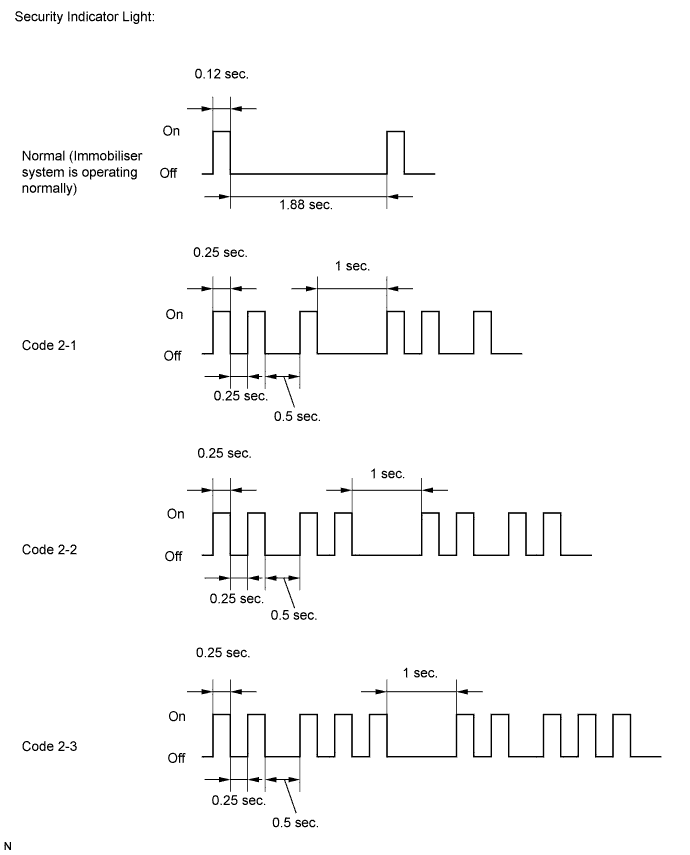
If the new key code registration fails, code 2-1 will be output through the security indicator light. Trying to re-register an already registered key will cause code 2-2 to be output when the key is inserted. If the number of registered key codes exceeds the maximum limit, code 2-3 will be output through the security indicator light. The output details are shown below.
-
-
End automatic key code registration mode:
Automatic key code registration mode can be forced to end when at least 1 key code (immobiliser code) has been registered as the master key.
Tech Tips
Follow the instruction on the Techstream screen to end new key code registration mode.
-
-
KEY REGISTRATION (PROCEDURE "B")
-
Additional registration (Procedure "B"):
Tech Tips
-
A maximum of 5 master key codes and 3 sub key codes can be registered.
-
Registration mode will end if any step is not completed within the specified time.
-
When the ignition cylinder or the key cylinder set is replaced, remove the transmitter module from the original master key. Then install this transmitter module to a new key and use the new key as the master key. If necessary, use this master key to register other keys.
Note
When the ignition key cylinder has been replaced, locking and unlocking doors is possible with the new master key transmitter module (removed from the original master key). However, the new master key will not be able to lock and unlock doors through the door key cylinder. Keep the original master key. If the battery in the new master key transmitter module fails, the original master key can be used to lock and unlock doors through the door key cylinder.
Additional Registration Procedure Time to Complete Operation Security Indicator Light Condition 1. Start - Blinking
Tech Tips
Until first key is inserted
2. Insert the previous registered master key into the ignition key cylinder and turn the ignition switch to ON. - Off 3. Techstream operation
Enter the following menus: Body Electrical / Immobiliser / Utility / Key Registration
Tech Tips
After completing the above operation, proceed to the next step in accordance with the prompts on the Techstream screen.
Within 120 sec. On 4. Remove the master key. Within 20 sec.
Tech Tips
After the Techstream instruction
On 5. Insert the key to be registered in the ignition key cylinder. Within 10 sec. Blinking 6. Wait for 60 sec. after the key is registered.
Tech Tips
The security indicator light goes off.
- Off 7. Remove the key. - Blinking 8. End Tech Tips
-
A brief outline of a key code registration procedure is shown above. For detailed information, refer to the Techstream screen.
-
When the engine immobiliser system is operating normally and the key is pulled out, the security indicator light blinks continuously.
-
If the key code registration has failed in automatic key code registration mode, code 2-1 will be output through the security indicator light. Trying to re-register a previous registered key will cause code 2-2 to be output when the key is inserted. If the number of registered key codes exceeds the maximum limit, code 2-3 will be output through the security indicator light. The details are shown in procedure "A".
-
-
-
KEY REGISTRATION (PROCEDURE "C")
-
Key code erasure (Procedure "C"):
Tech Tips
-
Performing this procedure will erase all key codes except for the master key, which is used for erasing the key codes. In order to use a key whose code has been erased, a new key code must be registered.
-
This procedure will be canceled if each step is not completed within the specified time.
Key Code Erasure Procedure Time to Complete Operation Security Indicator Light Condition 1. Start - Blinking
Tech Tips
Until first key is inserted
2. Insert the previous registered master key in the ignition key cylinder and turn the ignition switch to ON. - Off 3. Techstream operation
Enter the following menus: Body Electrical / Immobiliser / Utility / Transponder Code Erasure
Tech Tips
After completing the above operation, proceed to the next step in accordance with the prompts on the Techstream screen.
Within 120 sec. On for 1 sec. and then off 4. Remove the master key. Within 10 sec.
Tech Tips
After the Techstream instruction
Blinking 5. End Tech Tips
-
A brief outline of a key code registration procedure is shown above. For detailed information, refer to the Techstream screen.
-
When the engine immobiliser system is operating normally and the key is pulled out, the security indicator light blinks continuously.
-
-
-
KEY REGISTRATION (PROCEDURE "D")
-
All key code erasure (Procedure "D"):
Tech Tips
-
To perform this procedure, at least 1 key should be registered to the transponder key ECU assembly.
-
This procedure can be performed using either a registered or unregistered key.
All Key Code Erasure Procedure Time to Complete Operation Security Indicator Light Condition 1. Start - Blinking 2. Insert the previous registered master key or unregistered key into ignition key cylinder and turn the ignition switch to ON. Within 10 min. On or off 3. Using TIS, confirm that user and vehicle match. 4. Techstream operation
Enter the following menus: Body Electrical / Immobiliser / Utility / Immobiliser Code Reset
Tech Tips
After completing the above operation, proceed to the next step in accordance with the prompts on the Techstream screen.
Within 15 min. On for 1 sec. and then off 5. Completion of erasure of all key codes is displayed. Within 10 sec.
Tech Tips
After the Techstream instruction
On 6. End Tech Tips
-
A brief outline of a key code registration procedure is shown above. For detailed information, refer to the Techstream screen.
-
When the engine immobiliser system is operating normally and the key is pulled out, the security indicator light blinks continuously.
-
-
-
KEY REGISTRATION (PROCEDURE "E")
-
ECU communication ID registration (Procedure "E"):
Note
-
When the transponder key ECU assembly is replaced, the ECU communication ID of the ECM must be registered into the transponder key ECU assembly to match their ECU communication IDs.
-
The engine cannot be started unless the ECU communication IDs match.
-
Do not turn the ignition switch from ON to off 20 times or more before registering the ECU communication ID. Turning the ignition switch from ON to off 20 times or more will result in the engine not starting unless the transponder key ECU assembly is replaced with a new one.
-
After registration, turning the ignition switch to the START position may not start the engine on the first try. If so, turn the ignition switch to the START position again.
-
After the engine is started, clear DTC B2799 (code for ECM immobiliser communication error) by either of the following:
- Using the Techstream
- Disconnecting the battery for 30 sec.
-
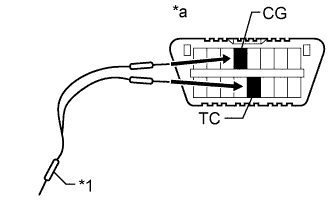
Text in Illustration *1 SST *a DLC3 Using SST, connect terminals TC and CG of the DLC3.
- SST
- 09843-18040
-
Turn the ignition switch to ON and leave the vehicle as is for 30 minutes.
Tech Tips
Do not start the engine.
-
Check that the engine starts.
-
-
-
KEY REGISTRATION (PROCEDURE "F")
-
ECU communication ID registration (Procedure "F"):
Note
The ECU communication ID should be registered when the ECM and transponder key ECU assembly are replaced or when the ECM only is replaced in order to match the ECU communication ID.
ECU Communication ID Registration Procedure Security Indicator Light Condition 1. Start Off 2. Insert an already registered key into the ignition key cylinder. 3. Start the engine. 4. Check that the engine starts and stays on for more than 3 sec. 5. End
-