DESCRIPTION
Terminals TC and CG are located in the DLC3.
The DLC3 is located under the instrument panel under cover. When terminals TC and CG are connected, DTCs in normal mode or test mode can be read from the Malfunction Indicator Lamp (MIL) in the combination meter assembly.
Also, terminal SIL is located in the DLC3. This terminal is used for M-OBD communication with the intelligent tester.
INSPECTION PROCEDURE
Inspect the fuses for circuits related to this system before performing the following inspection procedure.
PROCEDURE
- Click here
CHECK DLC3 (CHECK VOLTAGE)
-
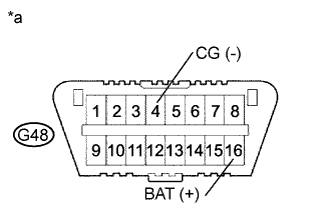
Measure the voltage according to the value(s) in the table below.
Standard Voltage Tester Connection Condition Specified Condition G48-16 (BAT) - G48-4 (CG) Always 11 to 14 V Table 1. Text in Illustration *a Front view of wire harness connector
(to DLC3)
- OKClick here
- NGClick here
-
- Click here
CHECK HARNESS AND CONNECTOR (ECM - DLC3)
-
Disconnect the ECM connector.
-
Measure the resistance according to the value(s) in the table below.
Standard Resistance (Check for Open) Tester Connection Condition Specified Condition G61-15 (SIL) - G48-7 (SIL) Always Below 1 Ω G61-4 (TC) - G48-13 (TC) Always Below 1 Ω Standard Resistance (Check for Short) Tester Connection Condition Specified Condition G61-15 (SIL) or G48-7 (SIL) - Body ground Always 10 kΩ or higher G61-4 (TC) or G48-13 (TC) - Body ground Always 10 kΩ or higher -
Reconnect the ECM connector.
- OKClick here
- NGClick here
-
- Click here
CHECK DLC3
-
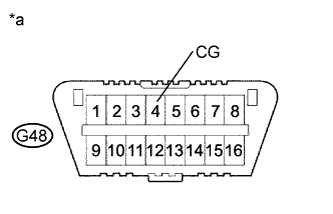
Measure the resistance according to the value(s) in the table below.
Standard Resistance (Check for Open) Tester Connection Condition Specified Condition G48-4 (CG) - Body ground Always Below 1 Ω Table 2. Text in Illustration *a Front view of wire harness connector
(to DLC3)
- OKClick here
- NGClick here
-
- Click here
REPLACE ECMClick here
- Click here
REPAIR OR REPLACE HARNESS OR CONNECTOR
- Click here
REPAIR OR REPLACE HARNESS OR CONNECTOR (DLC3 - BATTERY)