SFI SYSTEM, Diagnostic DTC:P0013, P0023

| DTC Code | DTC Name |
|---|---|
| P0013 | Camshaft Position "B" Actuator Circuit / Open (Bank 1) |
| P0023 | Camshaft Position "B" Actuator Circuit / Open (Bank 2) |
DESCRIPTION
The Variable Valve Timing (VVT) system adjusts the exhaust valve timing to improve driveability. The engine oil pressure turns the VVT controller to adjust the valve timing.
The camshaft timing oil control valve assembly is a solenoid valve and switches the engine oil line. The valve moves when the ECM applies 12 V to the solenoid. The ECM changes the energizing time to the solenoid (duty-cycle) in accordance with the camshaft position, crankshaft position, throttle position, etc.
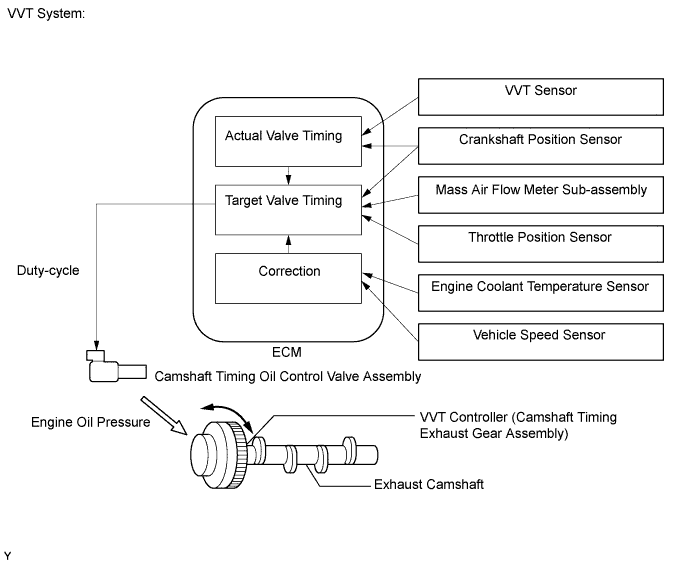
| DTC No. | DTC Detection Condition | Trouble Area |
|---|---|---|
| P0013 | Open or short in camshaft timing oil control valve assembly (for exhaust camshaft of bank 1) circuit (1 trip detection logic). |
|
| P0023 | Open or short in camshaft timing oil control valve assembly (for exhaust camshaft of bank 2) circuit (1 trip detection logic). |
|
MONITOR DESCRIPTION
These DTCs are designed to detect an open or short in the camshaft timing oil control valve assembly (for exhaust camshaft) circuit. If the camshaft timing oil control valve assembly duty-cycle is excessively high or low while the engine switch on (IG) or the engine is running, the ECM will illuminate the MIL and store the DTC.
MONITOR STRATEGY
| Related DTCs | P0013: Camshaft timing oil control valve assembly (for exhaust camshaft of bank 1) range check P0023: Camshaft timing oil control valve assembly (for exhaust camshaft of bank 2) range check |
| Required Sensors/Components (Main) | Camshaft timing oil control valve assembly (for exhaust camshaft) |
| Required Sensors/Components (Related) | - |
| Frequency of Operation | Continuous |
| Duration | 1 second |
| MIL Operation | Immediate |
| Sequence of Operation | None |
TYPICAL ENABLING CONDITIONS
| Monitor runs whenever the following DTCs are not stored | None |
| All of the following conditions are met: | - |
| Starter | Off |
| Engine switch | On (IG) |
| Time after turning engine switch off to on (IG) | 0.5 seconds or more |
| Either of the following conditions is met | Conditions A or B |
| A. Both of the following conditions are met | - |
| Battery voltage | 11 V or higher, and less than 13 V |
| Target duty cycle | Less than 70% |
| B. Both of the following conditions are met | - |
| Battery voltage | 13 V or more |
| Target duty cycle | Less than 80% |
| Current cut status | Not cut |
TYPICAL MALFUNCTION THRESHOLDS
| Output duty cycle | 100% or higher |
| Output duty cycle | 3% or less |
COMPONENT OPERATING RANGE
| Output duty cycle | Higher than 3%, and less than 100% |
CONFIRMATION DRIVING PATTERN
-
Connect the Techstream to the DLC3.
-
Turn the engine switch on (IG) and turn the Techstream on.
-
Clear the DTCs (even if no DTCs are stored, perform the clear DTC procedure).
-
Turn the engine switch off and wait for at least 30 seconds.
-
Turn the engine switch on (IG) and turn the Techstream on.
-
Wait 5 seconds.
-
Enter the following menus: Powertrain / Engine / Trouble Codes.
-
Read the pending DTCs.
Tech Tips
-
If a pending DTC is output, the system is malfunctioning.
-
If a pending DTC is not output, perform the following procedure.
-
-
Enter the following menus: Powertrain / Engine / Utility / All Readiness.
-
Input the DTC: P0013 or P0023.
-
Check the DTC judgment result.
Techstream Display Description NORMAL
-
DTC judgment completed
-
System normal
ABNORMAL
-
DTC judgment completed
-
System abnormal
INCOMPLETE
-
DTC judgment not completed
-
Perform driving pattern after confirming DTC enabling conditions
N/A
-
Unable to perform DTC judgment
-
Number of DTCs which do not fulfill DTC preconditions has reached ECU memory limit
Tech Tips
-
If the judgment result shows NORMAL, the system is normal.
-
If the judgment result shows ABNORMAL, the system has a malfunction.
-
-
If the judgment result is INCOMPLETE or N/A and no pending DTC is output, perform a universal trip and check for permanent DTCs Click here.
Tech Tips
-
If a permanent DTC is output, the system is malfunctioning.
-
If no permanent DTC is output, the system is normal.
-
WIRING DIAGRAM
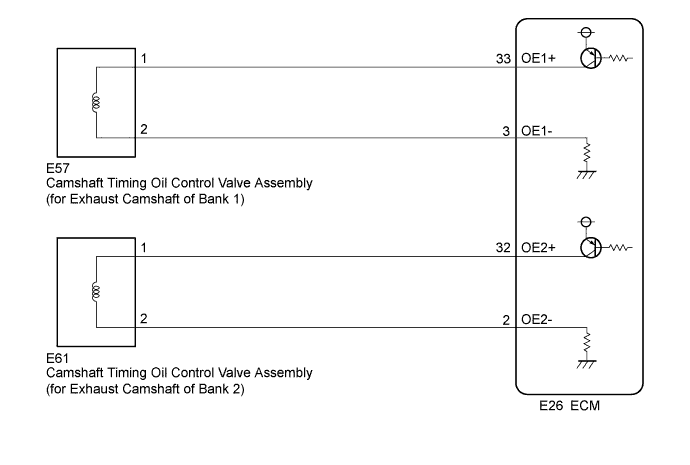
INSPECTION PROCEDURE
Tech Tips
-
If DTC P0013 is output, check the VVT system (for exhaust camshaft of bank 1) circuit.
-
If DTC P0023 is output, check the VVT system (for exhaust camshaft of bank 2) circuit.
-
Bank 1 refers to the bank that includes the No. 1 cylinder*.
*: The No. 1 cylinder is the cylinder which is farthest from the transaxle.
-
Bank 2 refers to the bank that does not include the No. 1 cylinder.
-
Read freeze frame data using the Techstream. The ECM records vehicle and driving condition information as freeze frame data the moment a DTC is stored. When troubleshooting, freeze frame data can help determine if the vehicle was moving or stationary, if the engine was warmed up or not, if the air fuel ratio was lean or rich, and other data from the time the malfunction occurred.
PROCEDURE
-
READ OUTPUT DTC (DTC P0013 OR P0023)
-
Connect the Techstream to the DLC3.
-
Turn the engine switch on (IG).
-
Turn the Techstream on.
-
Clear the DTC after recording the freeze frame data and DTC Click here.
-
Turn the engine switch off and wait for at least 30 seconds.
-
Turn the engine switch on (IG) and wait 5 seconds.
-
Turn the Techstream on.
-
Enter the following menus: Powertrain / Engine / Trouble Codes.
-
Read the DTCs.
Result Result Proceed to DTC P0013 or P0023 is output A DTC is not output B
B 
CHECK FOR INTERMITTENT PROBLEMS Click here
A 
-
-
INSPECT CAMSHAFT TIMING OIL CONTROL VALVE ASSEMBLY (FOR EXHAUST CAMSHAFT)
-
Inspect the camshaft timing oil control valve assembly (for exhaust camshaft) Click here.
NG
REPLACE CAMSHAFT TIMING OIL CONTROL VALVE ASSEMBLY (FOR EXHAUST CAMSHAFT) Click here
OK
-
-
CHECK HARNESS AND CONNECTOR (CAMSHAFT TIMING OIL CONTROL VALVE ASSEMBLY (FOR EXHAUST CAMSHAFT) - ECM)
-
Disconnect the camshaft timing oil control valve assembly (for exhaust camshaft) connector.
-
Disconnect the ECM connector.
-
Measure the resistance according to the value(s) in the table below.
Standard Resistance Tester Connection Condition Specified Condition E57-1 - E26-33 (OE1+) Always Below 1 Ω E57-2 - E26-3 (OE1-) Always Below 1 Ω E61-1 - E26-32 (OE2+) Always Below 1 Ω E61-2 - E26-2 (OE2-) Always Below 1 Ω E57-1 or E26-33 (OE1+) - Body ground Always 10 kΩ or higher E57-2 or E26-3 (OE1-) - Body ground Always 10 kΩ or higher E61-1 or E26-32 (OE2+) - Body ground Always 10 kΩ or higher E61-2 or E26-2 (OE2-) - Body ground Always 10 kΩ or higher
NG
REPAIR OR REPLACE HARNESS OR CONNECTOR
OK 
REPLACE ECM Click here
-