- Click here
DISCONNECT CABLE FROM NEGATIVE BATTERY TERMINAL
Note:
-
w/ Navigation System:
After the engine switch is turned off, the HDD navigation system requires approximately 6 minutes to record various types of memory and settings. As a result, after turning the engine switch off, wait 6 minutes or more before disconnecting the cable from the negative (-) battery terminal.
-
When disconnecting the cable, some systems need to be initialized after the cable is reconnected (Click here).
-
- Click here
REMOVE ENGINE ROOM SIDE COVER LH
-
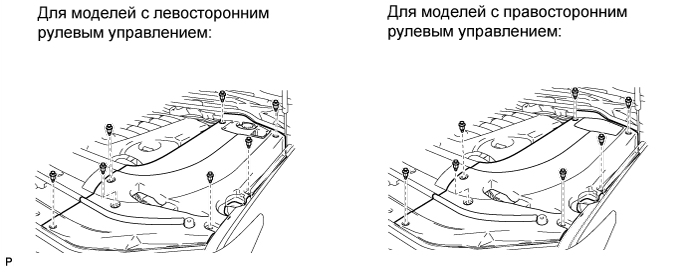
Освободите 7 фиксаторов и снимите левую боковую крышку моторного отсека.
-
- Click here
DISCONNECT CONNECTOR HOLDER BLOCK
-
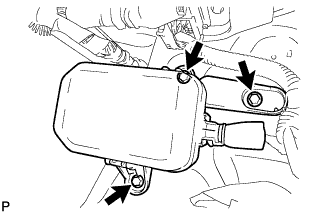
Remove the 3 bolts and move the connector holder block so that the ECM can be removed in the next step.
-
- Click here
REMOVE ECM
-
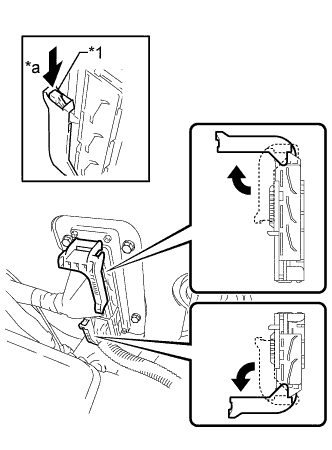
Raise the 2 levers while pushing the locks on the 2 levers.
Table 1. Text in Illustration *1 Lock *a Push Note:Make sure that the lock levers are raised 90° as shown in the illustration before disconnecting the ECM connectors. Failure to do this may cause the ECM connectors to break.
-
Disconnect the 2 connectors.
-

Remove the 4 bolts and ECM.
-
- Click here
REMOVE GASKET
-
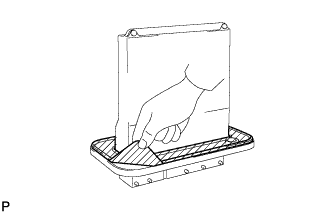
Peel off the gasket.
-
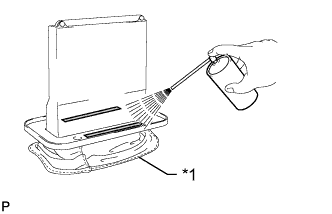
Spray gasket remover or equivalent on the remaining tape of the gasket.
Table 2. Text in Illustration *1 Cloth Note:When using gasket remover or equivalent, cover the ECM connectors with a cloth.
-
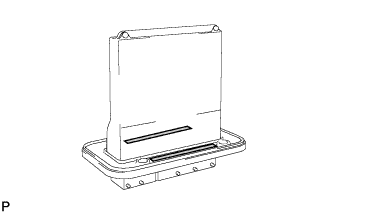
Remove the tape of the gasket without using bladed objects.
-