SLIDING ROOF SYSTEM DATA LIST / ACTIVE TEST

-
READ DATA LIST
Tech Tips
Using the intelligent tester to read the Data List allows the values or states of switches, sensors, actuators and other items to be read without removing any parts. This non-intrusive inspection can be very useful because intermittent conditions or signals may be discovered before parts or wiring is disturbed. Reading the Data List information early in troubleshooting is one way to save diagnostic time.
Note
In the following table, the values listed under "Normal Condition" are reference values. Do not depend solely on these reference values when deciding whether a part is faulty or not.
-
Connect the intelligent tester to the DLC3.
-
Turn the engine switch on (IG).
-
Turn the tester on.
-
Enter the following menus: Body / Sliding Roof / Data List.
-
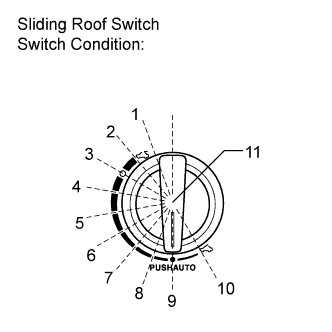
Read the Data List according to the display on the tester.
Sliding Roof Tester Display Measurement Item/Range Normal Condition Diagnostic Note Hall IC1 Pulse Sliding roof operation signal/LO or HI LO: Sliding roof motor is not operating
HI: Sliding roof motor is operating
- Hall IC1 Status Sliding roof operation signal/NORMAL or LOCK NORMAL: Sliding roof motor is operating
LOCK: Sliding roof motor is not operating
- Hall IC2 Pulse Sliding roof operation signal/LO or HI LO: Sliding roof motor is not operating
HI: Sliding roof motor is operating
- Hall IC2 Status Sliding roof operation signal/NORMAL or LOCK NORMAL: Sliding roof motor is operating
LOCK: Sliding roof motor is not operating
- Ignition (Direct Signal) Ignition switch signal/ON or OFF ON: Engine switch on (IG)
OFF: Engine switch off
- Ignition (MPX) Ignition switch signal (MPX signal)/ON or OFF ON: Engine switch on (IG)
OFF: Engine switch off
- Door Courtesy Driver's door courtesy light switch signal/ON or OFF ON: Driver's door is open
OFF: Driver's door is closed
- Door Key Open Operation Key-linked sliding roof open signal/ON or OFF ON: Door lock is turned to open position using key
OFF: Door lock is not turned
- Door Key Close Operation Key-linked sliding roof close signal/ON or OFF ON: Door lock is turned to close position using key
OFF: Door lock is not turned
- Wireless Open Operation Wireless sliding roof open signal/ON or OFF ON: Transmitter UNLOCK switch is pressed
OFF: Transmitter UNLOCK switch is not pressed
- Wireless Close Operation Wireless sliding roof close signal/ON or OFF ON: Transmitter LOCK switch is pressed
OFF: Transmitter LOCK switch is not pressed
- Door Key Related (Open) Key-linked sliding roof open permit signal/Available or Not available Available: Turn and hold the driver side door key to UNLOCK position for 3 seconds or more
Not Available: Any status except "Available" status.
- Door Key Related (Close) Key-linked sliding roof close permit signal/Available or Not available Available: Turn and hold the driver side door key to LOCK position for 3 seconds or more
Not Available: Any status except "Available" status.
- Wireless Key Rel (Open) Wireless sliding roof open permit signal/Available or Not available Available: Press and hold the transmitter UNLOCK switch for 4 seconds or more with key is not in the vehicle
Not Available: Any status except "Available" status.
- Wireless Key Rel (Close) Wireless sliding roof close permit signal/Available or Not available Available: Press and hold the transmitter LOCK switch for 4 seconds or more with key is not in the vehicle
Not Available: Any status except "Available" status.
- Door Key Related Operation Key-linked sliding roof operation signal/Tilt or Slide Tilt: Sliding roof Tilt operates
Slide: Sliding roof Slide operates
- Wireless Key Rel Operation Wireless sliding roof operation signal/Tilt or Slide Tilt: Sliding roof Tilt operates
Slide: Sliding roof Slide operates
- Key Off Permission Key-off sliding roof operation permit signal/ON or OFF ON: Front doors are not opened within 45 seconds after engine switch is turned off
OFF: Any status except "ON" status
- Rotary SW Sliding roof switch assembly switch position signal/Over, Open, Pos1, Pos2, Pos3, Pos4, Pos5, Pos6, Close or TiltUp Over: Switch position [1] in the illustration.
Open: Switch position [2] in the illustration.
Pos1: Switch position [3] in the illustration.
Pos2: Switch position [4] in the illustration.
Pos3: Switch position [5] in the illustration.
Pos4: Switch position [6] in the illustration.
Pos5: Switch position [7] in the illustration.
Pos6: Switch position [8] in the illustration.
Close: Switch position [9] in the illustration.
TiltUp: Switch position [10] in the illustration.
-
-
-
PERFORM ACTIVE TEST
Tech Tips
Using the intelligent tester to perform Active Tests allows relays, VSVs, actuators and other items to be operated without removing any parts. This non-intrusive functional inspection can be very useful because intermittent operation may be discovered before parts or wiring is disturbed. Performing Active Tests early in troubleshooting is one way to save diagnostic time. Data List information can be displayed while performing Active Tests.
-
Connect the intelligent tester to the DLC3.
-
Turn the engine switch on (IG).
-
Turn the tester on.
-
Enter the following menus: Body / Sliding Roof / Active Test.
-
Perform the Active Test according to the display on the tester.
Sliding Roof Tester Display Test Part Control Range Diagnostic Note Slide Roof Operate sliding roof CLOS/UP / OFF - Slide Roof Operate sliding roof OPN/DWN / OFF -
-