ENTRY AND START SYSTEM (for Start Function), Diagnostic DTC:B2282

| DTC Code | DTC Name |
|---|---|
| B2282 | Vehicle Speed Signal Malfunction |
DESCRIPTION
The power source control ECU and the combination meter are connected by a cable and the BEAN. DTC B2282 is output when: 1) the cable information and BEAN information are inconsistent; and 2) a malfunction is detected between the vehicle speed sensor and combination meter.
Tech Tips
When the power source control ECU is replaced with a new one and the negative (-) battery terminal is connected, the power source mode becomes the IG-ON mode. When the battery is removed and reinstalled, the power source mode that was selected when the battery was removed is restored.
| DTC No. | DTC Detection Condition | Trouble Area |
|---|---|---|
| B2282 | When both conditions below are met:
|
|
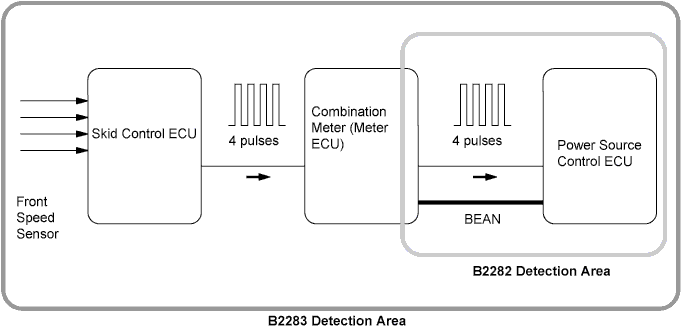
WIRING DIAGRAM
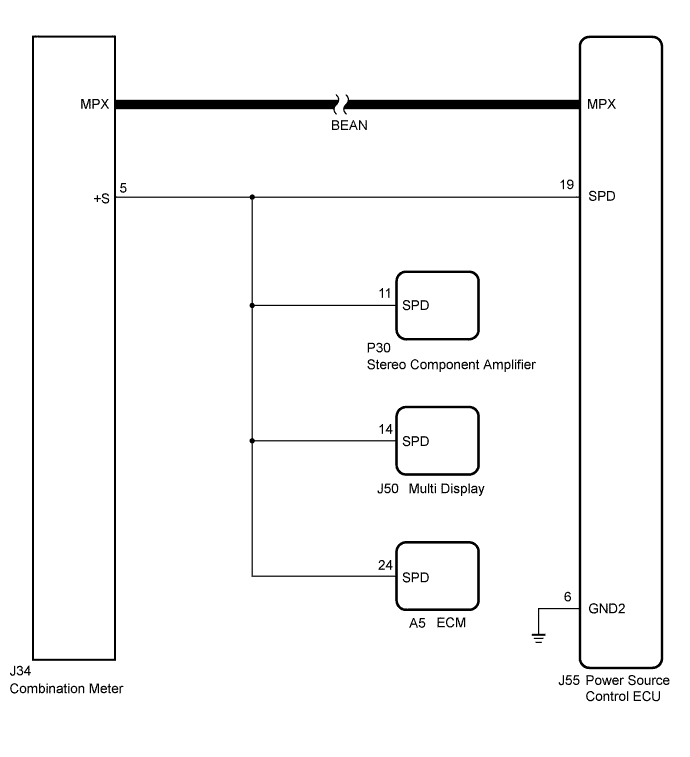
Tech Tips
-
A voltage of 12 V or 5 V is output from each ECU and then input to the combination meter. The signal is changed to a pulse signal at the transistor in the combination meter. Each ECU controls the respective system based on the pulse signal.
-
If a short occurs in an ECU, all systems in the diagram below will not operate normally.
INSPECTION PROCEDURE
PROCEDURE
-
CHECK OPERATION OF SPEEDOMETER
-
Drive the vehicle and check if the function of the speedometer in the combination meter is normal.
OK Actual vehicle speed and the speed indicated on the speedometer are the same. Tech Tips
The vehicle speed sensor is functioning normally when the indication on the speedometer is normal.
NG 
GO TO METER/GAUGE SYSTEM (SPEEDOMETER MALFUNCTION) Click here
OK 
-
-
CHECK DTC OUTPUT (MULTIPLEX NETWORK COMMUNICATION SYSTEM (BEAN))
-
Clear the DTC Click here.
-
Check for the multiplex network communication system DTCs B1210, B1214 and B1215.
Tech Tips
If the DTCs for the multiplex network communication system malfunction are output, inspect those DTCs first.
OK DTC is not output.
NG
GO TO MULTIPLEX COMMUNICATION SYSTEM Click here
OK
-
-
READ VALUE USING INTELLIGENT TESTER (VEHICLE SPEED SIGNAL)
-
Connect the intelligent tester to the DLC3.
-
Turn the engine switch on (IG).
-
Check the Data List for proper functioning of the vehicle speed signal.
Body Tester Display Measurement Item/Range Normal Condition Diagnostic Note Vehicle Speed Signal Vehicle speed signal/ STOP or RUN STOP: Vehicle is stopped
RUN: Vehicle is running
- OK STOP (vehicle is stopped) and RUN (vehicle is running) appear on the screen.
NG 
CHECK HARNESS AND CONNECTOR (POWER SOURCE CONTROL ECU - COMBINATION METER AND EACH ECU) Click here
OK
-
-
REPLACE POWER SOURCE CONTROL ECU
-
Replace power source control ECU.
NEXT
-
-
CHECK FOR DTC
-
Clear the DTC Click here.
-
Drive the vehicle.
-
Check for DTCs.
OK DTC B2282 is not output.
NG
REPLACE COMBINATION METER Click here
OK 
END (POWER SOURCE CONTROL ECU IS DEFECTIVE)
-
-
CHECK HARNESS AND CONNECTOR (POWER SOURCE CONTROL ECU - COMBINATION METER AND EACH ECU)
-
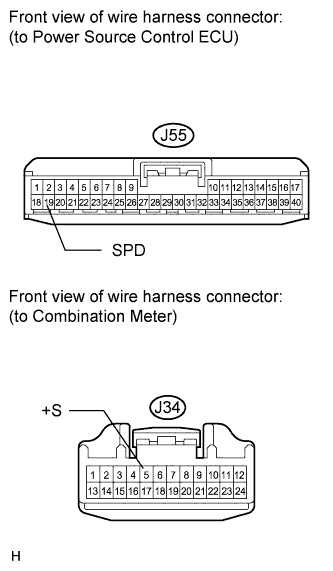
Disconnect the J55 connector from power source control ECU.
-
Disconnect the J34 connector from combination meter.
-
Measure the resistance according to the value(s) in the table below.
Standard Resistance Tester Connection Condition Specified Condition J55-19 (SPD) - J34-5 (+S) Always Below 1 Ω J55-19 (SPD) or J34-5 (+S) - Body ground Always 10 kΩ or higher
NG
REPAIR OR REPLACE HARNESS OR CONNECTOR OR EACH ECU (COMBINATION METER - EACH ECU)
OK
-
-
REPLACE POWER SOURCE CONTROL ECU
-
Replace power source control ECU.
NEXT
-
-
CHECK FOR DTC
-
Clear the DTC Click here.
-
Drive the vehicle.
-
Check for DTCs.
OK DTC B2282 is not output.
NG
REPLACE COMBINATION METER Click here
OK
END (POWER SOURCE CONTROL ECU IS DEFECTIVE)
-