CAN COMMUNICATION SYSTEM Open in One Side of CAN Branch Line
DESCRIPTION
If some ECUs and sensors are not displayed on the "Communication Bus Check" screen of the intelligent tester and some ECUs and sensors repeatedly appear and disappear from the screen when the CAN main bus lines are normal (there is no open, short, short to B+, or short to GND in the main bus lines), there may be an open circuit in either of the CAN branch lines.
Tech Tips
If some ECUs and sensors repeatedly appear and disappear from the "Communication Bus Check" screen, communication between the normal ECUs (sensors) and intelligent tester may be affected by the incomplete signals that are output from the ECU that has an open circuit in either of its CAN branch lines. In this case, the CAN branch lines for the ECUs and sensors that repeatedly appear and disappear from the screen are normal and the ECU that is not displayed on the screen may be the main cause of the problem (this ECU may have an open circuit in either of its CAN branch lines).
| Symptom | Trouble Area |
|---|---|
| 2 or more ECUs and/or sensors do not appear on the intelligent tester "Communication Bus Check" screen. | One side of the CAN branch line is open
|
WIRING DIAGRAM
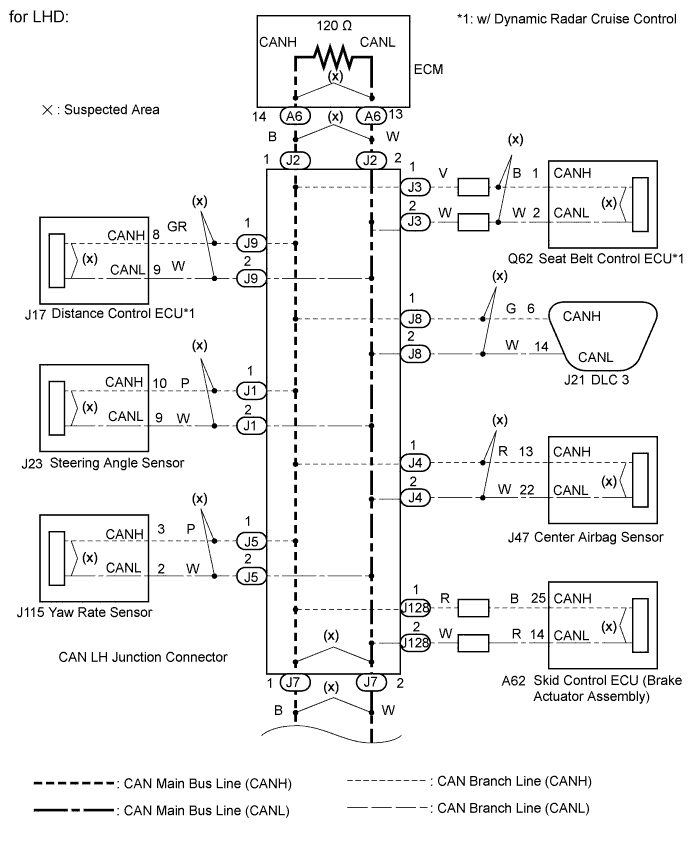
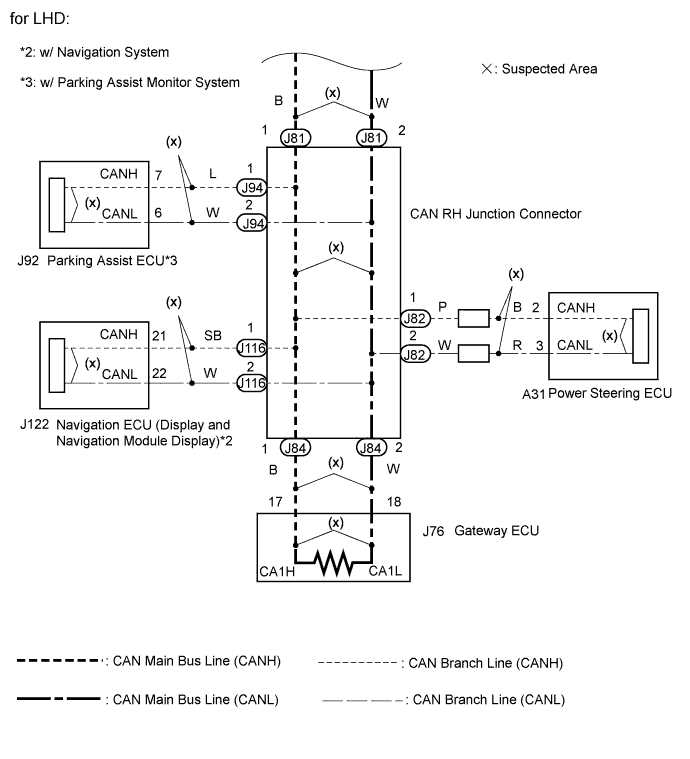
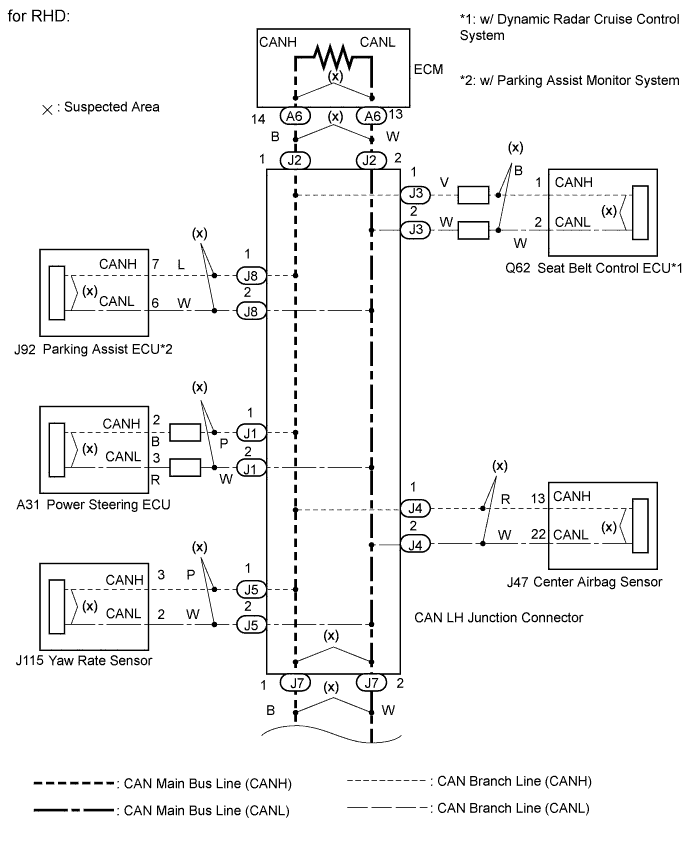
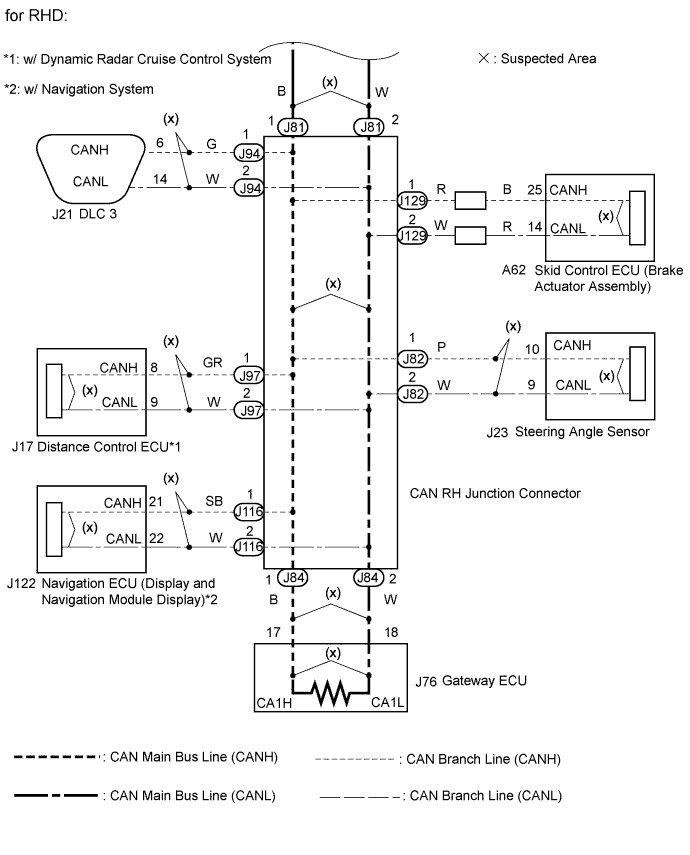
INSPECTION PROCEDURE
Note
-
Turn the engine switch off before measuring the resistance of CAN bus main wires and CAN bus branch wires.
-
After the engine switch is turned off, check that the key reminder warning system and light reminder warning system are not operating.
-
Before measuring the resistance, leave the vehicle as is for at least 1 minute and do not operate the engine switch, any other switches, or the doors. If any doors need to be opened in order to check connectors, open the doors and leave them open.
Tech Tips
Operating the engine switch, any switches, or any doors triggers related ECU and sensor communication with the CAN. This communication will cause the resistance value to change.
PROCEDURE
-
CHECK VEHICLE TYPE
-
Check the specification of thee vehicle.
Result Result Proceed to LHD A RHD B
B 
OPEN IN ONE SIDE OF CAN BRANCH WIRE (for RHD) Click here
A 
-
-
OPEN IN ONE SIDE OF CAN BRANCH WIRE (for LHD)
-
Confirm the systems (ECUs and sensors), which use CAN communication, equipped on the vehicle Click here.
-
Using the intelligent tester, select and perform "Communication Bus Check" Click here.
-
Check the screen for approximately 1 minute for the ECUs or sensors that either do not appear or intermittently appear and disappear.
-
Disconnect the branch line connectors connected to the ECUs or sensors not displayed on the screen from the CAN junction connector.
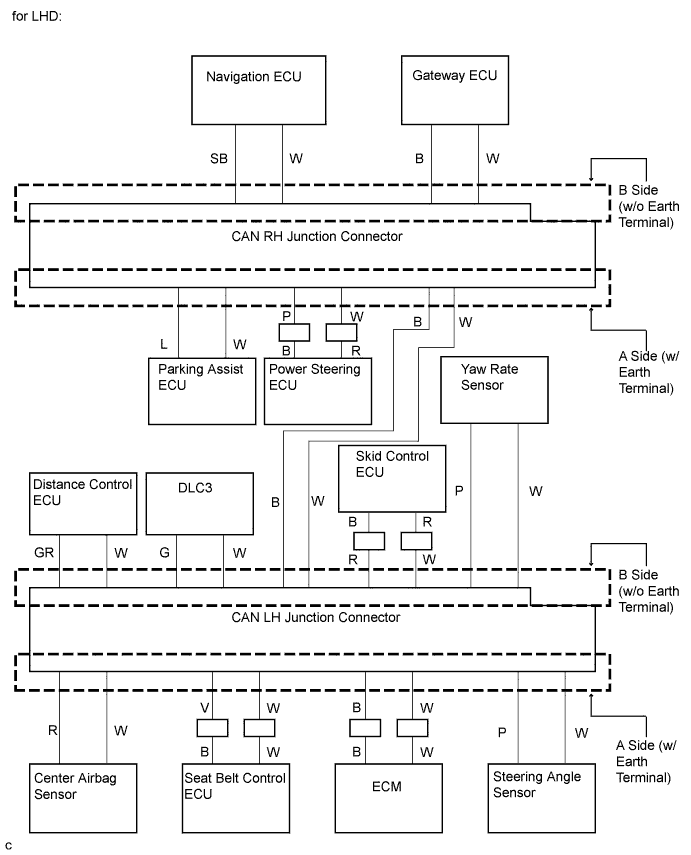
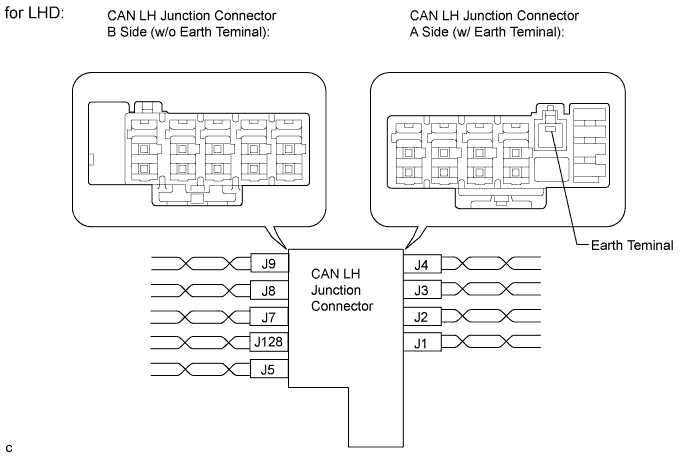
Wiring Color CAN LH Junction Connector A Side (w/ Earth Terminal) Code Color (CANH Side) Color (CANL Side) Steering angle sensor J1 P W ECM J2 B W Seat belt control ECU J3 V W Center airbag sensor J4 R W Wiring Color CAN LH Junction Connector B Side (w/o Earth Terminal) Code Color (CANH Side) Color (CANL Side) Yaw rate sensor J5 P W CAN main bus line (bus line connecting CAN LH junction connector and CAN RH junction connector) J7 B W DLC3 J8 G W Distance control ECU J9 GR W Skid control ECU (Brake actuator assembly) J128 R W 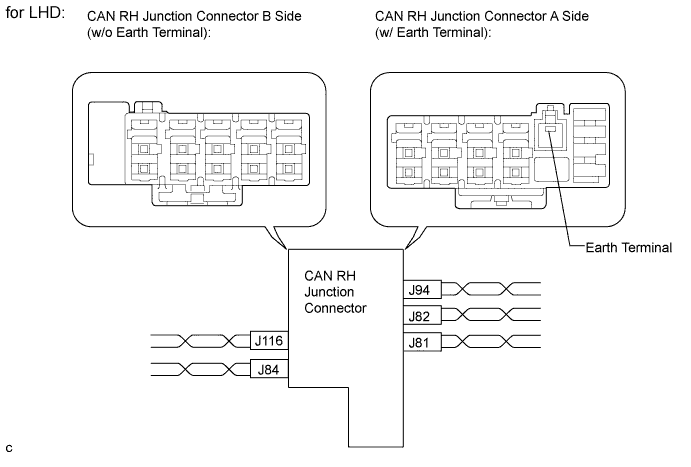
Wiring Color CAN RH Junction Connector A Side (w/ Earth Terminal) Code Color (CANH Side) Color (CANL Side) CAN main bus line (bus line connecting CAN RH junction connector and CAN LH junction connector) J81 B W Power steering ECU J82 P W Parking assist ECU J94 L W Wiring Color CAN RH Junction Connector B Side (w/o Earth Terminal) Code Color (CANH Side) Color (CANL Side) Gateway ECU J84 B W Navigation ECU (Display and navigation module display) J116 SB W Tech Tips
-
Connecting locations of the connectors shown in the above tables are those of a vehicle whose connector locations have never been changed.
-
If the connector locations differ from those shown in the above tables, identify each connector according to the color of the bus lines.
-
-
Check that the ECUs and sensors, which repeatedly appeared and disappeared from the "Communication Bus Check" screen, are constantly displayed.
-
Perform the communication stop mode check for the ECUs and sensors which correspond to the disconnected branch line connectors Click here.
NEXT 
GO TO CORRESPONDING COMMUNICATION STOP MODE
-
-
OPEN IN ONE SIDE OF CAN BRANCH WIRE (for RHD)
-
Confirm the systems (ECUs and sensors), which use CAN communication, equipped on the vehicle Click here.
-
Using the intelligent tester, select and perform "Communication Bus Check" Click here.
-
Check the screen for approximately 1 minute for the ECUs or sensors that either do not appear or intermittently appear and disappear.
-
Disconnect the branch line connectors connected to the ECUs or sensors not displayed on the screen from the CAN junction connector.
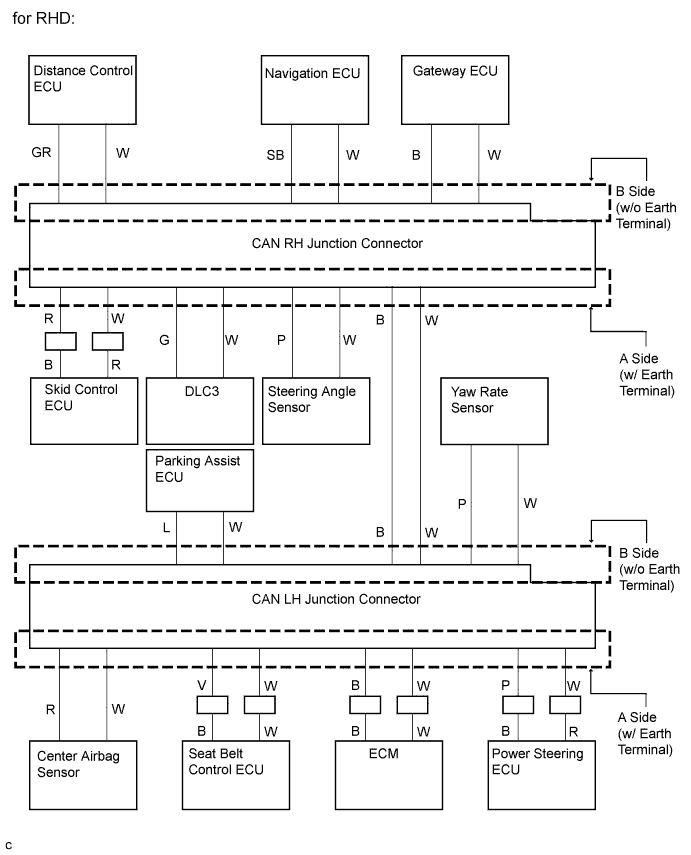
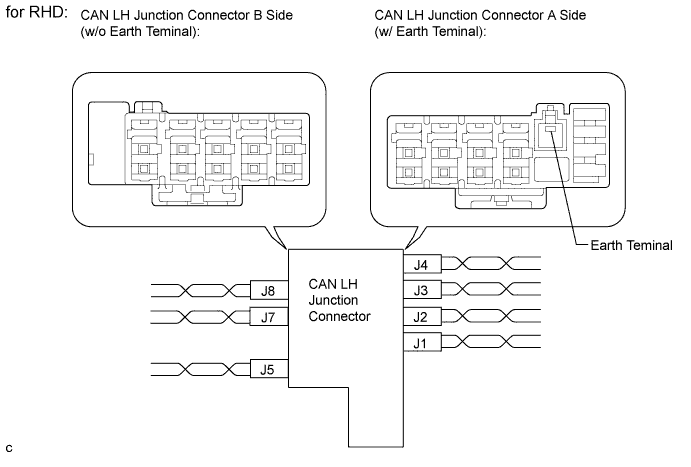
Wiring Color CAN LH Junction Connector A Side (w/ Earth Terminal) Code Color (CANH Side) Color (CANL Side) Power steering ECU J1 P W ECM J2 B W Seat belt control ECU J3 V W Center airbag sensor J4 R W Wiring Color CAN LH Junction Connector B Side (w/o Earth Terminal) Code Color (CANH Side) Color (CANL Side) Yaw rate sensor J5 P W CAN main bus line (bus line connecting CAN LH junction connector and CAN RH junction connector) J7 B W Parking assist ECU J8 L W 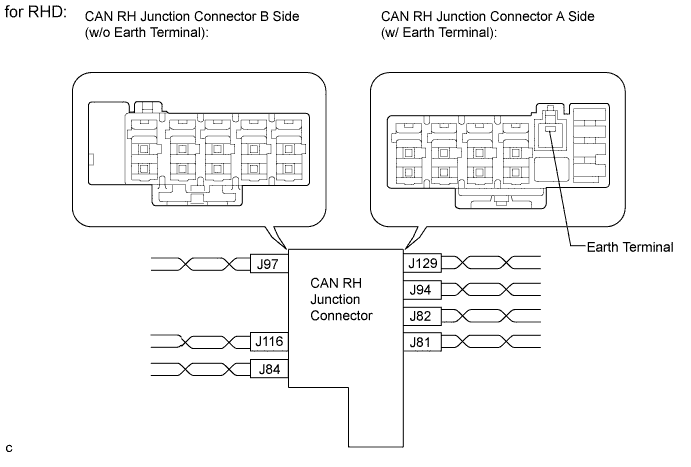
Wiring Color CAN RH Junction Connector A Side (w/ Earth Terminal) Code Color (CANH Side) Color (CANL Side) CAN main bus line (bus line connecting CAN RH junction connector and CAN LH junction connector) J81 B W Steering angle sensor J82 P W DLC3 J94 G W Skid control ECU (Brake actuator assembly) J129 R W Wiring Color CAN RH Junction Connector B Side (w/o Earth Terminal) Code Color (CANH Side) Color (CANL Side) Gateway ECU J84 B W Distance control ECU J97 GR W Navigation ECU (Display and navigation module display) J116 SB W Tech Tips
-
Connecting locations of the connectors shown in the above tables are those of a vehicle whose connector locations have never been changed.
-
If the connector locations differ from those shown in the above tables, identify each connector according to the color of the bus lines.
-
-
Check that the ECUs and sensors, which repeatedly appeared and disappeared from the "Communication Bus Check" screen, are constantly displayed.
-
Perform the communication stop mode check for the ECUs and sensors which correspond to the disconnected branch line connectors Click here.
NEXT
GO TO CORRESPONDING COMMUNICATION STOP MODE
-