TELEVISION CAMERA ECU REMOVAL

-
DISCONNECT CABLE FROM NEGATIVE BATTERY TERMINAL
CAUTION:
Wait at least 90 seconds after disconnecting the cable from the negative (-) battery terminal to disable the SRS system Click here.
Note
When disconnecting the cable, some systems need to be initialized after the cable is reconnected Click here.
-
REMOVE FRONT DOOR SCUFF PLATE
Tech Tips
Use the same procedure for the RH side and the LH side Click here.
-
REMOVE FRONT DOOR OPENING TRIM COVER
Tech Tips
Use the same procedure for the RH side and the LH side Click here.
-
REMOVE SIDE INSTRUMENT PANEL
-
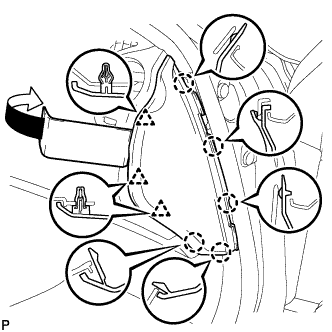
Using a moulding remover, disengage the 5 claws and 3 clips, and then remove the side instrument panel RH.
-
-
REMOVE NO. 2 INSTRUMENT PANEL UNDER COVER SUB-ASSEMBLY
-
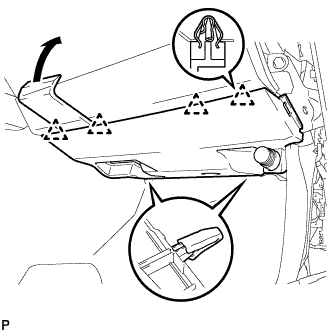
Using a moulding remover, disengage the 4 clips and remove the No. 2 instrument panel under cover sub-assembly.
-
-
REMOVE FRONT PASSENGER SIDE KNEE AIRBAG ASSEMBLY
-
Check that the engine switch is off.
-
Check that the cable is disconnected from the negative (-) battery terminal.
CAUTION:
Wait at least 90 seconds after disconnecting the cable from the negative (-) battery terminal to disable the SRS system.
-
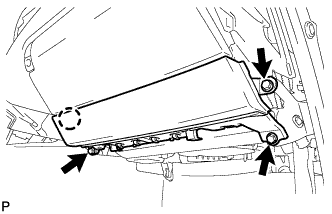
Remove the 3 bolts.
-
Disengage the claw and separate the front passenger side knee airbag assembly.
-
Disconnect the connector and remove the front passenger side knee airbag assembly.
Note
When disconnecting the airbag connector, take care not to damage the airbag wire harness.
-
-
REMOVE GLOVE COMPARTMENT DOOR ASSEMBLY
-
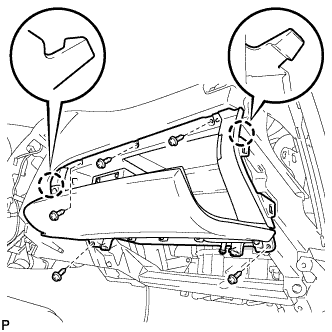
Remove the 5 screws <D>.
-
Disengage the 2 claws.
-
Disconnect the connectors and remove the glove compartment door assembly.
-
-
REMOVE TELEVISION CAMERA CONTROLLER (for LHD)
-
Disconnect each connector.
-
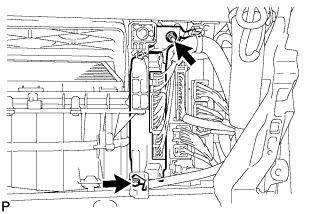
Remove the nut, bolt and television camera controller.
-
-
REMOVE TELEVISION CAMERA CONTROLLER (for RHD)
-
Disconnect each connector.
-
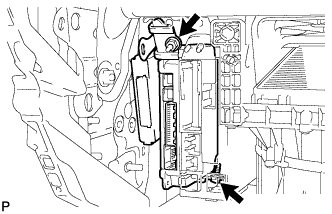
Remove the nut, bolt and television camera controller with power source control ECU.
-
Remove the 2 nuts and television camera controller.
-