PARKING ASSIST MONITOR SYSTEM DIAGNOSIS SYSTEM

-
PARKING ASSIST MONITOR DIAGNOSIS SYSTEM
-
For parking assist monitor system diagnosis, signals received by the parking assist ECU can be checked and the parking assist monitor system can be calibrated, adjusted and checked using the display and navigation module display.
Note
Depending on the parts that are replaced or operations that are performed during vehicle inspection or maintenance, calibration of other systems as well as the parking assist monitor system may be needed Click here.
Tech Tips
The displayed items may differ depending on vehicle specifications.
-
-
DIAGNOSIS SCREEN TRANSITION (during parking assist ECU initialization)
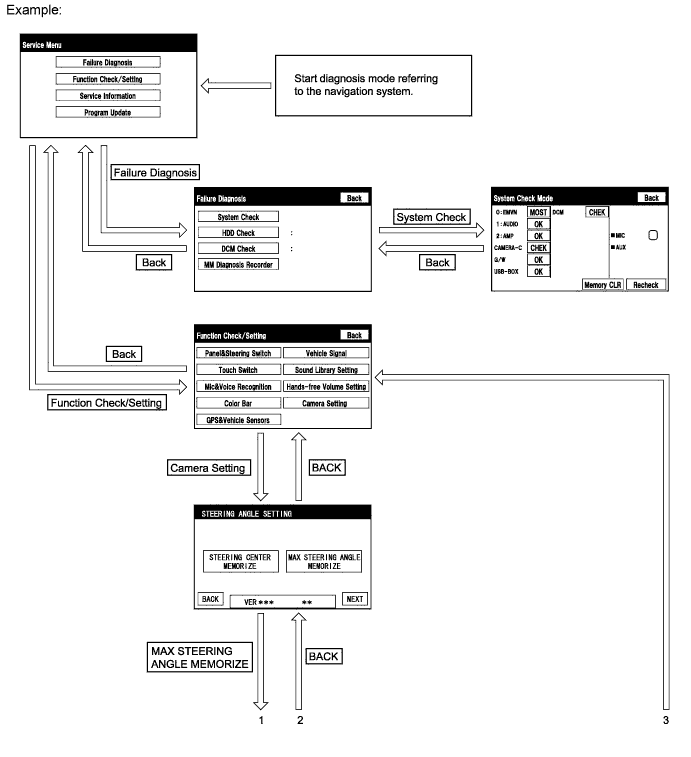
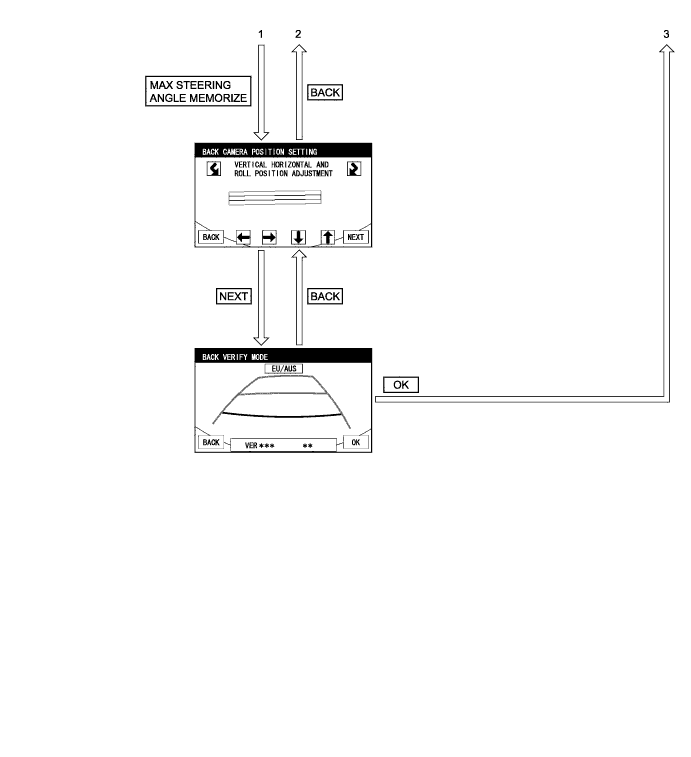
-
DIAGNOSIS SCREEN TRANSITION (after parking assist ECU initialization)
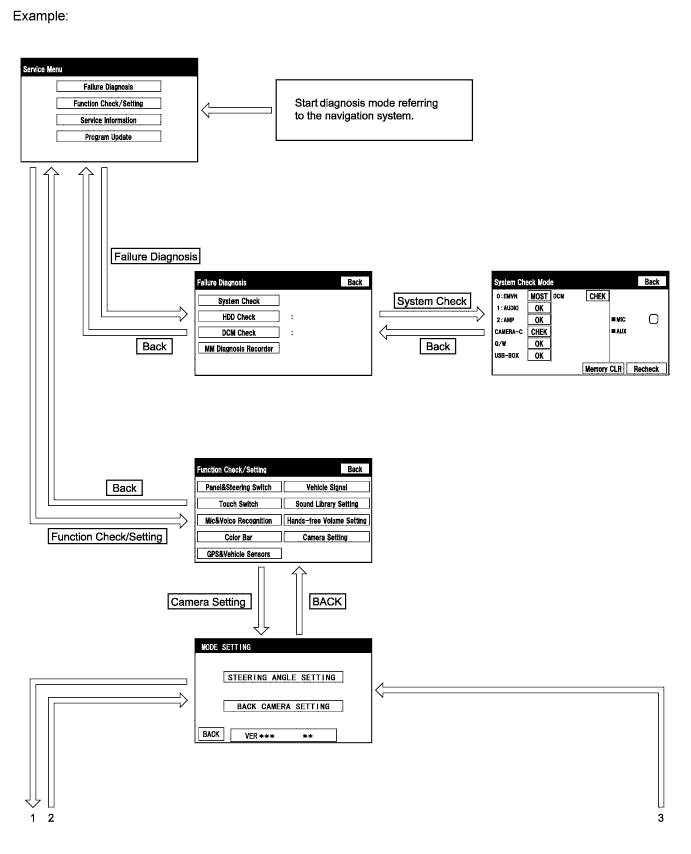
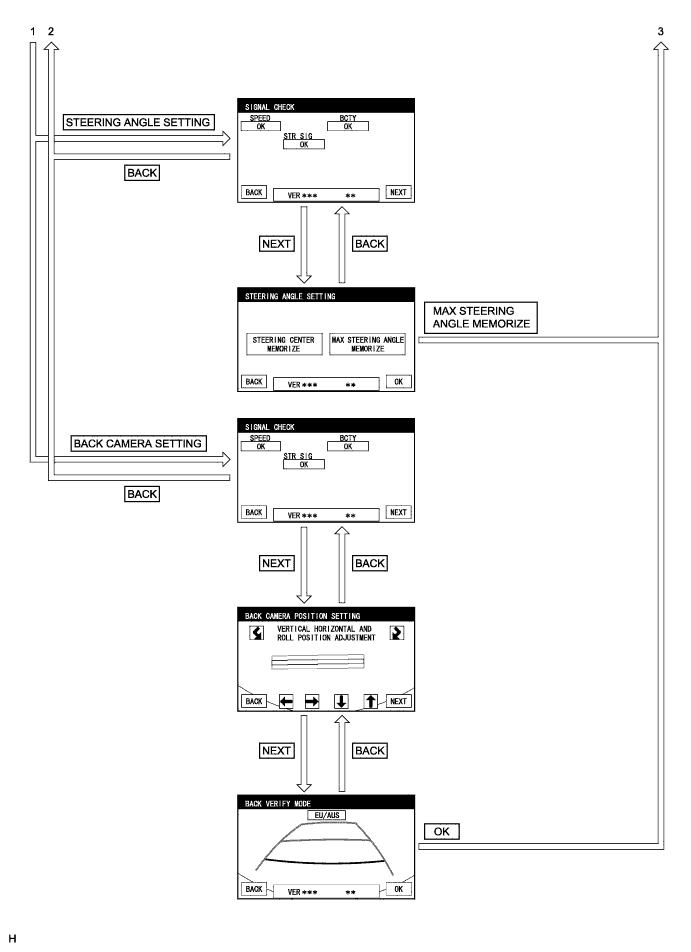
-
DIAGNOSTIC MODE
-
Start diagnostic mode Click here.
-
Failure diagnosis.
-
System check (check using system check mode screen).
-
Finish diagnostic mode.
-
-
SIGNAL CHECK (parking assist ECU input signal)
-
Start diagnostic mode Click here.
-
Select "Function Check/Setting" on the Service Menu screen.
-
Select "Camera Setting" on the Function Check/Setting screen.
Tech Tips
After "Camera Setting" is selected, the screen transitions differ depending on whether initialization of the parking assist ECU was performed after parking assist ECU replacement.
Parking Assist ECU Initialization Screen Transition Not performed SIGNAL CHECK screen Performed MODE SETTING screen -
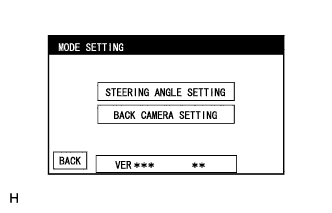
When the screen changes to the MODE SETTING screen, select "BACK CAMERA SETTING" to display the SIGNAL CHECK screen.
Tech Tips
To select a grayed out item, select and hold the item for 2 seconds or more.
-
-
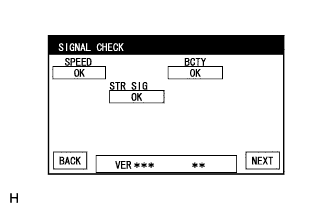
SIGNAL CHECK
-
On the SIGNAL CHECK screen, it is possible to inspect the state of signals sent to the parking assist ECU and check the settings.
Item Inspection Detail Note SPEED Vehicle speed signal input from the skid control ECU When "CHK" (red) is displayed, selecting "NEXT" will not change to the next screen. BCTY CAN communication condition with main body ECU RH STR SIG Steering angle sensor signal input Tech Tips
-
When "CHK" (red) is displayed, perform inspections based on the result of the following inspections.
-
If performing the adjustment after proceeding to the next screen, confirm that all items display "OK" (blue) before selecting "NEXT".
-
-
-
SPEED inspection
Tech Tips
If "CHK" (red) is displayed for "SPEED", check for DTCs and perform troubleshooting based on the output DTCs Click here.
-
BCTY inspection
Tech Tips
If "CHK" (red) is displayed for "BCTY", check for DTCs and perform troubleshooting based on the output DTCs Click here.
-
STR SIG inspection
Tech Tips
If "CHK" (red) is displayed for "STR SIG", check for DTCs and perform troubleshooting based on the output DTCs Click here.
-
Finish diagnostic mode Click here.
-
-
CALIBRATION WHEN SERVICING VEHICLE
Note
Depending on the parts that are replaced or operations that are performed during vehicle inspection or maintenance, calibration of other systems as well as the parking assist monitor system may be needed Click here.
-
STEERING ANGLE SETTING (after parking assist ECU is initialized)
Tech Tips
If the vehicle width extension lines and predicted path lines are not aligned when the steering wheel is centered, or if the predicted path line does not move before the steering wheel is fully turned to either the left or right, adjust the steering angle settings.
-
Center the steering wheel and stop the vehicle.
-
Start diagnostic mode Click here.
Note
Steering angle setting must be carried out with the engine started. Apply the parking brake, depress the brake pedal, check that the shift lever is in P, and ensure that the vehicle is not moving.
-
Select "Function Check/Setting" on the Service Menu screen.
-
Select "Camera Setting" on the Function Check/Setting screen.
-
Select "STEERING ANGLE SETTING" on the MODE SETTING screen.
Tech Tips
To select a grayed out item, select and hold the item for 2 seconds or more.
-
Select "NEXT" on the SIGNAL CHECK screen to display the STEERING ANGLE SETTING screen.
Note
-
When "CHK" (red) is displayed for any items on the SIGNAL CHECK screen, selecting "NEXT" will not change the screen to the STEERING ANGLE SETTING screen.
-
When "CHK" is displayed for any items on the SIGNAL CHECK screen, perform inspections using the SIGNAL CHECK screen.
-
-
-
Steering angle setting
-
Check that the steering wheel is centered (approximately +/- 5 degrees or less) and select "STEERING CENTER MEMORIZE".
-
After the centered steering position is memorized, turn the steering wheel to the left and then to the right full lock positions and select "MAX STEERING ANGLE MEMORIZE".
Tech Tips
It is also possible to start by initially turning the steering wheel to the right side.
-
Select "MAX STEERING ANGLE MEMORIZE" to store the steering angle adjustment value and change the screen to the MODE SETTING screen.
Tech Tips
-
When "MAX STEERING ANGLE MEMORIZE" is selected, a beep will sound to confirm that the steering angle adjustment values have been stored.
-
The adjustment values will not be stored unless "MAX STEERING ANGLE MEMORIZE" is selected.
-
Until a beep finishes sounding, the adjustment values are not stored.
-
When "BACK" is selected, the screen changes to SIGNAL CHECK without storing the set values.
-
Even if "OK" is selected, the adjustment values will not be stored.
-
If the steering angle settings have not been adjusted, selecting "MAX STEERING ANGLE MEMORIZE" will not cause the adjustment values to be stored.
-
Even if no DTCs are detected, selecting "MAX STEERING ANGLE MEMORIZE" may not cause the adjustment value to be stored if the steering sensor is malfunctioning.
-
If selecting "MAX STEERING ANGLE MEMORIZE" does not cause the adjustment value to be stored after adjusting the steering angle, replace the steering sensor Click here.
-
-
-
Finish diagnostic mode Click here.
-
Confirm steering angle adjustment.
Tech Tips
If the steering angle has been adjusted, confirm the steering angle adjustment on the parking assist monitor screen after finishing diagnostic mode.
-
Check on the parking assist screen that the predicted path line moves until the steering wheel is fully turned to either the left or right.
Tech Tips
If the predicted path line stops moving before the steering wheel is fully turned to either the left or right, the steering angle adjustment values have not been stored correctly. In this case, perform "STEERING CENTER MEMORIZE" and "MAX STEERING ANGLE MEMORIZE" again.
-
-