PARKING ASSIST MONITOR SYSTEM CALIBRATION

-
ADJUST PARKING ASSIST MONITOR SYSTEM
-
This parking assist monitor system can be adjusted using the diagnostic screen of the display and navigation module display.
-
If the following operations are performed, it is necessary to perform adjustments and checks using the diagnostic screen.
Part Name Operation Adjustment Item Proceed to Steering angle sensor
-
Removal and installation of the steering angle sensor
-
Removal and installation of the connector of the steering angle sensor
Steering angle neutral point Steering angle sensor Replacement Steering angle neutral point Parking assist ECU Replacement Parking assist ECU initialization Step 2 Suspension, tires, etc. The vehicle height changes because of suspension or tire replacement Rear television camera optical axis (Back camera position setting) Step 3 Rear television camera assembly
-
Replacement
-
Installation angle of the rear television camera changes because of the removal and installation of the rear television camera etc.
Rear television camera optical axis (Back camera position setting) Step 3 Tech Tips
The adjustment values stored while performing parking assist monitor system calibration are stored in the parking assist ECU.
-
-
-
PARKING ASSIST ECU INITIALIZATION
Tech Tips
Be sure to check for DTCs before performing this procedure Click here.
-
Preparation for adjustment
-
Park the vehicle with the steering wheel centered.
-
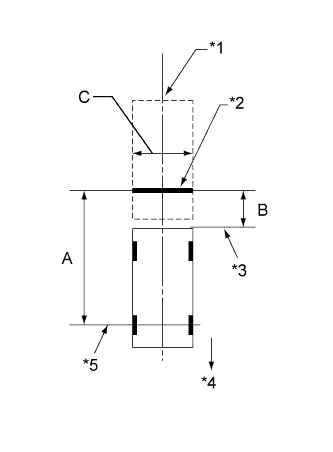
Text in Illustration *1 Vehicle Center *2 Target Bar for Back Camera Position Setting *3 Vehicle End *4 Front Side *5 Front Wheel Axis Set a target bar behind the vehicle for optical axis adjustment of the rear television camera assembly.
Tech Tips
Only when adjusting the optical axis of the camera, create a target bar for adjustment.
Tech Tips
-
Set a piece of tape on the ground as the target bar for adjustment. Its width and length should be 20 to 30 mm (0.787 to 1.181 in.) and 1995 to 2005 mm (6.545 to 6.578 ft.), respectively. Check the color on the navigation display and choose a tape color which can be easily seen.
-
Before parking the vehicle, be sure to move the vehicle forward and in reverse to check that the tires are facing straight ahead with the steering wheel centered.
-
Check that the luggage compartment door is fully closed.
-
-
-
Start diagnostic mode Click here.
Note
Parking assist ECU initialization must be entered out with the engine started. Apply the parking brake, depress the brake pedal, check that the shift lever is in P, and ensure that the vehicle is not moving.
-
Select "Function Check/Setting" on the Service Menu screen.
-
Select "Camera Setting" on the Function Check/Setting screen.
-
-
STEERING ANGLE SETTING
-
Perform the STEERING CENTER MEMORIZE operation.
-
Check that the steering wheel is centered, and then select "STEERING CENTER MEMORIZE".
Tech Tips
When performing removal and installation, or replacement of the rear television camera, steering angle setting is not required.
-
-
Perform the MAX STEERING ANGLE MEMORIZE operation.
-
After performing the steering center memorize operation, turn the steering wheel to the left and right lock positions and select "MAX STEERING ANGLE MEMORIZE". The maximum steering angle is then stored and the screen changes to the BACK CAMERA POSITION SETTING screen.
Tech Tips
The "NEXT" button does not respond until the system memorizes the steering center and maximum steering angle.
Tech Tips
-
It is also possible to start by initially turning the steering to the right side.
-
When "MAX STEERING ANGLE MEMORIZE" is selected, a beep will sound to confirm that the adjustment values have been stored.
-
The adjustment value will not be stored unless "MAX STEERING ANGLE MEMORIZE" is selected after turning the steering wheel from lock to lock.
-
When "BACK" is selected, the screen changes to SIGNAL CHECK screen without storing any values.
-
Even if no DTCs are detected, selecting "MAX STEERING ANGLE MEMORIZE" may not cause the adjustment value to be stored if the steering angle sensor is malfunctioning.
-
If selecting "MAX STEERING ANGLE MEMORIZE" does not cause the adjustment value to be stored after performing the steering angle setting procedure, replace the steering angle sensor Click here.
-
-
-
-
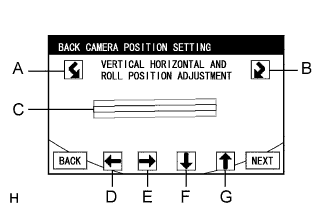
BACK CAMERA POSITION SETTING
Tech Tips
-
When the luggage compartment door is open, a luggage compartment door open warning message will be displayed and camera position setting will not be possible.
-
If a luggage compartment door open warning message is displayed even when the luggage compartment door is closed, perform inspections according to the following inspection procedure: "A luggage compartment door open warning message is displayed even after luggage compartment door is closed" Click here.
-
Perform roll angle adjustment.
-
Select switches A and B to rotate C so that it is parallel to the target bar for back camera adjustment.
-
-
Perform vertical and horizontal position adjustment.
-
Use directional switches D, E, F and G to move C so that the target bar for back camera adjustment is centered in C.
-
-
Select the "NEXT" button on the BACK CAMERA POSITION SETTING screen.
-
-
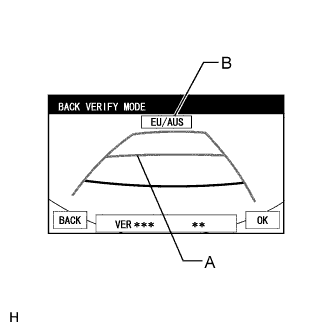
BACK VERIFY MODE
-
Check that A and the target bar for back camera adjustment are overlapping.
-
Check that vehicle width extension line and predicted path line are overlapping.
-
If the lines are not aligned, perform the STEERING CENTER MEMORIZE and MAX STEERING ANGLE MEMORIZE operations.
-
If A and the target bar for back camera adjustment are not aligned even if the tires are aligned straight ahead, perform the back camera position setting operation.
-
-
Check that B (destination information) is correct by referring to the table below.
B Destination EU/AUS Europe, Australia, New Zealand TAIWAN Taiwan Tech Tips
If "CHK" (red) is displayed, check for DTCs and perform troubleshooting based on the output DTCs Click here.
-
Selecting "OK" will return the screen to the Service Menu screen, and complete the adjustment.
Tech Tips
-
The update is not completed until "OK" is selected.
-
When "OK" is selected, a beep will sound to confirm that the adjustment values have been stored.
-
The adjustment values are not stored until the beep has sounded.
-
-
-
Finish diagnostic mode Click here.
-
-
BACK CAMERA POSITION SETTING
Tech Tips
Be sure to check for DTCs before performing this procedure Click here.
-
Preparation for adjustment
-
Park the vehicle with the steering wheel centered.
-
Text in Illustration *1 Vehicle Center *2 Target Bar for Back Camera Position Setting *3 Vehicle End *4 Front Side *5 Front Wheel Axis Set a target bar behind the vehicle for optical axis adjustment of the rear television camera.
Tech Tips
Only when adjusting the optical axis of the camera, create a target bar for adjustment.
Tech Tips
-
Set a piece of tape on the ground as the target bar for adjustment. Its width and length should be 20 to 30 mm (0.787 to 1.181 in.) and 1995 to 2005 mm (6.545 to 6.578 ft.), respectively. Check the color on the navigation display and choose a tape color which can be easily seen.
-
Before parking the vehicle, be sure to move the vehicle forward and in reverse to check that the tires are facing straight ahead with the steering wheel centered.
-
Check that the luggage compartment door is fully closed.
-
-
-
Start diagnostic mode Click here.
Note
Back camera position setting must be performed with the engine started. Apply the parking brake, depress the brake pedal, check that the shift lever is in P, and ensure that the vehicle is not moving.
-
Select "Function Check/Setting" on the Service Menu screen.
-
Select "Camera Setting" on the Function Check/Setting screen.
-
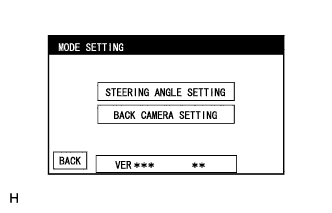
Select "BACK CAMERA SETTING" on the MODE SETTING screen.
Tech Tips
To select a grayed out item, select and hold the item for 2 seconds or more.
-
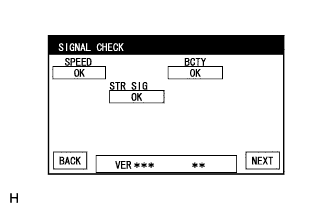
Select "NEXT" on the SIGNAL CHECK screen.
Note
-
When "CHK" (red) is displayed for any items on the SIGNAL CHECK screen, selecting "NEXT" will not change the screen to the BACK CAMERA POSITION SETTING screen.
-
When "CHK" (red) is displayed for any items on the SIGNAL CHECK screen, perform inspections using the SIGNAL CHECK screen Click here.
-
-
-
BACK CAMERA POSITION SETTING
Tech Tips
-
When the luggage compartment door is open, a luggage compartment door open warning message will be displayed and camera position setting will not be possible.
-
If a luggage compartment door open warning message is displayed even when the luggage compartment door is closed, perform inspections according to the following inspection procedure: "A luggage compartment door open warning message is displayed even after luggage compartment door is closed" Click here.
-
Perform roll angle adjustment.
-
Select switches A and B to rotate C so that it is parallel to the target bar for back camera adjustment.
-
-
Perform vertical and horizontal position adjustment.
-
Use directional switches D, E, F and G to move C so that the target bar for back camera adjustment is centered in C.
-
-
Select the "NEXT" button on the "BACK CAMERA POSITION SETTING" screen.
-
-
BACK VERIFY MODE
-
Check that A and the target bar for back camera adjustment are overlapping.
-
Check that vehicle width extension line and predicted path line are overlapping.
-
If the lines are not aligned, perform the STEERING CENTER MEMORIZE and MAX STEERING ANGLE MEMORIZE operations.
-
If A and the target bar for back camera adjustment are not aligned even if the tires are aligned straight ahead, perform the back camera position setting operation.
-
-
Check that B (destination information) is correct by referring to the table below.
B Destination EU/AUS Europe, Australia, New Zealand TAIWAN Taiwan Tech Tips
If "CHK" (red) is displayed, check for DTCs and perform troubleshooting based on the output DTCs Click here.
-
Selecting "OK" will return the screen to the Service Menu, and complete the adjustment.
Tech Tips
-
The update is not completed until "OK" is selected.
-
When "OK" is selected, a beep will sound to confirm that the back camera aiming adjustment values have been stored.
-
The adjustment values are not stored until the beep has sounded.
-
-
-
Finish diagnostic mode Click here.
-