STEERING LOCK SYSTEM DIAGNOSIS SYSTEM

-
DESCRIPTION
-
Diagnostic System
When troubleshooting a vehicle with a diagnostic system, the only difference from the usual troubleshooting procedure is connecting the intelligent tester to the vehicle and reading various data output from the vehicle's steering lock ECU.
The steering lock ECU records DTCs when the computer detects a malfunction in the computer itself or in its circuits.
To check the DTCs, connect the intelligent tester to the DLC3 on the vehicle. The intelligent tester enables the DTCs to be cleared, the indicators to be activated, and the Data List to be checked.
-
The diagnosis information of the steering lock ECU is transmitted to the intelligent tester via the certification ECU as the steering lock ECU is not connected to BEAN.
-
Check the DLC3.
-
Check the DLC3 Click here.
-
-
-
WARNING FUNCTION OF ENGINE SWITCH INDICATOR
-
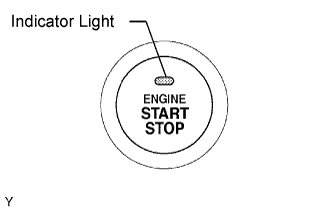
The steering lock ECU blinks the LED indicator of the engine switch when any of the following problems occurs in the system:
Detection Item Indicator Light Blink Pattern Indication Status Countermeasure Steering lock is still not released
-
Blinks green at 1-second intervals
-
Goes off 30 seconds after blinking starts
The motor operates to release the steering lock, but the steering lock cannot be released (e.g. the lock bar is stuck in the steering column). Push the engine switch while turning the steering wheel left or right. Malfunction in entry and start system
-
Blinks amber at 2-second intervals
-
Goes off 15 seconds after the engine switch is turned off while blinking
-
There is a short in the devices activating the motor.
-
There is a problem in the steering lock ECU or power source control ECU.
Troubleshoot by following "How To Proceed With Troubleshooting" Click here.
-
-
-
WARNING FUNCTION OF COMBINATION METER
-
The steering lock ECU displays a warning on the combination meter when any of the following problems occurs in the system:
Detection Item Display Indication Status Countermeasure Steering lock is still not released "S/T is not Unlocked"
-
Goes off 30 seconds after blinking starts
The motor operates to release the steering lock, but the steering lock cannot be released (e.g. the lock bar is stuck in the steering column). Push the engine switch while turning the steering wheel left or right. Malfunction in entry and start system "Check S/T Lock"
-
Goes off 15 seconds after the engine switch is turned off while blinking
-
There is a short in the devices activating the motor.
-
There is a problem in the steering lock ECU or power source control ECU.
Troubleshoot by following "How To Proceed With Troubleshooting" Click here.
-
-