VEHICLE STABILITY CONTROL SYSTEM VSC Warning Light Remains ON
DESCRIPTION
The skid control ECU is connected to the combination meter via the CAN and multiplex communication systems.
If the skid control ECU stores a DTC, the master caution indicator light will come on and the DTC will be displayed on the multi-information display in the combination meter.
WIRING DIAGRAM
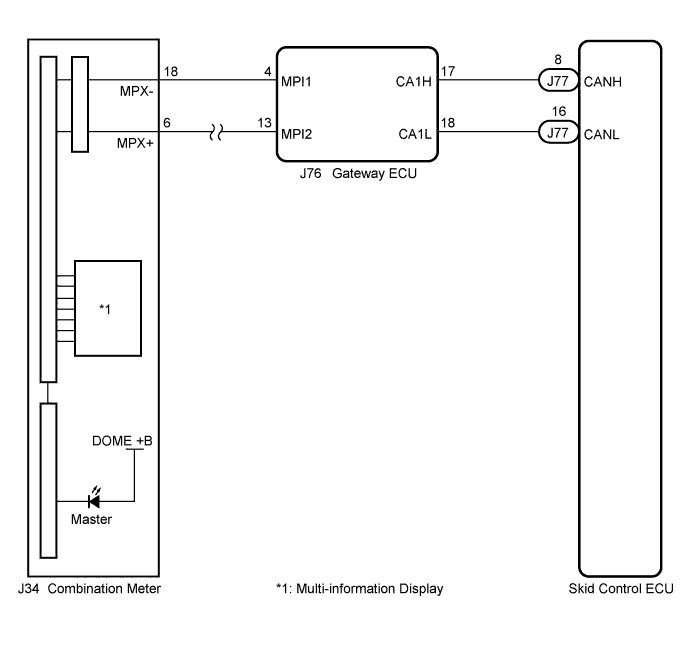
INSPECTION PROCEDURE
Note
When replacing the skid control ECU, perform zero point calibration and store system information Click here.
PROCEDURE
-
CHECK CAN COMMUNICATION SYSTEM
-
Check if a CAN communication system DTC is output Click here.
Result Result Proceed to DTC is not output A DTC is output B
B 
INSPECT CAN COMMUNICATION SYSTEM Click here
A 
-
-
CHECK MULTIPLEX COMMUNICATION SYSTEM
-
Check if a multiplex communication system DTC is output Click here.
Result Result Proceed to DTC is not output A DTC is output B
B
INSPECT MULTIPLEX COMMUNICATION SYSTEM Click here
A
-
-
CHECK IF SKID CONTROL ECU CONNECTOR IS SECURELY CONNECTED
-
Check if the skid control ECU connector is securely connected.
OK The connector is securely connected.
NG
CONNECT CONNECTOR TO ECU CORRECTLY Click here
OK
-
-
CHECK BATTERY
-
Check the battery voltage.
Standard Voltage 11 to 14 V
NG
CHECK OR REPLACE CHARGING SYSTEM OR BATTERY (for 2UR-GSE) Click here
OK
-
-
INSPECT COMBINATION METER ASSEMBLY
-
Perform the Active Test of the combination meter (meter CPU) using the intelligent tester Click here.
-
Check the combination meter.
OK The master caution indicator light and multi-information display turns on or off in accordance with the intelligent tester operation. Tech Tips
If troubleshooting has been carried out according to Problem Symptoms Table, refer back to the table and proceed to the next step before replacing the part Click here.
NG
REPLACE COMBINATION METER ASSEMBLY Click here
OK 
REPLACE SKID CONTROL ECU Click here
-