REAR SUSPENSION MEMBER REMOVAL

-
REMOVE REAR WHEEL
-
REMOVE NO. 2 DIFFERENTIAL SUPPORT PROTECTOR
-
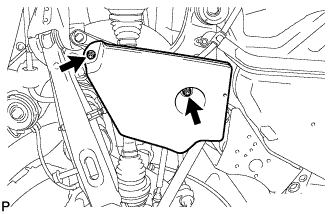
Remove the 2 nuts and No. 2 differential support protector.
-
-
REMOVE NO. 1 DIFFERENTIAL SUPPORT PROTECTOR
Tech Tips
Perform the same procedure as the No. 2 differential support protector.
-
REMOVE REAR SUSPENSION MEMBER BRACE LH
-
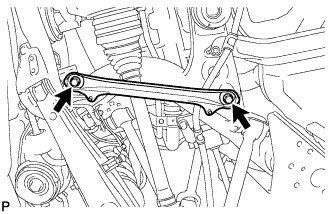
Remove the 2 bolts and rear suspension member brace.
-
-
REMOVE REAR SUSPENSION MEMBER BRACE RH
Tech Tips
Perform the same procedure as the LH side.
-
REMOVE NO. 2 FLOOR UNDER COVER
-
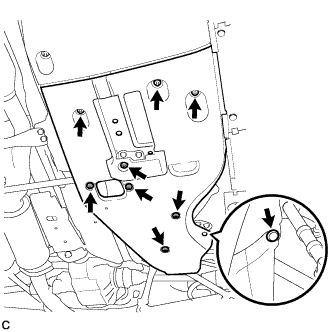
Remove the 6 clips, 3 grommets, and No. 2 floor under cover.
-
-
REMOVE NO. 1 FLOOR UNDER COVER
-
Remove the 5 clips, 3 grommets, and No. 1 floor under cover.
-
-
REMOVE REAR NO. 1 FLOOR PANEL BRACE
-
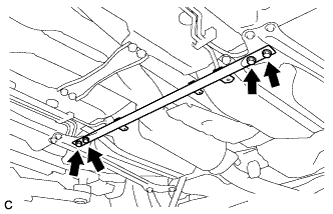
Remove the 4 bolts and rear No. 1 floor panel brace.
-
-
REMOVE FRONT CENTER FLOOR BRACE
-
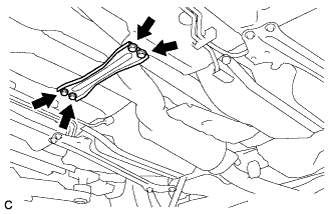
Remove the 4 bolts and front center floor brace.
-
-
REMOVE TAIL EXHAUST PIPE ASSEMBLY
-
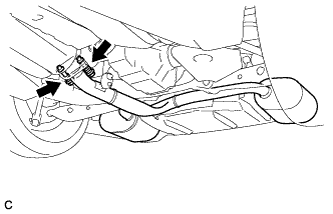
Remove the 2 bolts and 2 compression springs.
-
Remove the tail exhaust pipe assembly from the 6 exhaust pipe supports.
-
Remove the gasket from the front exhaust pipe assembly.
-
-
DISCONNECT HEATED OXYGEN SENSOR
-
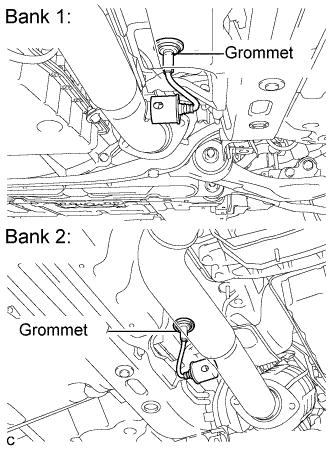
Remove the grommets of the heated oxygen sensors.
-
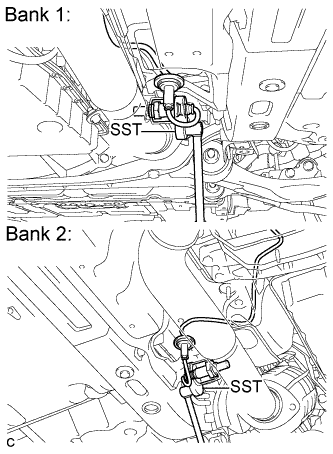
Using SST, loosen the heated oxygen sensors, and disconnect the sensors by hand.
- SST
- 09224-00010
-
-
REMOVE FRONT EXHAUST PIPE ASSEMBLY
-
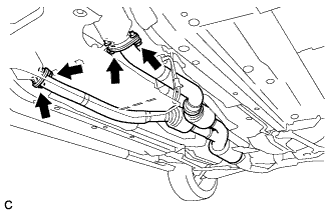
Remove the 4 bolts, 4 nuts and front exhaust pipe assembly.
-
Remove the 2 gaskets from the exhaust manifold RH and exhaust manifold LH.
-
-
REMOVE FRONT NO. 1 FLOOR HEAT INSULATOR
-
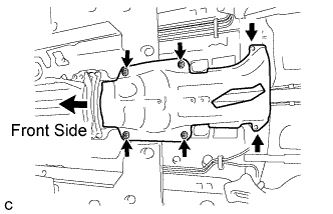
Remove the 4 nuts, 2 bolts and front No. 1 floor heat insulator.
-
-
REMOVE OUTSIDE AIR GUIDE PLATE RH
-
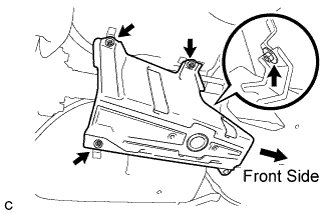
Remove the 4 nuts and outside air guide plate RH.
-
-
REMOVE PROPELLER SHAFT WITH CENTER BEARING ASSEMBLY
-
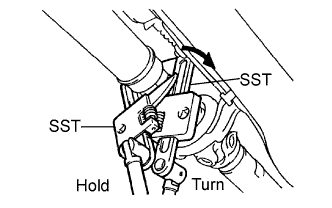
Using SST, loosen the adjusting nut until it can be turned by hand.
- SST
- 09922-10010
Tech Tips
Use 2 of the same SST.
-
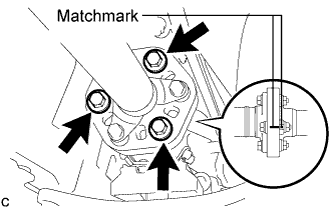
Put matchmarks on the transmission companion flange, flexible coupling and intermediate shaft.
-
Remove the 3 bolts, 3 washers and 3 nuts.
Note
Do not separate the propeller shaft and flexible coupling.
-
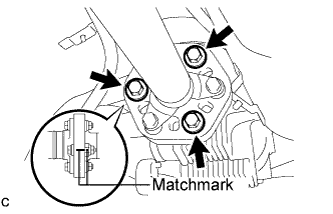
Put matchmarks on the differential companion flange, flexible coupling and propeller shaft.
-
Remove the 3 bolts, 3 washers and 3 nuts.
Note
Do not separate the propeller shaft and flexible coupling.
-
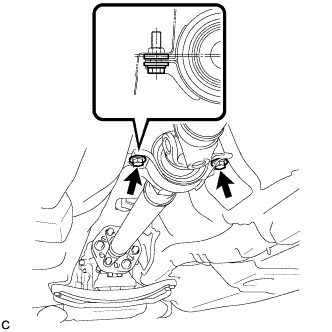
Remove the 2 center support bearing set bolts and 2 center support bearing washers.
Tech Tips
Some vehicles are not equipped with center support bearing washers.
-
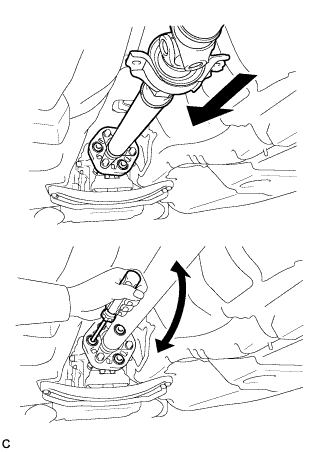
Push the propeller shaft with center bearing assembly straight ahead to compress and pull out the propeller shaft with center bearing assembly from the differential centering pin.
Note
Press the propeller shaft straight ahead to keep the transmission and intermediate shaft aligned straight.
Tech Tips
If it is difficult to separate the flange from the flexible coupling, pry it using a screwdriver.
-
Pull the propeller shaft outward from the rear of the vehicle.
Note
Do not separate the intermediate shaft and propeller shaft.
-
-
DRAIN DIFFERENTIAL OIL
-
Using a hexagon wrench (10 mm), remove the differential filler plug and gasket.
Tech Tips
Add differential oil before installing the gasket and fully tightening the rear differential filler plug.
-
Using a hexagon wrench (10 mm), remove the differential drain plug and gasket, and drain the oil.
-
Using a hexagon wrench (10 mm), install the differential drain plug with a new gasket.
- Torque:
- 49 N*m { 500 kgf*cm, 36 ft.*lbf }
-
-
REMOVE REAR AXLE SHAFT NUT LH
-
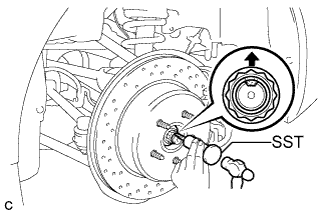
Using SST and a hammer, release the staked part of the axle shaft nut.
- SST
- 09930-00010
Note
Release the staked part of the nut completely, otherwise the threads of the drive shaft may be damaged.
-
While depressing the brake pedal, remove the axle shaft nut.
-
-
REMOVE REAR AXLE SHAFT NUT RH
Tech Tips
Perform the same procedure as the LH side.
-
SEPARATE REAR DISC BRAKE CYLINDER ASSEMBLY LH
-
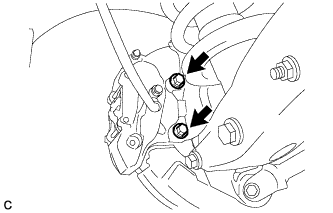
Remove the 2 bolts and separate the rear disc brake cylinder assembly.
Note
Hang the caliper with wire or equivalent.
-
-
SEPARATE REAR DISC BRAKE CYLINDER ASSEMBLY RH
Tech Tips
Perform the same procedure as the LH side.
-
REMOVE REAR DISC (for LH Side)
-
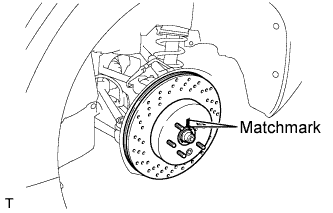
Put matchmarks on the rear disc and rear axle hub.
-
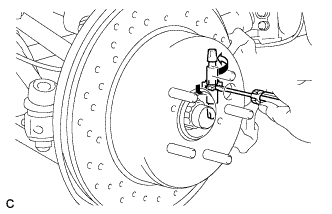
Release the parking brake and remove the rear disc.
Tech Tips
If the disc cannot be removed easily, turn and press firmly the shoe adjuster until the wheel comes free.
-
-
REMOVE REAR DISC (for RH Side)
Tech Tips
Perform the same procedure as the LH side.
-
SEPARATE REAR SPEED SENSOR LH
-
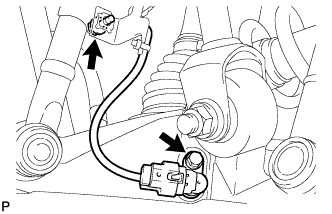
Remove the 2 bolts and separate the rear speed sensor.
Note
Prevent foreign matter from attaching to the sensor tip.
-
-
SEPARATE REAR SPEED SENSOR RH
Tech Tips
Perform the same procedure as the LH side.
-
SEPARATE NO. 3 PARKING BRAKE CABLE ASSEMBLY
-
Remove the 3 bolts and disengage the 2 clamps.
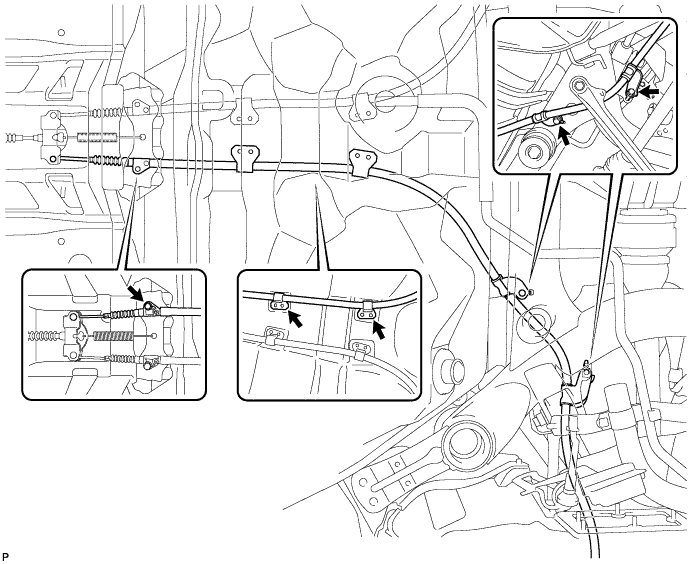
-
Separate the No. 3 parking brake cable assembly from the parking brake equalizer.
-
-
SEPARATE NO. 2 PARKING BRAKE CABLE ASSEMBLY
Tech Tips
Perform the same procedure as the No. 3 parking brake cable assembly.
-
REMOVE REAR NO. 1 SUSPENSION ARM ASSEMBLY LH
-
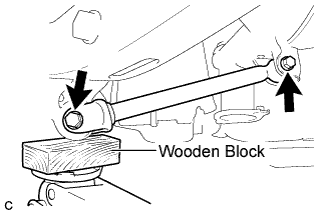
Support the rear axle assembly with a jack using a wooden block.
-
Remove the 2 bolts, 2 nuts, and rear No. 1 suspension arm assembly.
Note
Turn the bolts while holding the nuts.
-
-
REMOVE REAR NO. 1 SUSPENSION ARM ASSEMBLY RH
Tech Tips
Perform the same procedure as the LH side.
-
REMOVE TOE CONTROL LINK SUB-ASSEMBLY LH
-
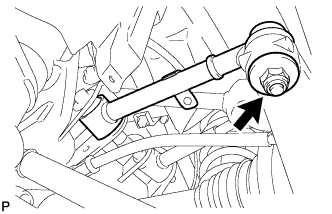
Remove the nut.
-
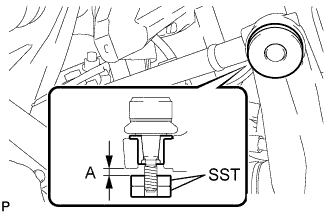
Install 2 spacers (SST spacer B) as shown in the illustration.
- SST
- 09960-20010 ( 09961-02060, 09961-02060 )
A 1 mm (0.0394 in.) or more Note
As SST may be damaged, make sure that the clearance between the arm and spacers is less than 1 mm (0.0394 in.).
-
Using SST, remove the toe control link sub-assembly from the rear axle carrier sub-assembly as shown in the illustration.
- SST
- 09960-20010 ( 09961-02010, 09961-02060, 09961-02060 )
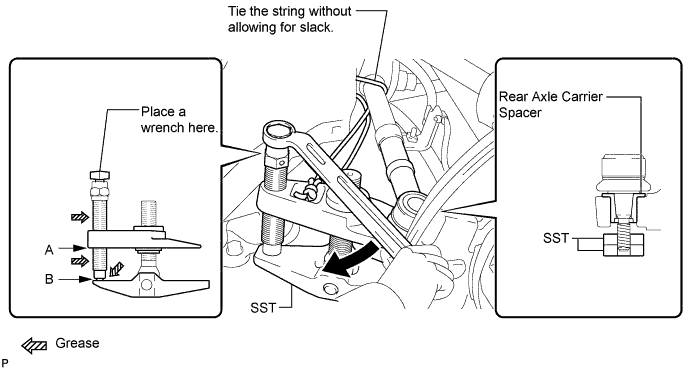
CAUTION:
Apply grease to the threads and end of the SST bolt.
Note
-
Install SST so that A and B are parallel.
-
Be sure to place a wrench on the part indicated in the illustration.
-
Make sure that SST is securely positioned on the rear axle carrier spacer.
-
Use caution not to damage the rear axle carrier sub-assembly because it is made of aluminum and may be damaged easily.
-
Do not damage the ball joint dust cover.
-
Make sure that the SST string is securely tied to the vehicle.
If the rear axle carrier spacer has come off, replace the rear axle carrier sub-assembly with a new one.
-
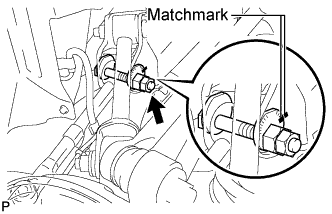
Put matchmarks on the toe adjust plate and rear suspension member.
-
Remove the nut, toe adjust cam, toe adjust plate, and toe control link sub-assembly.
-
-
REMOVE TOE CONTROL LINK SUB-ASSEMBLY RH
Tech Tips
Perform the same procedure as the LH side.
-
REMOVE REAR NO. 2 UPPER CONTROL ARM ASSEMBLY (for LH Side)
-
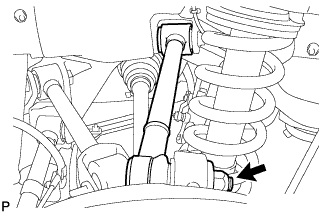
Remove the nut.
-
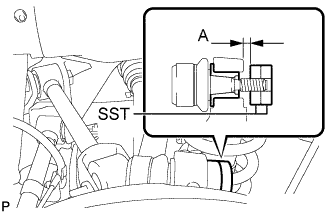
Install 2 spacers (SST spacer B) as shown in the illustration.
- SST
- 09960-20010 ( 09961-02060, 09961-02060 )
A 1 mm (0.0394 in.) or more Note
As SST may be damaged, make sure that the clearance between the arm and spacers is less than 1 mm (0.0394 in.).
-
Using SST, separate the rear No. 2 upper control arm assembly from the rear axle carrier sub-assembly as shown in the illustration.
- SST
- 09960-20010 ( 09961-02010, 09961-02060, 09961-02060 )
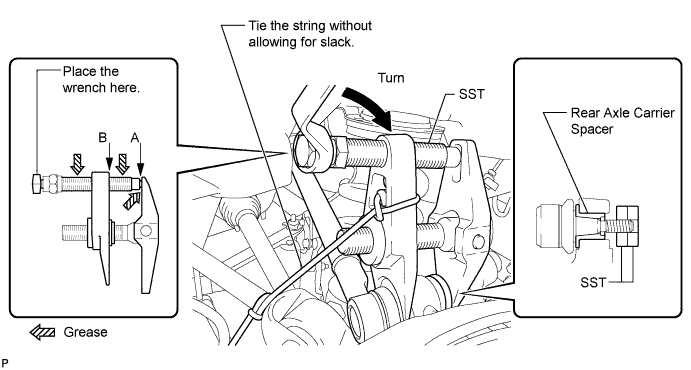
CAUTION:
Apply grease to the threads and end of the SST bolt.
Note
-
Install SST so that A and B are parallel.
-
Be sure to place a wrench on the part indicated in the illustration.
-
Make sure that SST is securely positioned on the rear axle carrier.
-
Use caution not to damage the rear axle carrier sub-assembly because it is made of aluminum and may be damaged easily.
-
Do not damage the ball joint dust cover.
-
Make sure that the SST string is securely tied to the vehicle.
If the rear axle carrier spacer has come off, replace the rear axle carrier sub-assembly with a new one.
-
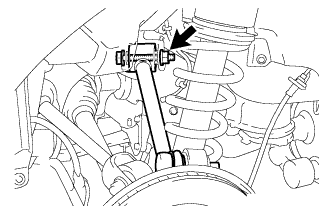
Remove the bolt, nut, washer, and rear No. 2 upper control arm assembly.
Tech Tips
Push the rear axle assembly downward.
-
-
REMOVE REAR NO. 2 UPPER CONTROL ARM ASSEMBLY (for RH Side)
Tech Tips
Perform the same procedure as the LH side.
-
REMOVE REAR NO. 1 UPPER CONTROL ARM ASSEMBLY (for LH Side)
-
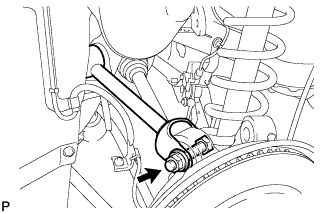
Remove the bolt, nut, and washer, and separate the rear No. 1 upper control arm assembly from the rear axle carrier.
-
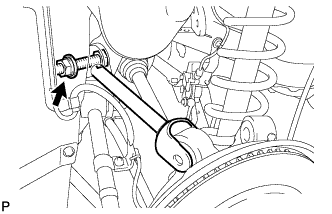
Remove the bolt, nut, washer, and rear No. 1 upper control arm assembly.
-
-
REMOVE REAR NO. 1 UPPER CONTROL ARM ASSEMBLY (for RH Side)
Tech Tips
Perform the same procedure as the LH side.
-
SEPARATE REAR NO. 2 SUSPENSION ARM ASSEMBLY LH
-
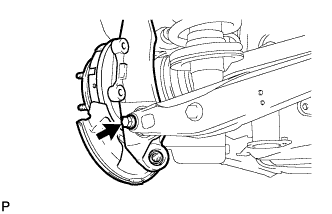
Remove the bolt and nut, and separate the rear No. 2 suspension arm assembly from the rear axle carrier sub-assembly.
Note
Turn the bolt while holding the nut.
-
-
SEPARATE REAR NO. 2 SUSPENSION ARM ASSEMBLY RH
Tech Tips
Perform the same procedure as the LH side.
-
REMOVE REAR AXLE ASSEMBLY LH
-
Using a plastic hammer, separate the rear drive shaft assembly from the rear axle assembly.
Note
-
Be careful not to damage the boot.
-
Use wire or equivalent to prevent the rear drive shaft assembly from hanging down.
-
-
-
REMOVE REAR AXLE ASSEMBLY RH
Tech Tips
Perform the same procedure as the LH side.
-
REMOVE REAR NO. 2 SUSPENSION ARM ASSEMBLY LH
-
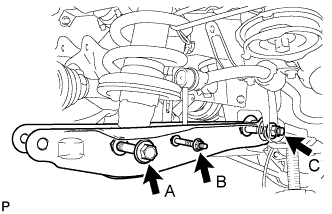
Remove the bolt and nut (B), and separate the rear stabilizer link assembly and the height control sensor link bracket.
-
Remove the bolt (A) and nut, and separate the rear shock absorber with coil spring.
Note
Turn the bolt while holding the nut.
-
Remove the bolt and nut (C), and remove the rear No. 2 suspension arm assembly.
-
-
REMOVE REAR NO. 2 SUSPENSION ARM ASSEMBLY RH
Tech Tips
Perform the same procedure as the LH side.
-
REMOVE REAR DRIVE SHAFT ASSEMBLY LH
-
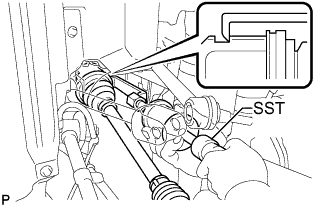
Using SST, remove the rear drive shaft assembly.
- SST
- 09520-01010
- 09520-24010 ( 09520-32040 )
Note
-
Be careful not to damage the oil seal, inboard joint boot or drive shaft dust cover.
-
Be careful not to drop the drive shaft assembly.
-
-
REMOVE REAR DRIVE SHAFT ASSEMBLY RH
Tech Tips
Perform the same procedure as the LH side.
-
REMOVE HOLE SNAP RING (for LH Side)
-
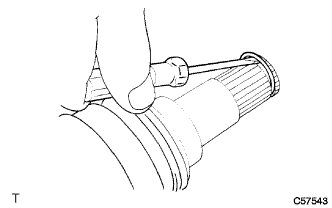
Using a screwdriver, remove the hole snap ring.
-
-
REMOVE HOLE SNAP RING (for RH Side)
Tech Tips
Perform the same procedure as the LH side.
-
REMOVE REAR HEIGHT CONTROL SENSOR SUB-ASSEMBLY
-
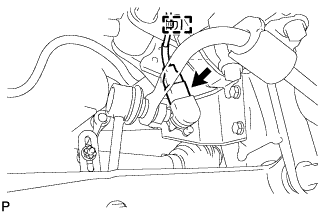
Disengage the clamp and disconnect the connector.
-
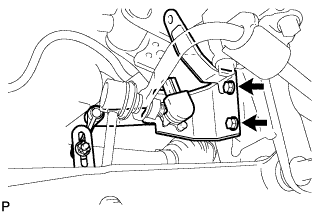
Remove the 2 bolts and rear height control sensor sub-assembly.
-
-
REMOVE REAR STABILIZER BAR
-
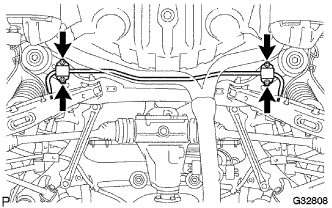
Remove the 4 bolts, 2 stabilizer brackets, 2 rear stabilizer bushings, and rear stabilizer bar.
-
-
REMOVE REAR SUSPENSION REAR LOWER MEMBER BRACE LH
-
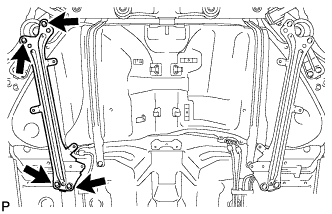
Remove the 4 bolts and rear suspension member brace LH.
-
-
REMOVE REAR SUSPENSION REAR LOWER MEMBER BRACE RH
Tech Tips
Perform the same procedure as the LH side.
-
REMOVE REAR DIFFERENTIAL CARRIER ASSEMBLY
-
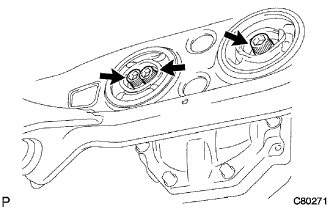
Support the rear differential carrier assembly with a jack.
Note
Do not drop the differential carrier.
-
Using a hexagon wrench (12 mm), remove the 3 hexagon bolts.
-
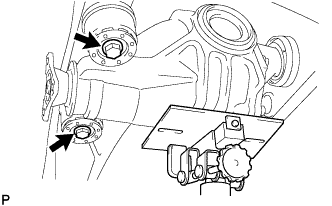
Remove the 2 bolts, 2 lower rear differential mount stoppers and rear differential carrier assembly.
-
Remove the 2 upper rear differential mount stoppers from rear differential carrier assembly
Note
Make sure not to install the upper and lower rear differential mount stoppers upside down.
-
-
REMOVE REAR SUSPENSION MEMBER
-
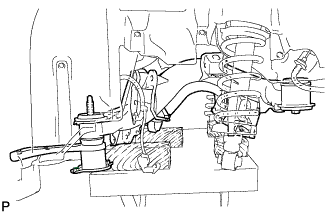
Support the rear suspension member with a jack.
-
Remove the 8 bolts, 2 rear suspension member stoppers, 2 differential support member lower stoppers and rear suspension member lower stoppers from the rear suspension member.
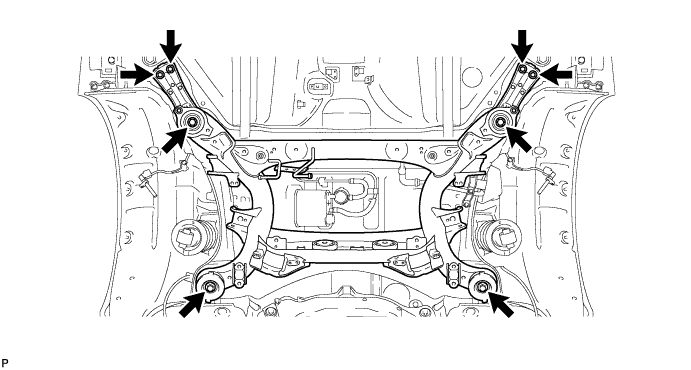
-
Lower the jack slowly and remove the rear suspension member.
-
-
REMOVE REAR SUSPENSION MEMBER REAR UPPER STOPPER (for LH Side)
-
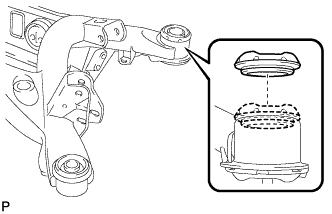
Remove the rear suspension member rear upper stopper from the rear suspension member sub-assembly.
-
-
REMOVE REAR SUSPENSION MEMBER REAR UPPER STOPPER (for RH Side)
Tech Tips
Perform the same procedure as the LH side.
-
REMOVE REAR SUSPENSION MEMBER FRONT BODY MOUNTING CUSHION (for LH Side)
-
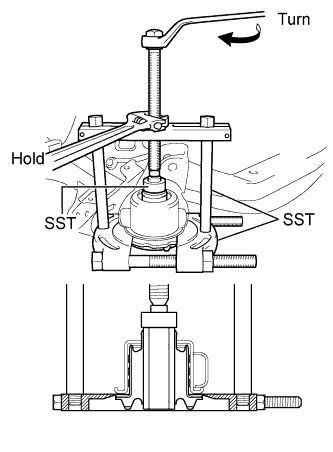
Using SST, remove the rear suspension member front body mounting cushion, while applying grease to the clearance between the rear suspension member front body mounting cushion and the rear suspension member sub-assembly.
- SST
- 09950-00020
- 09950-00030
- 09950-40011 ( 09957-04010 )
- 09950-60010 ( 09951-00300 )
Note
-
Apply a small amount of grease to the threads of SST (center bolt) before use.
-
Be careful as the body mounting cushion may fly out.
-
The rear suspension member front body mounting cushion cannot be reused.
-
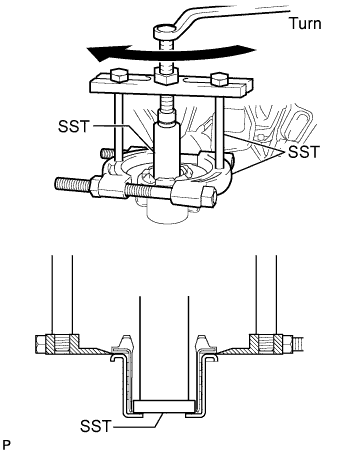
If the outer casing of the rear suspension member front body mounting cushion remains, insert SST between the rear suspension member front body mounting cushion and the rear suspension member sub-assembly, then remove the outer casing.
- SST
- 09608-06041
- 09950-00020
- 09950-00030
- 09950-60010 ( 09951-00550 )
-
-
REMOVE REAR SUSPENSION MEMBER FRONT BODY MOUNTING CUSHION (for RH Side)
Tech Tips
Perform the same procedure as the LH side.
-
REMOVE REAR SUSPENSION MEMBER REAR BODY MOUNTING CUSHION (for LH Side)
-
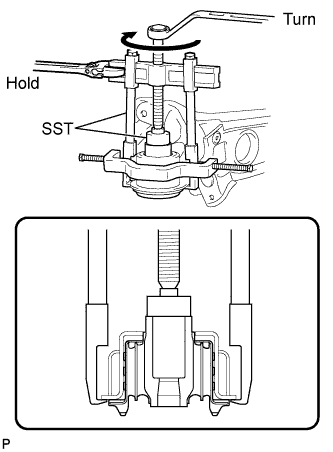
Using SST, remove the rear suspension member rear body mounting cushion, while applying grease to the clearance between the rear suspension member rear body mounting cushion and the rear suspension member sub-assembly
- SST
- 09950-40011 ( 09951-04020, 09952-04010, 09953-04030, 09954-04020, 09955-04061, 09957-04010, 09958-04011 )
- 09950-60010 ( 09951-00320 )
Note
-
Apply a small amount of grease to the threads of SST (center bolt) before use.
-
Be careful as the body mounting cushion may fly out.
-
The rear suspension member rear body mounting cushion cannot be reused.
-
-
REMOVE REAR SUSPENSION MEMBER REAR BODY MOUNTING CUSHION (for RH Side)
Tech Tips
Perform the same procedure as the LH side.
-
REMOVE REAR NO. 1 DIFFERENTIAL MOUNT CUSHION
-
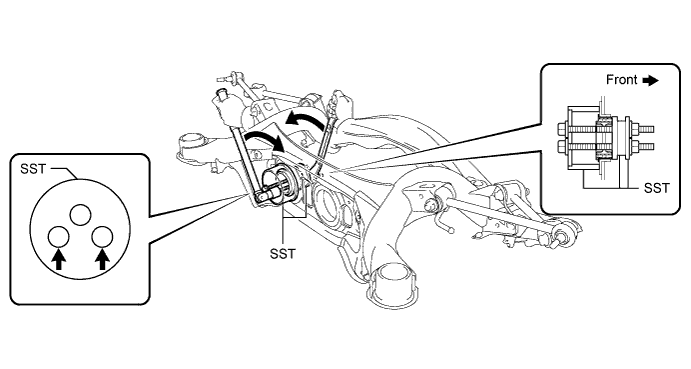
Using SST, remove the rear No. 1 differential mount cushion.
- SST
- 09316-12010
- 09570-24011
Note
-
Do not bring SST into contact with the rear suspension member.
-
Apply a small amount of grease to the threads of SST before use.
-
Set SST in the correct direction.
-
Do not slant the bolts of SST.
-
Tighten the 2 bolts of SST equally into the 2 holes of the rear No. 1 differential mount cushion.
-
Do not reuse the rear No. 1 differential mount cushion.
-
-
REMOVE REAR NO. 2 DIFFERENTIAL MOUNT CUSHION
-
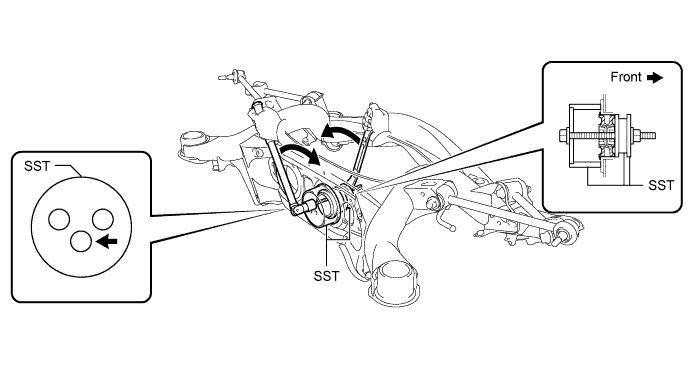
Using SST, remove the rear No. 2 differential mount cushion.
- SST
- 09316-12010
- 09570-24011
Note
-
Do not bring SST into contact with the rear suspension member.
-
Apply a small amount of grease to the threads of SST before use.
-
Set SST in the correct direction.
-
Do not slant the bolt of SST.
-
Do not reuse the rear No. 2 differential mount cushion.
-
-
REMOVE HOLE PLUG
-
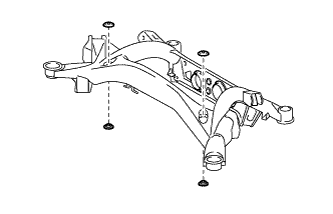
Remove the 4 hole plugs from the rear suspension member sub-assembly.
-