REAR STABILIZER BAR REMOVAL

-
REMOVE NO. 2 DIFFERENTIAL SUPPORT PROTECTOR
-
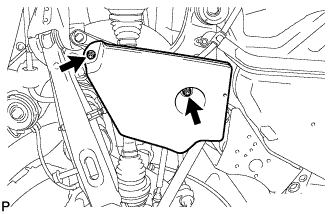
Remove the 2 nuts and No. 2 differential support protector.
-
-
REMOVE NO. 1 DIFFERENTIAL SUPPORT PROTECTOR
Tech Tips
Perform the same procedure as the No. 2 differential support protector.
-
LOOSEN BOLT (for LH Side)
-
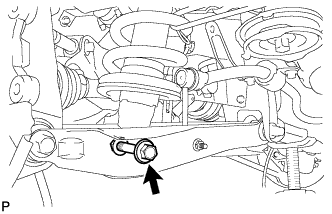
Loosen the bolt.
Note
-
Do not remove the bolt.
-
Turn the bolt while holding the nut.
-
-
-
LOOSEN BOLT (for RH Side)
Tech Tips
Perform the same procedure as the LH side.
-
REMOVE REAR STABILIZER LINK ASSEMBLY LH
-
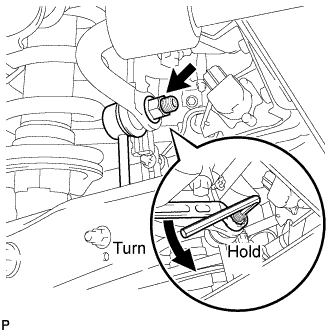
Remove the nut, and separate the rear stabilizer link assembly LH from the rear stabilizer bar.
Tech Tips
If the ball joint turns together with the nut, use a hexagon wrench (6 mm) to hold the stud bolt.
-
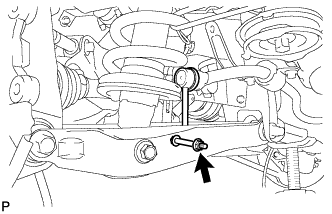
Remove the nut, bolt, and the stabilizer link assembly LH.
-
-
REMOVE REAR STABILIZER LINK ASSEMBLY RH
Tech Tips
Use the same procedure as the LH side.
-
REMOVE REAR STABILIZER BAR
-
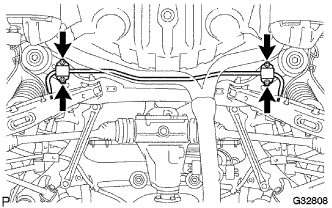
Remove the 4 bolts, 2 stabilizer brackets, 2 rear stabilizer bushings, and rear stabilizer bar.
-