REAR DIFFERENTIAL CARRIER ASSEMBLY DISASSEMBLY

-
PRECAUTION
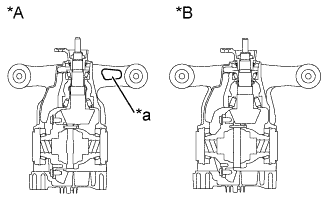
Text in Illustration *A A Type *B B Type *a Hole The work procedures to be followed differ depending on the type of differential carrier right arm (A Type with a hole or B Type without a hole), so check whether the differential carrier right arm has a hole before disassembling.
HINT Item A Type B Type Rear Differential Drive Pinion Bearing Spacer 41231-30050 41231-50010 Rear Drive Pinion Front Tapered Roller Bearing 90366-34024 90366-34010 Rear Drive Pinion Rear Tapered Roller Bearing 90366-45056 90366-45035 -
REMOVE REAR DIFFERENTIAL BREATHER PLUG
-
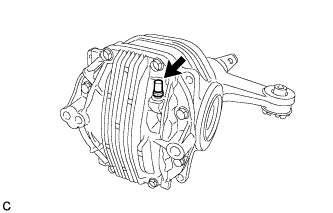
Remove the breather plug from the differential carrier cover.
-
-
REMOVE REAR DIFFERENTIAL CARRIER COVER
-
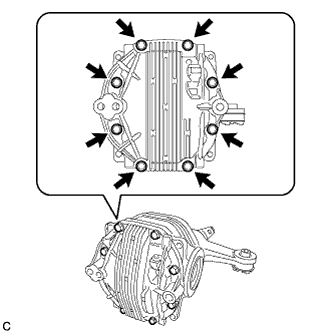
Remove the 8 bolts from the differential carrier cover.
-
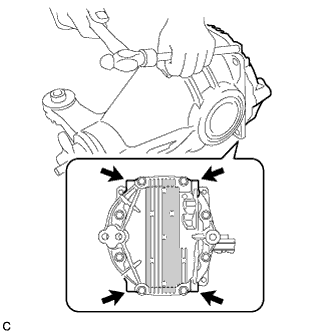
Using a brass bar and a hammer, remove the differential carrier cover from the differential carrier.
Note
-
Place the brass bar onto the corners of the carrier cover.
-
Do not damage the sealing surface of the differential carrier.
-
-
-
REMOVE REAR DIFFERENTIAL CARRIER STRAIGHT PIN
-
Remove the 2 rear differential carrier straight pins.
-
-
REMOVE REAR DIFFERENTIAL BREATHER PLUG OIL DEFLECTOR
-
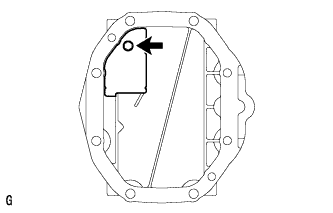
Remove the bolt and oil deflector from the differential carrier cover.
-
-
SECURE REAR DIFFERENTIAL CARRIER
-
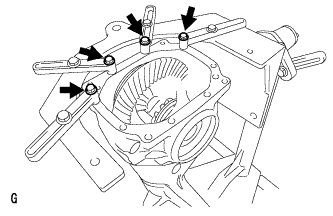
Set the differential carrier to the overhaul stand, etc., as shown in the illustration.
-
-
INSPECT RUNOUT OF DIFFERENTIAL RING GEAR
-
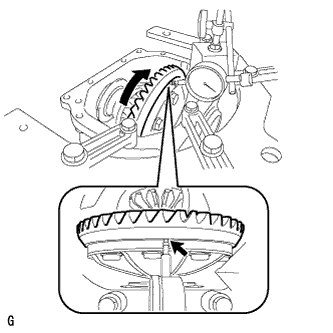
Set the dial indicator perpendicular to the end of the ring gear face.
-
Rotate the ring gear and measure the backlash.
Maximum runout 0.04 mm (0.00157 in.) If the runout exceeds the specified maximum value, remove the ring gear and check the runout of the differential case.
-
-
INSPECT DIFFERENTIAL RING GEAR BACKLASH
-
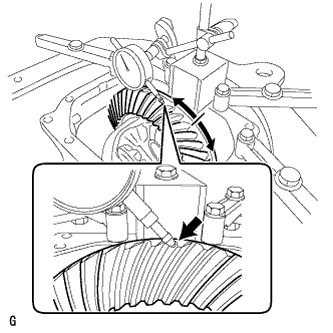
While holding the rear drive pinion companion flange, rotate the ring gear and measure the backlash.
Backlash 0.08 to 0.13 mm (0.00315 to 0.00512 in.) If the backlash is not within the specified range, adjust the backlash or repair as necessary.
-
-
INSPECT TOOTH CONTACT BETWEEN RING GEAR AND DRIVE PINION
-
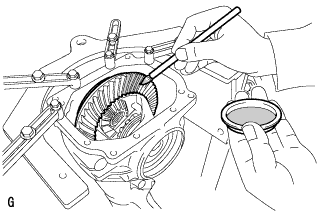
Coat 3 or 4 teeth at the 3 different positions on the ring gear with prussian blue.
-
Rotate the ring gear in both directions.
-
Inspect the tooth contact pattern.
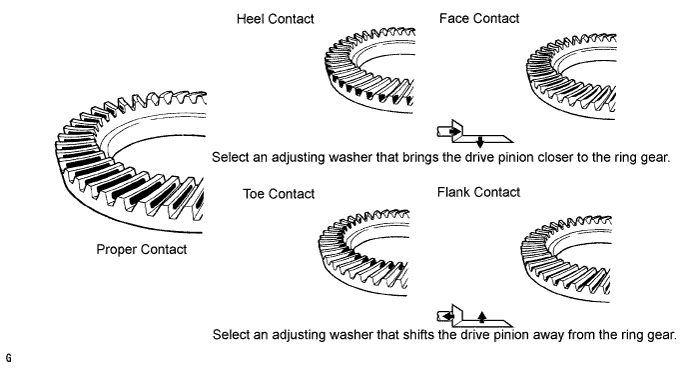
-
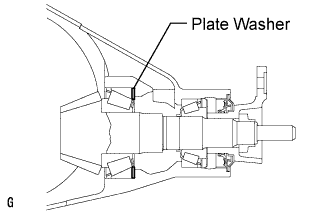
If the teeth are not contacting properly, use the following table to select a proper plate washer for correction.
Tech Tips
-
If the contact pattern is face contact or flank contact, tooth contact may be adjustable while keeping the backlash within the specified range.
-
If the thickness of the drive pinion washer has been changed, adjust the backlash and measure the total preload.
Washer Thickness Thickness mm (in.) No. Thickness mm (in.) No. Thickness mm (in.) No. 1.87 (0.0736) 87 2.01 (0.0791) 01 2.15 (0.0846) 15 1.88 (0.0740) 88 2.02 (0.0795) 02 2.16 (0.0850) 16 1.89 (0.0744) 89 2.03 (0.0799) 03 2.17 (0.0854) 17 1.90 (0.0748) 90 2.04 (0.0803) 04 2.18 (0.0858) 18 1.91 (0.0752) 91 2.05 (0.0807) 05 2.19 (0.0862) 19 1.92 (0.0756) 92 2.06 (0.0811) 06 2.20 (0.0866) 20 1.93 (0.0760) 93 2.07 (0.0815) 07 2.21 (0.0870) 21 1.94 (0.0764) 94 2.08 (0.0819) 08 2.22 (0.0874) 22 1.95 (0.0768) 95 2.09 (0.0823) 09 2.23 (0.0878) 23 1.96 (0.0772) 96 2.10 (0.0827) 10 2.24 (0.0882) 24 1.97 (0.0776) 97 2.11 (0.0831) 11 2.25 (0.0886) 25 1.98 (0.0780) 98 2.12 (0.0835) 12 2.26 (0.0890) 26 1.99 (0.0783) 99 2.13 (0.0839) 13 2.27 (0.0894) 27 2.00 (0.0787) 00 2.14 (0.0843) 14 2.28 (0.0898) 28 -
-
-
INSPECT DIFFERENTIAL SIDE GEAR BACKLASH
-
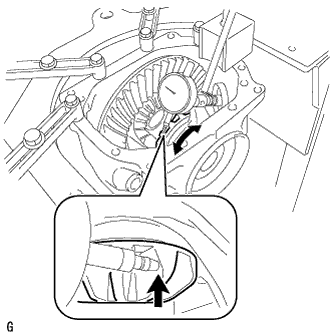
Place a dial indicator on the tip of the pinion gear tooth at a right angle. Hold the side gear in the differential case and check that the backlash is 0.15 mm (0.00591 in.) or less.
If not, replace the rear differential case sub-assembly with a new one.
-
-
INSPECT RUNOUT OF DIFFERENTIAL DRIVE PINION
-
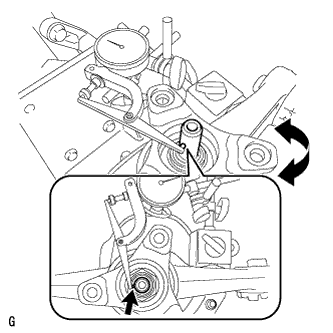
Using a dial indicator, measure the runout of the drive pinion shaft at a position 10 mm (0.394 in.) away from the end of the shaft.
Maximum runout 0.08 mm (0.00315 in.) If the runout is greater than the maximum, replace the drive pinion and ring gear.
-
-
INSPECT DIFFERENTIAL DRIVE PINION PRELOAD
-
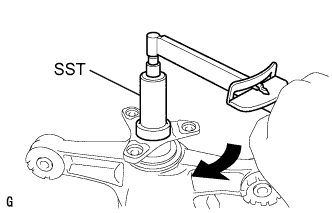
Using SST and a torque wrench, measure the starting torque of the drive pinion. The backlash between the drive pinion and ring gear should allow enough movement of the drive pinion to allow this measurement to be performed. Make sure not to include the preload of the ring gear (differential case) in the measurement of the drive pinion preload.
Differential Drive Pinion Preload (at Starting) A Type Item Specified Condition New rear drive pinion tapered roller bearing 1.25 to 1.65 N*m (12.75 to 16.83 kgf*cm, 11.06 to 14.60 in.*lbf) Used rear drive pinion tapered roller bearing 1.25 to 1.65 N*m (12.75 to 16.83 kgf*cm, 11.06 to 14.60 in.*lbf) B Type Item Specified Condition New rear drive pinion tapered roller bearing 1.44 to 2.01 N*m (14.68 to 20.50 kgf*cm, 12.74 to 17.79 in.*lbf) Used rear drive pinion tapered roller bearing 0.50 to 0.80 N*m (5.10 to 8.16 kgf*cm, 4.43 to 7.08 in.*lbf) If the preload is not within the specified range, adjust the rear differential drive pinion preload or repair as necessary.
-
-
INSPECT TOTAL PRELOAD
-
Using SST and a torque wrench, measure the preload with the teeth of the drive pinion and ring gear in contact.
Total Preload (at Starting) A Type Item Specified Condition New rear drive pinion tapered roller bearing 1.91 to 3.51 N*m (19.48 to 35.79 kgf*cm, 16.90 to 31.07 in.*lbf) Used rear drive pinion tapered roller bearing 1.74 to 2.96 N*m (17.74 to 30.18 kgf*cm, 15.40 to 26.20 in.*lbf) B Type Item Specified Condition New rear drive pinion tapered roller bearing 2.10 to 3.87 N*m (21.41 to 39.46 kgf*cm, 18.59 to 34.25 in.*lbf) Used rear drive pinion tapered roller bearing 0.99 to 2.11 N*m (10.10 to 21.52 kgf*cm, 8.76 to 18.67 in.*lbf)
-
-
REMOVE REAR DIFFERENTIAL SIDE GEAR SHAFT OIL SEAL
-
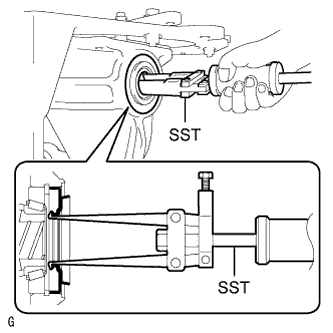
Using SST, remove the 2 rear differential side gear shaft oil seals.
- SST
- 09308-00010
-
-
REMOVE REAR DIFFERENTIAL SIDE GEAR SHAFT SNAP RING (for RH Side)
-
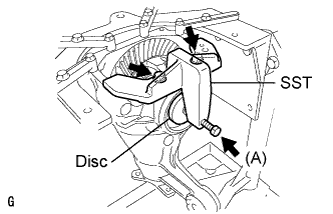
Install SST to the differential carrier.
- SST
- 09571-50010
-
Tighten the SST bolt (A) until the SST disc lightly touches the differential side bearing outer race RH.
-
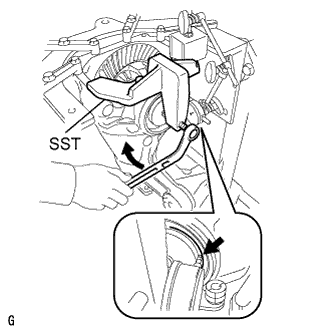
Install a dial indicator to the rear differential carrier.
-
Tighten the SST bolt and alter the shape of the differential carrier to create a 0.1 mm (0.00394 in.) clearance between the differential side bearing outer race RH and side gear shaft snap ring.
Note
Observe the dial indicator to ensure that the shape of the differential carrier does not change more than 0.2 mm (0.00787 in.).
Tech Tips
-
Set the dial indicator to the rearmost position (upper side in the illustration) of the area around where the side gear shaft oil seal is tapped in.
-
Approximately 0.1 mm (0.00394 in.) clearance between the differential side bearing outer race RH and the side gear shaft snap ring is sufficient for the washer to move slightly.
-
-
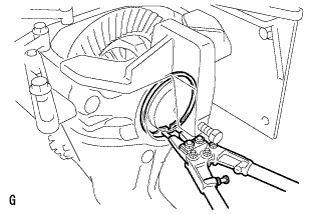
Using snap ring pliers, remove the side gear shaft snap ring on the ring gear tooth side.
Tech Tips
For reassembly purposes, measure the thickness of the side gear shaft snap ring. Write down the result.
-
Remove the dial indicator and loosen the SST bolt.
Note
Do not remove SST.
-
-
REMOVE REAR DIFFERENTIAL SIDE GEAR SHAFT SNAP RING (for LH Side)
-
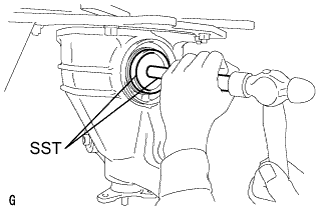
Using SST and a hammer, create a clearance between the differential side bearing outer race LH on the back surface of the ring gear and side gear shaft snap ring.
- SST
- 09608-32010
- 09950-70010 ( 09951-07200 )
Tech Tips
The clearance is not visible, but tapping SST with a hammer three or four times should be enough.
-
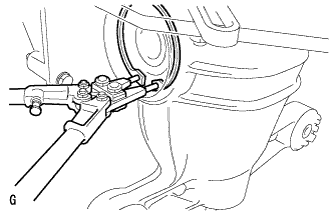
Using snap ring pliers, remove the side gear shaft snap ring on the back surface of the ring gear.
Tech Tips
For reassembly purposes, measure the thickness of the side gear shaft snap ring. Write down the result.
-
-
REMOVE DIFFERENTIAL SIDE BEARING OUTER RACE LH
-
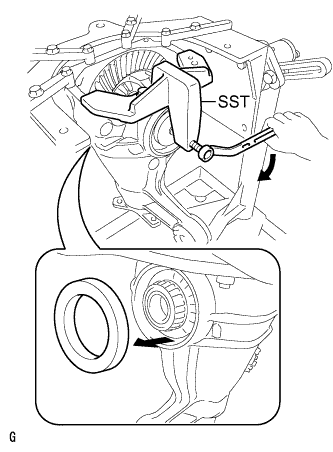
Tighten the SST bolt and push out the differential side bearing outer race LH on the back surface of the ring gear.
- SST
- 09571-50010
Note
Do not drop the differential side bearing outer race LH.
-
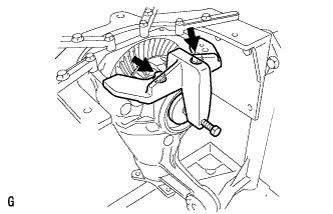
Remove SST.
-
-
REMOVE DIFFERENTIAL SIDE BEARING OUTER RACE RH
-
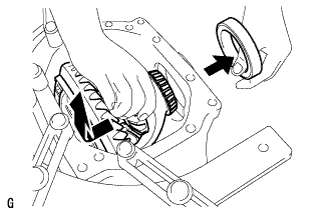
Raise the ring gear of the differential case slightly to remove the ring gear tooth side differential side bearing outer race RH.
Tech Tips
For reassembly, check the installation position of the differential side bearing outer race and the side gear shaft snap ring before removing the differential side bearing outer race. Write down the result.
-
-
REMOVE REAR DIFFERENTIAL CASE SUB-ASSEMBLY
-
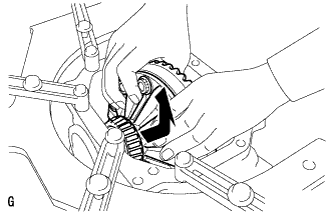
Remove the rear differential case sub-assembly.
Note
Do not damage the case bearing.
-
-
REMOVE REAR DRIVE PINION NUT
-
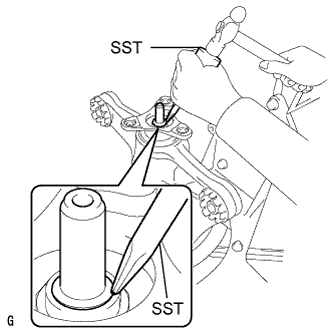
Using SST and a hammer, unstake the staked part of the drive pinion nut.
- SST
- 09930-00010
Note
-
Be sure to use SST with the tapered surface facing the shaft.
-
Do not grind the tip of SST with a grinder, etc.
-
Completely loosen the staked part of the nut when removing it.
-
Do not damage the threads of the drive pinion.
-
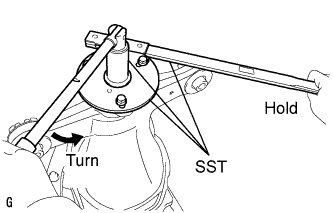
Using SST to hold the flange, remove the drive pinion nut.
- SST
- 09229-55010
- 09330-00021
- 09950-30012 ( 09955-03040 )
-
-
REMOVE REAR DRIVE PINION COMPANION FLANGE
-
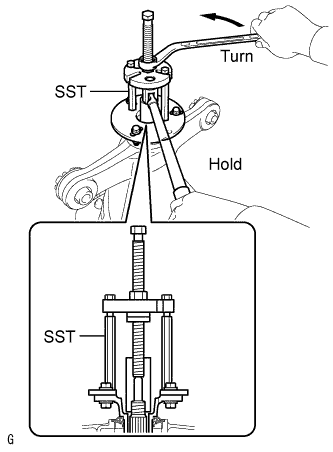
Using SST, remove the companion flange.
- SST
- 09950-30012 ( 09951-03010, 09953-03010, 09954-03010, 09955-03040, 09956-03060 )
Note
Apply grease to the threads and tip of the SST center bolt before use.
-
-
REMOVE REAR DIFFERENTIAL DUST DEFLECTOR
Tech Tips
Perform this procedure only when the dust deflector is damaged.
-
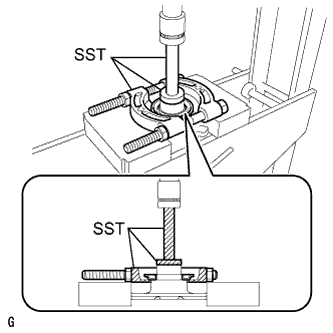
Using SST and a press, remove the dust deflector.
- SST
- 09950-60010 ( 09951-00440 )
- 09950-00020
- 09950-70010 ( 09951-07100 )
-
-
REMOVE REAR DIFFERENTIAL CARRIER OIL SEAL
-
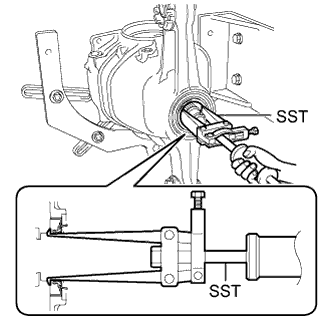
Using SST, remove the rear differential carrier oil seal from the rear differential carrier.
- SST
- 09308-00010
-
-
REMOVE REAR DIFFERENTIAL DRIVE PINION OIL SLINGER
-
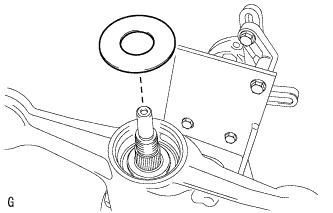
Remove the drive pinion oil slinger.
-
-
REMOVE DIFFERENTIAL DRIVE PINION
-
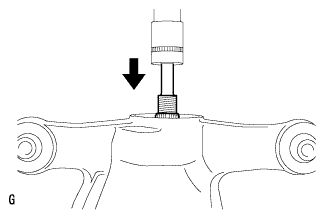
Using a press, remove the drive pinion from the differential carrier.
Note
Do not drop the drive pinion.
-
-
REMOVE REAR DIFFERENTIAL DRIVE PINION BEARING SPACER
-
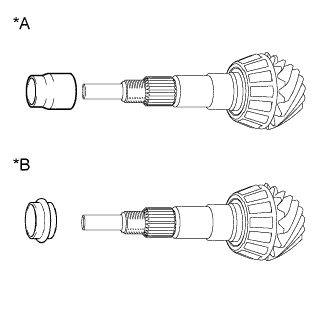
Text in Illustration *A A Type *B B Type Remove the rear differential drive pinion bearing spacer from the differential drive pinion.
-
-
REMOVE REAR DRIVE PINION FRONT TAPERED ROLLER BEARING
-
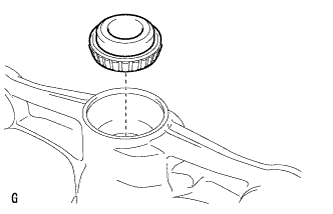
Remove the rear drive pinion front tapered roller bearing inner race from the differential carrier.
-
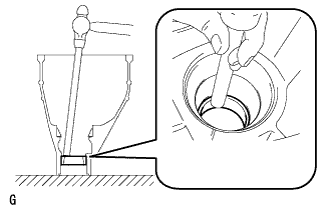
Using a brass bar and a hammer, remove the rear drive pinion front tapered roller bearing outer race from the differential carrier.
-
-
REMOVE REAR DRIVE PINION REAR TAPERED ROLLER BEARING
-
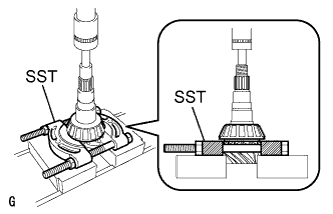
Using SST and a press, remove the rear drive pinion rear tapered roller bearing inner race from the drive pinion.
- SST
- 09950-00020
Tech Tips
If either the drive pinion or ring gear is damaged, replace both as a set.
-
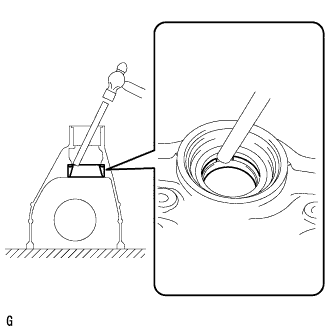
Using a brass bar and a hammer, remove the rear drive pinion rear tapered roller bearing outer race from the differential carrier.
-
Remove the differential drive pinion plate washer.
-
-
REMOVE DIFFERENTIAL RING GEAR
-
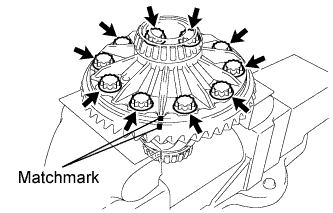
Put matchmarks on the ring gear and differential case.
-
Remove the 10 ring gear set bolts.
-
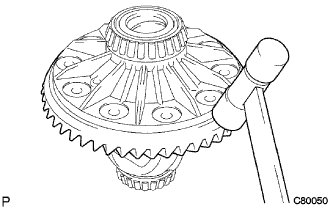
Using a plastic hammer, tap on the ring gear to separate it from the differential case.
Note
Do not damage the ring gear.
-
-
INSPECT RUNOUT OF REAR DIFFERENTIAL CASE SUB-ASSEMBLY
Tech Tips
Perform this procedure only when the runout of the differential ring gear exceeds the specified maximum value.
-
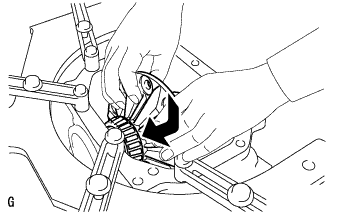
Install the differential case to the differential carrier.
Note
Do not damage the case bearing.
-
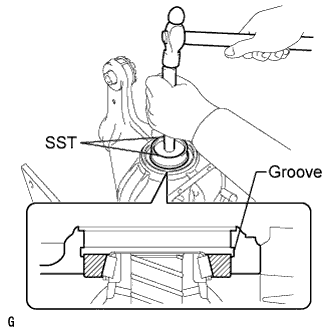
Using SST and a hammer, install the differential side bearing outer race RH on the ring gear tooth side.
- SST
- 09608-32010
- 09950-70010 ( 09951-07200 )
Tech Tips
Tap in the differential side bearing outer race RH until half of the side gear shaft snap ring groove of the differential carrier can be seen.
-
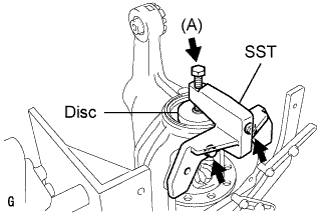
Install SST to the differential carrier with the 2 bolts.
- SST
- 09571-50010
-
Tighten the SST bolt (A) until the SST disc lightly touches the differential side bearing outer race RH.
-
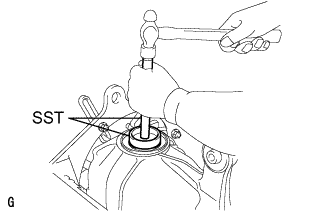
Using SST and a hammer, install the differential side bearing outer race LH on the ring gear back surface side.
- SST
- 09608-32010
- 09950-70010 ( 09951-07200 )
Tech Tips
Tap in the differential side bearing outer race LH until it touches the case bearing inner race roller.
-
Using snap ring pliers, install the side gear shaft snap ring in the differential carrier on the ring gear back surface side.
-
Place a dial indicator on the differential case flange surface at a right angle.
-
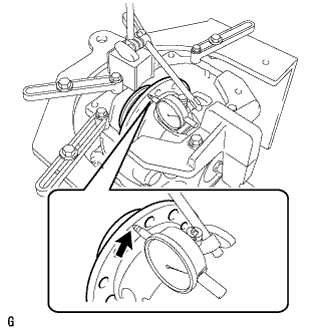
Using a dial indicator, measure the differential case runout.
Maximum runout 0.04 mm (0.00157 in.) If the runout is greater than the maximum, replace the rear differential case with a new one.
-
Using snap ring pliers, remove the side gear shaft snap ring on the ring gear back surface side.
-
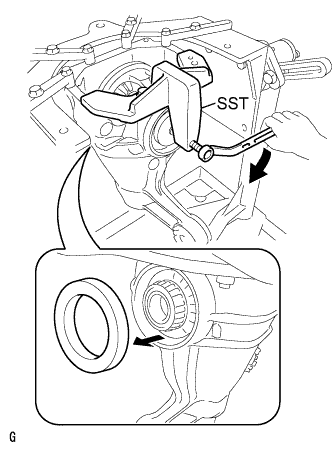
Tighten the SST bolt to push out the ring gear back surface side differential side bearing outer race LH.
Note
Do not drop the differential side bearing outer race LH.
-
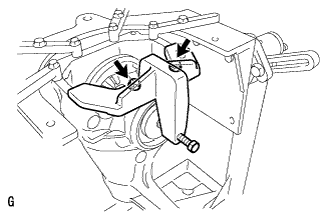
Remove the 2 bolts and SST.
-
Raise the ring gear side of the differential case slightly to remove the ring gear tooth side differential side bearing outer race RH.
-
Remove the differential case from the differential carrier as shown in the illustration.
Note
Do not damage the case bearing.
-
-
REMOVE REAR DIFFERENTIAL CASE BEARING
Tech Tips
Perform this procedure only when replacing the rear differential case bearing or differential case sub-assembly.
-
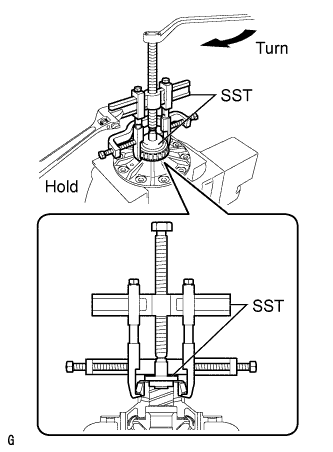
Using SST, remove the case bearing inner races LH and RH from the differential case sub-assembly.
- SST
- 09950-40011 ( 09951-04020, 09952-04010, 09953-04030, 09954-04010, 09955-04061, 09957-04010, 09958-04011 )
- 09950-60010 ( 09951-00350, 09951-00480, 09952-06010 )
Note
-
Do not deform the bearing cage if the bearing is to be reused.
-
Hook the SST claw from the dent of the differential case to the bearing inner race.
-
Apply grease to the threads and tip of the SST center bolt before use.
-
-
INSPECT DIFFERENTIAL SIDE GEAR BACKLASH
-
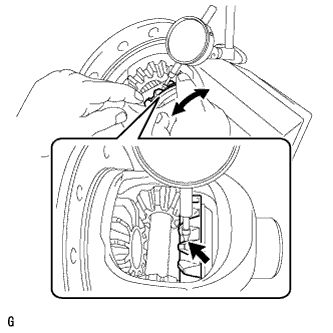
Secure the differential case in a vise between aluminum plates.
Note
Do not overtighten the vise.
-
Place a dial indicator on the tip of the side gear tooth at a right angle. Hold the pinion gear in the differential case and check that the backlash is 0.15 mm (0.00591 in.) or less.
If not, replace the rear differential case sub-assembly with a new one.
-