REAR DRIVE SHAFT ASSEMBLY INSTALLATION

Tech Tips
-
Use the same procedure for the RH side and LH side.
-
The procedure listed below is for the LH side.
-
INSTALL HOLE SNAP RING
-
Install a new hole snap ring.
-
-
INSTALL REAR DRIVE SHAFT ASSEMBLY
-
Coat the spline of the inboard joint shaft assembly with gear oil.
-
Set the shaft snap ring with the opening side facing down.
-
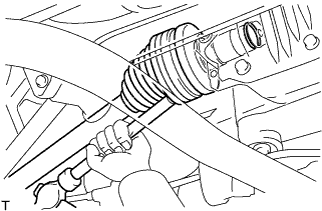
Align the shaft splines and install the drive shaft assembly with a brass bar and a hammer.
Note
-
Be careful not to damage the drive shaft dust cover, boot or oil seal.
-
Move the drive shaft assembly while keeping it level.
Tech Tips
It is possible to determine if the inboard joint shaft is properly engaged (the shaft is in contact with the pinion shaft, and the snap ring is engaged in the pinion gear) based on the sound or feeling when the shaft is driven in.
-
-
Install the rear drive shaft assembly to the rear axle carrier.
Note
Be careful not to damage the drive shaft boot.
-
-
INSTALL REAR AXLE ASSEMBLY
-
Connect the rear drive shaft assembly and to the rear axle assembly.
-
-
TEMPORARILY TIGHTEN REAR NO. 2 SUSPENSION ARM ASSEMBLY
-
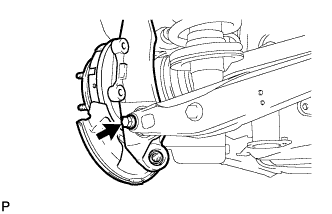
Temporarily tighten the rear No. 2 suspension arm assembly to the rear axle carrier sub-assembly with the bolt and nut.
Note
Turn the bolt while holding the nut.
Tech Tips
Install the bolt from the rear side of the vehicle and temporarily tighten the bolt.
-
-
TEMPORARILY TIGHTEN REAR NO. 1 UPPER CONTROL ARM ASSEMBLY
-
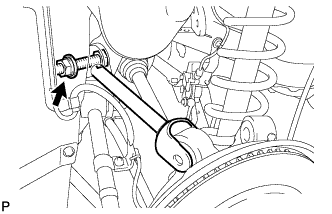
Temporarily tighten the rear No. 1 upper control arm assembly to the rear suspension member with the bolt, nut, and washer.
-
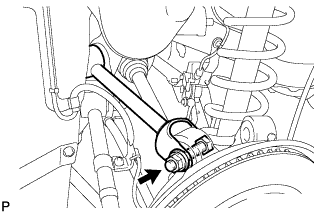
Temporarily tighten the rear No. 1 upper control arm assembly to the rear axle carrier sub-assembly with the bolt, nut, and washer.
-
-
TEMPORARILY TIGHTEN TOE CONTROL LINK SUB-ASSEMBLY
-
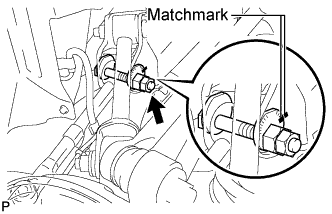
Temporarily tighten the nut.
Note
Align the matchmarks on the rear suspension member and toe adjust plate.
Tech Tips
Fully tighten the nut after stabilizing the suspension.
-
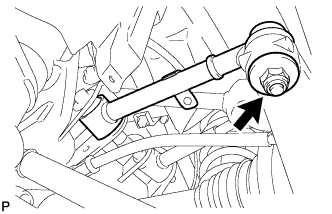
Install the toe control link sub-assembly with a new nut.
- Torque:
- 70 N*m { 714 kgf*cm, 52 ft.*lbf }
-
-
TEMPORARILY TIGHTEN REAR NO. 2 UPPER CONTROL ARM ASSEMBLY
-
Insert the stud of the rear No. 2 upper control arm assembly to the rear axle carrier sub-assembly.
-
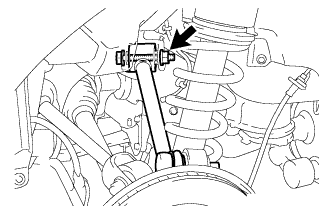
Temporarily install the rear No. 2 upper control arm assembly to the rear suspension member with the bolt, nut, and washer.
Tech Tips
Push the axle carrier downward.
-
Temporarily tighten the nut.
-
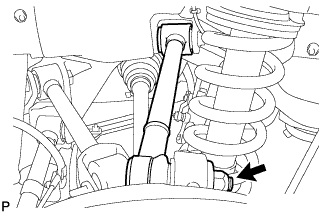
Install a new nut and fully tighten the nut.
- Torque:
- 70 N*m { 714 kgf*cm, 52 ft.*lbf }
-
-
TEMPORARILY TIGHTEN REAR NO. 1 SUSPENSION ARM ASSEMBLY
-
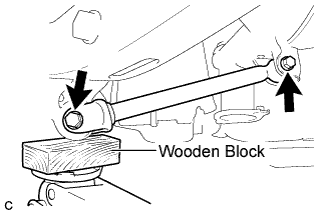
Support the rear axle assembly with a jack using a wooden block.
-
Temporarily tighten the rear No. 1 suspension arm assembly with the 2 bolts and 2 nuts.
Note
Turn the bolts while holding the nuts.
Tech Tips
Fully tighten the bolts after stabilizing the suspension.
-
-
INSTALL NO. 3 PARKING BRAKE CABLE ASSEMBLY
-
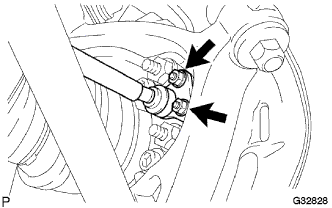
Install the parking brake cable assembly to the rear axle carrier sub-assembly with the 2 nuts.
- Torque:
- 8.0 N*m { 82 kgf*cm, 71 in.*lbf }
-
-
APPLY HIGH TEMPERATURE GREASE
-
Apply a thin layer of high temperature grease to the area where the parking brake plate contacts the parking brake shoe Click here.
-
-
INSTALL PARKING BRAKE SHOE LEVER SUB-ASSEMBLY
-
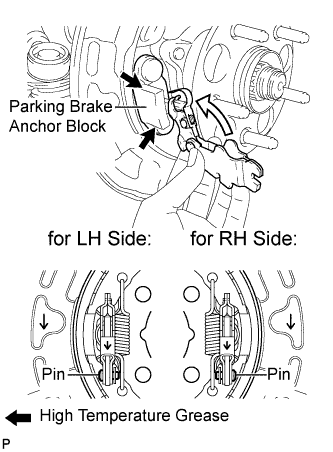
Apply a thin layer of high temperature grease to the area where the parking brake shoe lever contacts the parking brake anchor block.
-
Install the parking brake shoe lever sub-assembly to the parking brake cable assembly.
Note
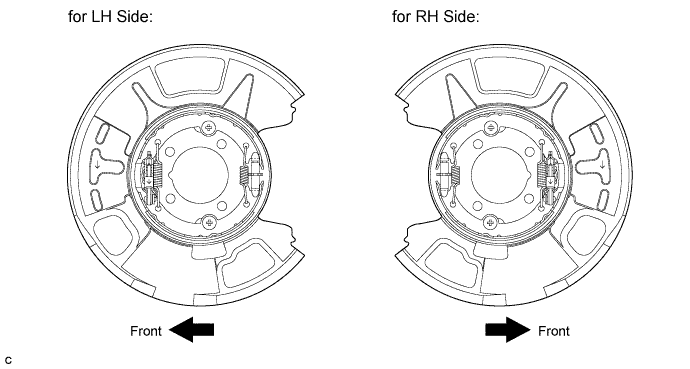
Be sure to install the parking brake shoe lever sub-assembly in the correct position and direction because the direction of the pin is different between the LH side and RH side.
-
-
INSTALL NO. 2 PARKING BRAKE SHOE ASSEMBLY
-
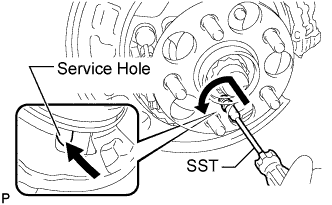
Using SST, install the No. 2 parking brake shoe assembly with the No. 1 shoe hold down spring cup, No. 1 compression spring and No. 1 shoe hold down spring pin.
- SST
- 09718-00011
Tech Tips
Use the service hole to retain the No. 1 shoe hold down spring pin with your finger.
-
-
INSTALL NO. 1 PARKING BRAKE SHOE ASSEMBLY
-
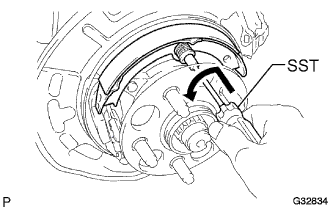
Using SST, install the No. 1 parking brake shoe assembly with the No. 1 shoe hold down spring cup, No. 1 compression spring and No. 1 shoe hold down spring pin.
- SST
- 09718-00011
Tech Tips
Use the service hole to retain the No. 1 shoe hold down spring pin.
-
-
INSTALL PARKING BRAKE SHOE ADJUSTING SCREW SET
-
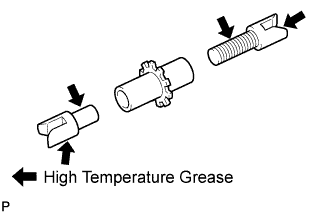
Apply high temperature grease to the threads and all joints of the parking brake shoe adjusting screw set.
-
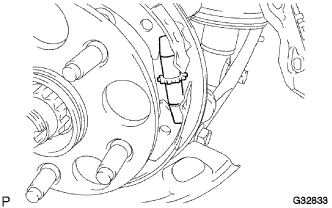
Install the parking brake shoe adjusting screw set.
-
-
INSTALL NO. 1 PARKING BRAKE SHOE RETURN TENSION SPRING
-
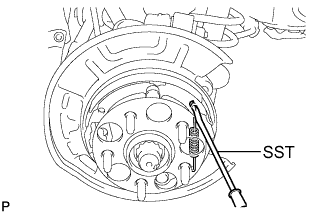
Using SST, install the No. 1 parking brake shoe return tension spring.
- SST
- 09703-30011
-
-
INSTALL NO. 2 PARKING BRAKE SHOE RETURN TENSION SPRING
-
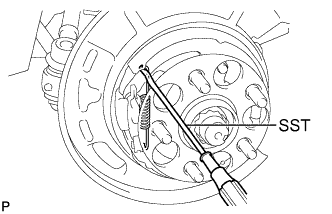
Using SST, install the No. 2 parking brake shoe return spring.
- SST
- 09703-30011
-
-
INSPECT PARKING BRAKE INSTALLATION
-
Make sure that all parts are installed properly. If necessary, reinstall them properly.
-
-
INSTALL REAR SPEED SENSOR
-
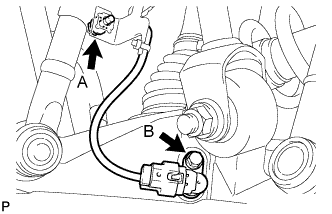
Install the rear speed sensor with the bolt A and bolt B.
- Torque:
- Bolt A
- 6.0 N*m { 61 kgf*cm, 53 in.*lbf }
- Bolt B
- 8.5 N*m { 87 kgf*cm, 75 in.*lbf }
Note
-
Prevent foreign matter from attaching to the sensor tip.
-
Do not twist the rear speed sensor when installing it.
-
-
INSTALL REAR DISC
-
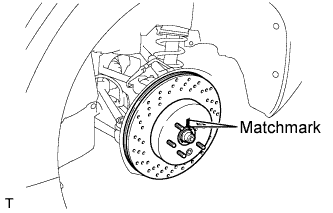
Align matchmarks of the rear disc and rear axle hub, and install the rear disc.
Note
When replacing the disc with a new one, select the installation position where the rear disc has minimal runout.
-
-
INSTALL REAR DISC BRAKE CYLINDER ASSEMBLY
-
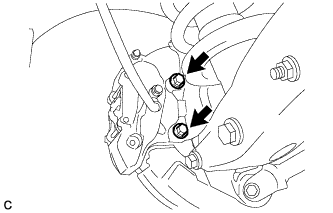
Install the rear disc brake cylinder assembly to the rear axle carrier with the 2 bolts.
- Torque:
- 54 N*m { 551 kgf*cm, 40 ft.*lbf }
Note
-
Do not twist the brake hose.
-
Make sure that the bolts are free from damage and foreign matter.
-
Do not overtighten the bolts.
-
-
INSTALL REAR AXLE SHAFT NUT
-
Clean the threaded parts on the drive shaft and axle hub nut using a non-residue solvent.
Note
-
Be sure to perform this work for a new drive shaft.
-
Keep the threaded parts free of oil and foreign objects.
-
-
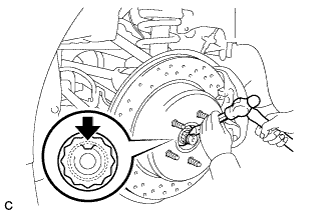
Install a new rear axle shaft nut.
- Torque:
- 290 N*m { 2957 kgf*cm, 214 ft.*lbf }
-
Using a chisel and hammer, stake the rear axle shaft nut.
-
-
STABILIZE SUSPENSION
-
Install the rear wheels.
-
Lower the vehicle to the ground.
-
Bounce the vehicle up and down at the corners to stabilize the rear suspension.
-
Remove the rear wheels.
-
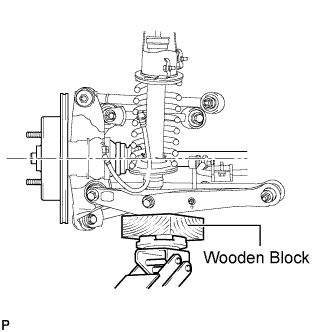
Jack up the axle carrier, with a wooden block placed between the jack and axle carrier, to apply a load to the suspension so that the rear drive shaft assembly becomes level.
-
-
FULLY TIGHTEN TOE CONTROL LINK SUB-ASSEMBLY
-
Fully tighten the nut on the rear suspension member side.
- Torque:
- 50 N*m { 510 kgf*cm, 37 ft.*lbf }
Note
Check that the matchmarks on the rear suspension member and toe adjust plate are aligned.
-
-
FULLY TIGHTEN REAR NO. 1 UPPER CONTROL ARM ASSEMBLY
-
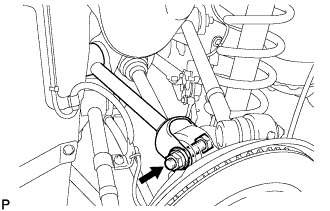
Fully tighten the nut.
- Torque:
- 161 N*m { 1642 kgf*cm, 119 ft.*lbf }
-
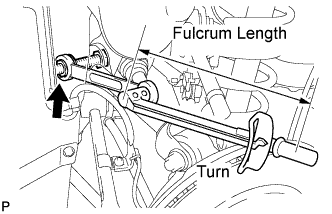
Using a ball joint lock nut wrench (19 mm), fully tighten the nut.
- Torque:
- without the ball joint lock nut wrench (19 mm)
- 161 N*m { 1642 kgf*cm, 119 ft.*lbf }
- with the ball joint lock nut wrench (19 mm)
- 119 N*m { 1214 kgf*cm, 88 ft.*lbf }
Note
-
Use a torque wrench with a fulcrum length of 425 mm (16.73 in.).
-
Use the recommended ball joint lock nut wrench (19 mm).
-
This torque value is effective when the ball joint lock nut wrench (19 mm) is parallel to the torque wrench.
-
-
FULLY TIGHTEN REAR NO. 2 UPPER CONTROL ARM ASSEMBLY
-
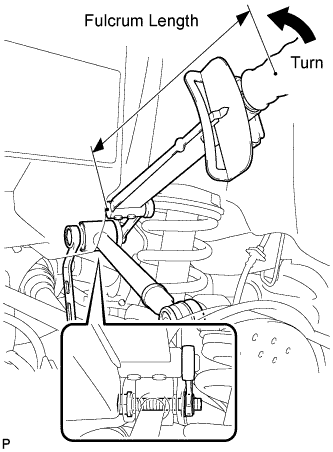
Using a ball joint lock nut wrench (19 mm), fully tighten the nut.
- Torque:
- without the ball joint lock nut wrench (19 mm)
- 145 N*m { 1479 kgf*cm, 107 ft.*lbf }
- with the ball joint lock nut wrench (19 mm)
- 107 N*m { 1091 kgf*cm, 79 ft.*lbf }
Note
-
Use a torque wrench with a fulcrum length of 425 mm (16.73 in.).
-
Use the recommended ball joint lock nut wrench (19 mm).
-
This torque value is effective when the ball joint lock nut wrench (19 mm) is parallel to the torque wrench.
-
-
FULLY TIGHTEN REAR NO. 1 SUSPENSION ARM ASSEMBLY
-
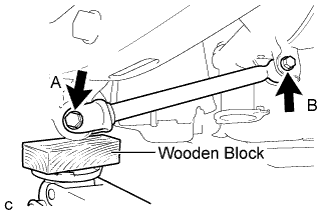
Fully tighten the 2 bolts.
- Torque:
- Bolt A
- 95 N*m { 969 kgf*cm, 70 ft.*lbf }
- Bolt B
- 100 N*m { 1020 kgf*cm, 74 ft.*lbf }
Note
Turn the bolts while holding the nuts.
-
-
FULLY TIGHTEN REAR NO. 2 SUSPENSION ARM ASSEMBLY
-
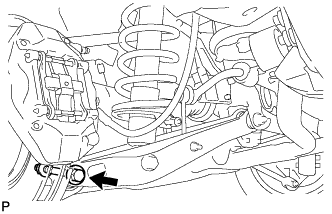
Fully tighten the rear No. 2 suspension arm assembly with the bolt and nut.
- Torque:
- 161 N*m { 1642 kgf*cm, 119 ft.*lbf }
Note
Turn the bolt while holding the nut.
-
-
INSTALL REAR SUSPENSION MEMBER BRACE
-
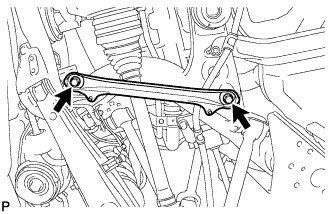
Install the rear suspension member brace with the 2 bolts.
- Torque:
- 50 N*m { 510 kgf*cm, 37 ft.*lbf }
-
-
INSTALL NO. 2 DIFFERENTIAL SUPPORT PROTECTOR
-
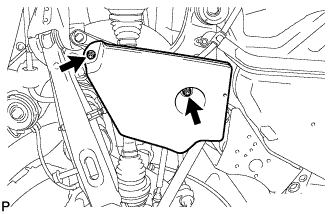
Install the No. 2 differential support protector with the 2 nuts.
-
-
INSTALL REAR WHEEL
- Torque:
- 103 N*m { 1050 kgf*cm, 76 ft.*lbf }
-
BED IN PARKING BRAKE SHOES TO DISCS
-
Drive the vehicle at about 50 km/h (31 mph) on a safe, level and dry road.
-
Depress the parking brake pedal with 150 N (15 kgf, 34 lbf) of force.
-
Drive the vehicle for about 400 m (0.25 mile) in this condition.
-
Repeat this procedure 3 times.
Note
Set a 5-minute interval between each procedure to prevent the brake assembly from overheating.
-
-
ADJUST PARKING BRAKE SHOE CLEARANCE AND PARKING BRAKE PEDAL
-
Remove the No. 1 instrument panel under cover sub-assembly Click here.
-
Completely release the parking brake pedal.
-
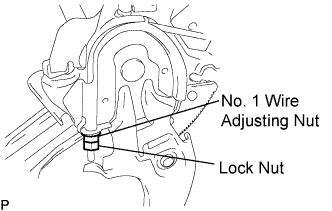
Loosen the lock nut and No. 1 wire adjusting nut to completely release the parking brake cable.
-
Remove the rear wheel.
-
Temporarily install the hub nuts.
-
Remove the shoe adjusting hole plug.
-
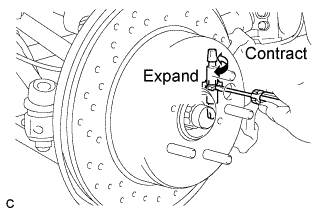
Turn the shoe adjuster and expand the shoe until the disc locks.
-
Turn and contract the shoe adjuster until the disc can rotate smoothly.
Standard Return 7 notches. -
Check that there is no brake drag against the shoe.
-
Install the shoe adjusting hole plug.
-
Turn the adjusting nut until the parking brake pedal travel is corrected to be within the specified range.
Parking brake pedal travel 7 to 9 notches at 300 N (31 kgf, 67.5 lbf) -
Using a wrench or an equivalent tool, hold the adjusting nut and tighten the lock nut.
- Torque:
- 7.0 N*m { 71 kgf*cm, 62 in.*lbf }
-
Operate the parking brake pedal 3 to 4 times, and check the parking brake pedal travel.
-
Check that there is no brake drag against the shoe.
-
Remove the hub nuts.
-
Install the rear wheel.
- Torque:
- 103 N*m { 1050 kgf*cm, 76 ft.*lbf }
-
Install the No. 1 instrument panel under cover sub-assembly Click here.
-
-
INSPECT AND ADJUST REAR WHEEL ALIGNMENT
-
INSPECT BRAKE WARNING LIGHT
-
When operating the parking brake pedal, check that the brake warning light illuminates.
Standard The brake warning light always illuminates at the first click.
-
-
CHECK ABS SPEED SENSOR SIGNAL
Tech Tips