REAR DRIVE SHAFT ASSEMBLY REMOVAL

Tech Tips
-
Use the same procedure for the RH side and LH side.
-
The procedure listed below is for the LH side.
-
REMOVE REAR WHEEL
-
REMOVE REAR AXLE SHAFT NUT
-
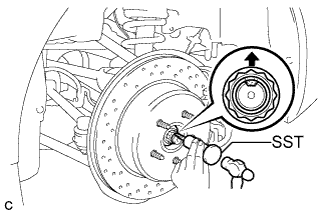
Using SST and a hammer, release the staked part of the axle shaft nut.
- SST
- 09930-00010
Note
Release the staked part of the nut completely, otherwise the threads of the drive shaft may be damaged.
-
While depressing the brake pedal, remove the axle shaft nut.
-
-
SEPARATE REAR DISC BRAKE CYLINDER ASSEMBLY
-
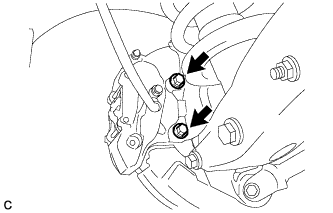
Remove the 2 bolts and separate the rear disc brake cylinder assembly.
Note
Hang the caliper with wire or equivalent.
-
-
REMOVE REAR DISC
-
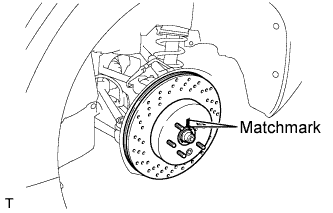
Put matchmarks on the rear disc and rear axle hub.
-
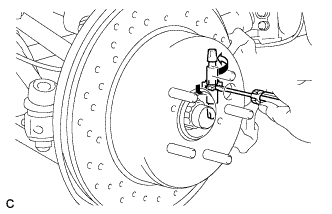
Release the parking brake and remove the rear disc.
Tech Tips
If the disc cannot be removed easily, turn and press firmly the shoe adjuster until the wheel comes free.
-
-
REMOVE NO. 2 DIFFERENTIAL SUPPORT PROTECTOR
-
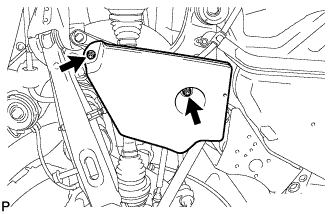
Remove the 2 nuts and No. 2 differential support protector.
-
-
REMOVE REAR SUSPENSION MEMBER BRACE
-
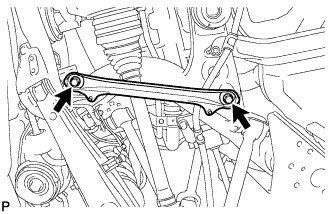
Remove the 2 bolts and rear suspension member brace.
-
-
SEPARATE REAR SPEED SENSOR
-
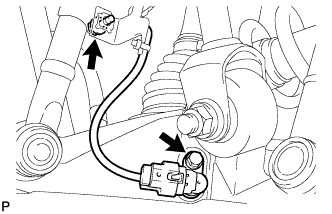
Remove the 2 bolts and separate the rear speed sensor.
Note
Prevent foreign matter from attaching to the sensor tip.
-
-
REMOVE NO. 2 PARKING BRAKE SHOE RETURN TENSION SPRING
-
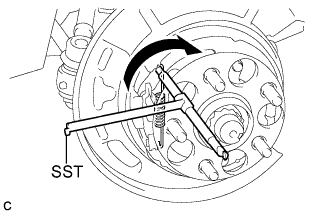
Using SST, remove the No. 2 parking brake shoe return tension spring.
- SST
- 09703-30011
-
-
REMOVE NO. 1 PARKING BRAKE SHOE RETURN TENSION SPRING
-
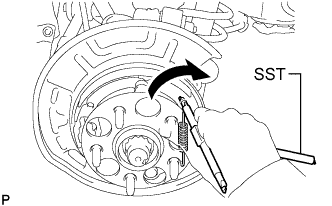
Using SST, remove the No. 1 parking brake shoe return tension spring.
- SST
- 09703-30011
-
-
REMOVE PARKING BRAKE SHOE ADJUSTING SCREW SET
-
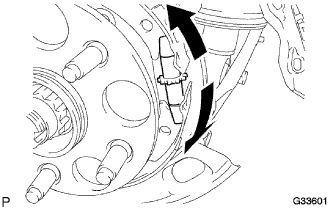
Spread apart the No. 1 parking brake shoe assembly and No. 2 parking brake shoe assembly, and remove the parking brake shoe adjusting screw set.
-
-
REMOVE NO. 1 PARKING BRAKE SHOE ASSEMBLY
-
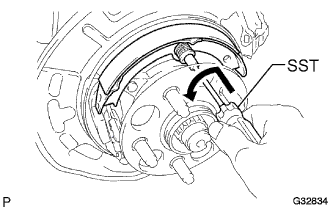
Using SST, remove the No. 1 shoe hold down spring cup, No. 1 compression spring and No. 1 shoe hold down spring pin.
- SST
- 09718-00011
-
Remove the No. 1 parking brake shoe assembly.
Tech Tips
Use the service hole to retain the No. 1 shoe hold down spring pin.
-
-
REMOVE NO. 2 PARKING BRAKE SHOE ASSEMBLY
-
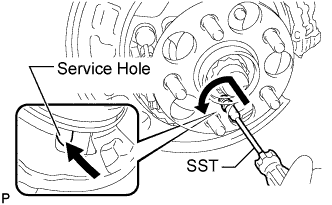
Using SST, remove the No. 1 shoe hold down spring cup, No. 1 compression spring and No. 1 shoe hold down spring pin.
- SST
- 09718-00011
-
Remove the No. 2 parking brake shoe assembly.
Tech Tips
Use the service hole to retain the No. 1 shoe hold down spring pin with your finger.
-
-
REMOVE PARKING BRAKE SHOE LEVER SUB-ASSEMBLY
-
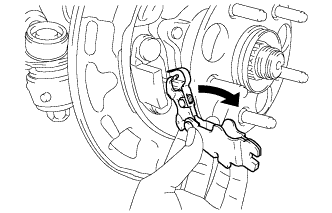
Remove the parking brake shoe lever sub-assembly.
-
-
SEPARATE NO. 3 PARKING BRAKE CABLE ASSEMBLY
-
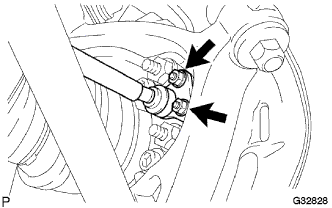
Remove the 2 nuts, and separate the parking brake cable assembly from the rear axle carrier sub-assembly.
-
-
REMOVE REAR NO. 1 SUSPENSION ARM ASSEMBLY
-
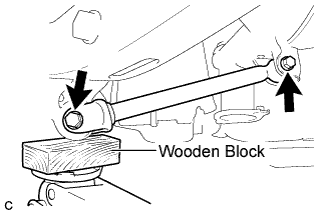
Support the rear axle assembly with a jack using a wooden block.
-
Remove the 2 bolts, 2 nuts, and rear No. 1 suspension arm assembly.
Note
Turn the bolts while holding the nuts.
-
-
REMOVE REAR NO. 2 UPPER CONTROL ARM ASSEMBLY
-
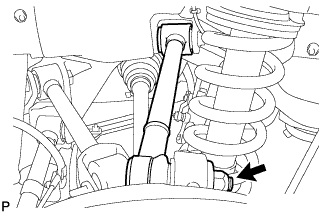
Remove the nut.
-
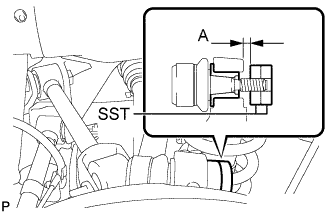
Install 2 spacers (SST spacer B) as shown in the illustration.
- SST
- 09960-20010 ( 09961-02060, 09961-02060 )
A 1 mm (0.0394 in.) or more Note
As SST may be damaged, make sure that the clearance between the arm and spacers is less than 1 mm (0.0394 in.).
-
Using SST, separate the rear No. 2 upper control arm assembly from the rear axle carrier sub-assembly as shown in the illustration.
- SST
- 09960-20010 ( 09961-02010, 09961-02060, 09961-02060 )
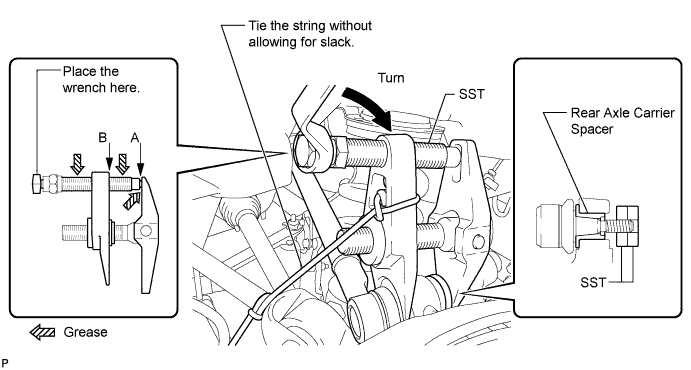
CAUTION:
Apply grease to the threads and end of the SST bolt.
Note
-
Install SST so that A and B are parallel.
-
Be sure to place a wrench on the part indicated in the illustration.
-
Make sure that SST is securely positioned on the rear axle carrier.
-
Use caution not to damage the rear axle carrier sub-assembly because it is made of aluminum and may be damaged easily.
-
Do not damage the ball joint dust cover.
-
Make sure that the SST string is securely tied to the vehicle.
If the rear axle carrier spacer has come off, replace the rear axle carrier sub-assembly with a new one.
-
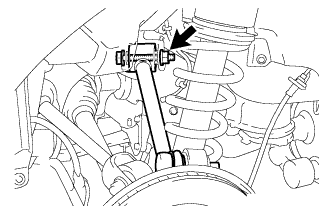
Remove the bolt, nut, washer, and rear No. 2 upper control arm assembly.
Tech Tips
Push the rear axle assembly downward.
-
-
SEPARATE TOE CONTROL LINK SUB-ASSEMBLY
-
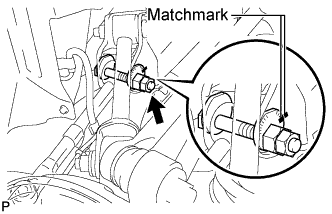
Put matchmarks on the toe adjust plate and rear suspension member.
-
Loosen the nut.
Tech Tips
Do not remove the nut, the toe adjust plate and the toe control link sub-assembly.
-
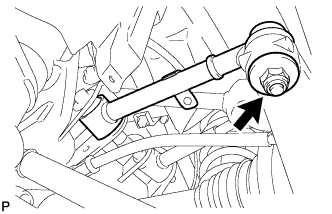
Remove the nut.
-
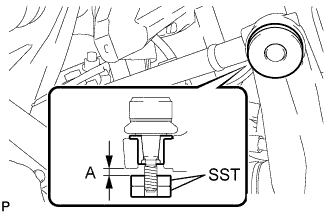
Install 2 spacers (SST spacer B) as shown in the illustration.
- SST
- 09960-20010 ( 09961-02060, 09961-02060 )
A 1 mm (0.0394 in.) or more Note
As SST may be damaged, make sure that the clearance between the arm and spacers is less than 1 mm (0.0394 in.).
-
Using SST, separate the toe control link sub-assembly from the rear axle carrier sub-assembly as shown in the illustration.
- SST
- 09960-20010 ( 09961-02010, 09961-02060, 09961-02060 )
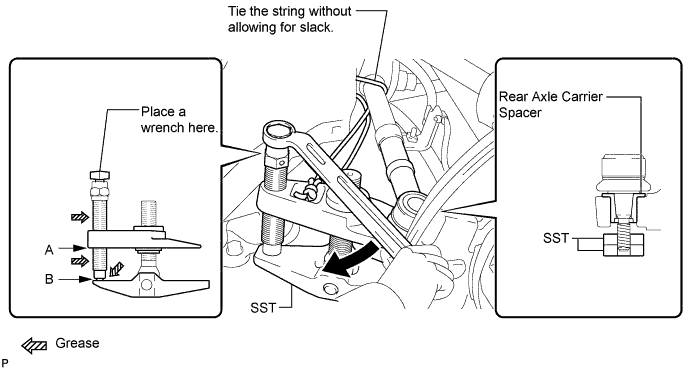
CAUTION:
Apply grease to the threads and end of the SST bolt.
Note
-
Install SST so that A and B are parallel.
-
Be sure to place a wrench on the part indicated in the illustration.
-
Make sure that SST is securely positioned on the rear axle carrier spacer.
-
Be careful not to damage the rear axle carrier sub-assembly because it is made of aluminum and may be damaged easily.
-
Do not damage the ball joint dust cover.
-
Make sure that the SST string is securely tied to the vehicle.
If the rear axle carrier spacer has come off, replace the rear axle carrier sub-assembly with a new one.
-
-
REMOVE REAR NO. 1 UPPER CONTROL ARM ASSEMBLY
-
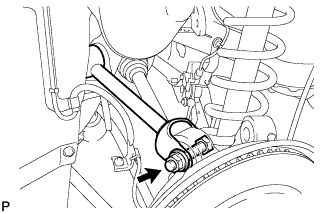
Remove the bolt, nut, and washer, and separate the rear No. 1 upper control arm assembly from the rear axle carrier.
-
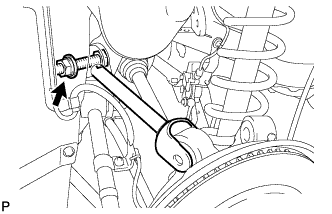
Remove the bolt, nut, washer, and rear No. 1 upper control arm assembly.
-
-
REMOVE REAR NO. 2 SUSPENSION ARM ASSEMBLY
-
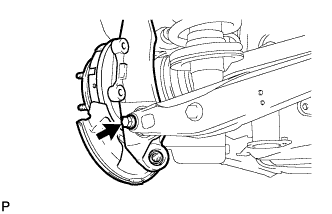
Remove the bolt and nut, and separate the rear No. 2 suspension arm assembly from the rear axle carrier sub-assembly.
Note
Turn the bolt while holding the nut.
-
-
REMOVE REAR AXLE ASSEMBLY
-
Using a plastic hammer, separate the rear drive shaft assembly from the rear axle assembly.
Note
-
Be careful not to damage the boot.
-
Use wire or equivalent to prevent the rear drive shaft assembly from hanging down.
-
-
-
REMOVE REAR DRIVE SHAFT ASSEMBLY
-
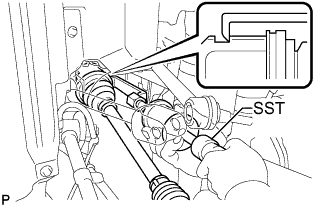
Using SST, remove the rear drive shaft assembly.
- SST
- 09520-01010
- 09520-24010 ( 09520-32040 )
Note
-
Be careful not to damage the oil seal, inboard joint boot or drive shaft dust cover.
-
Be careful not to drop the drive shaft assembly.
-
-
REMOVE HOLE SNAP RING
-
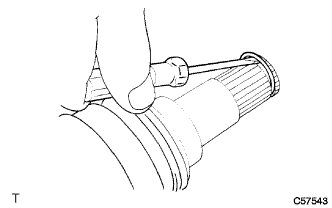
Using a screwdriver, remove the hole snap ring.
-
-
INSPECT REAR DRIVE SHAFT ASSEMBLY
-
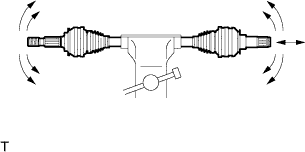
Check that there is no excessive play in the outboard joint.
-
Check that the inboard joint slides smoothly in the thrust direction.
-
Check that there is no excessive play in the radial directions of the inboard joint.
-
Check the boot for damage.
-
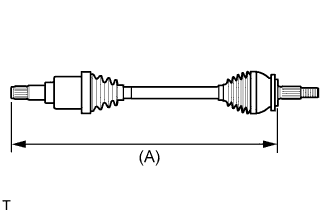
Check whether the drive shaft dimensions are within the following specifications.
Tech Tips
The following table shows dimension (A) of the drive shaft.
Reference Dimension (A) LH 675.9 mm (26.61 in.) RH 721.9 mm (28.42 in.)
-