MILLIMETER WAVE RADAR SENSOR ADJUSTMENT

-
ADJUST MILLIMETER WAVE RADAR SENSOR ASSEMBLY
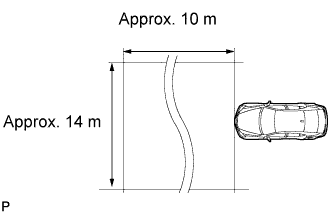
CAUTION:
Exposure to radio frequency emissions is hazardous to your health. It is hazardous to your health to be within 20 cm (7.87 in.) of the device's radio frequency aperture.
Note
-
This device complies with FCC radio frequency emission regulations.
-
Perform measurements on a level surface.
-
Make sure that no large pieces of metal are within a 10 m (32.81 ft.) x 14 m (45.93 ft.) area in front of the vehicle. If possible, the surrounding area should also be free of large metal objects.
-
Before adjusting the radar beam axis, prepare the vehicle as follows:
-
Check the tire pressure and adjust it if necessary.
-
Remove all excess weight from the vehicle (luggage, heavy objects, etc.).
-
-
Check and adjust the vertical direction of the radar sensor.
-
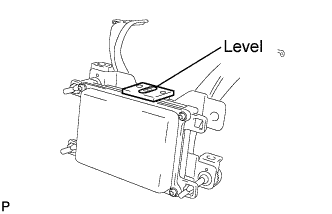
Remove dust, oil, and foreign matter from the radar sensor's level rack.
-
Set a level on the radar sensor's level rack.
-
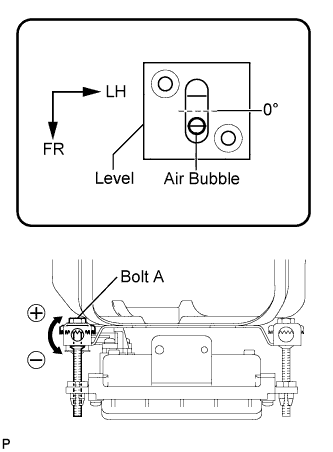
Check that the air bubble is within the red frame on the level.
OK The air bubble is within the red frame on the level. If the bubble is not within the red frame, use a screwdriver to adjust bolt A until the air bubble is within the red frame. Tech Tips
-
The adjustable range within the red frame on the level is +/- 0.2°.
-
The target angle is +0.2° (upward angle of 0.2°).
Result Adjustment Direction Adjustment Procedure Adjustment Angle Vertical adjustment
-
Left direction: Turn bolt A to negative (-) side
-
Right direction: Turn bolt A to positive (+) side
For every 8.4 rotations of adjustment bolt, sensor moves about 1° -
-
-
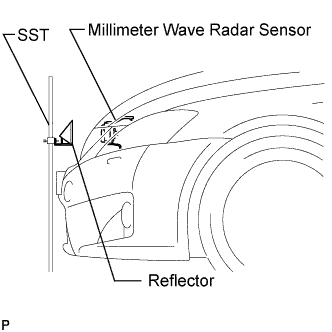
Adjust the reflector height.
-
Adjust the reflector so that the center of the SST reflector is the same height as the millimeter wave radar sensor.
- SST
- 09870-60000 ( 09870-60010 )
- 09870-60040
Tech Tips
Prepare a 10 m (32.81 ft.) string, a string with a sharp-pointed weight (plumb bob), and a 5 m (16.41 ft.) tape measure.
-
-
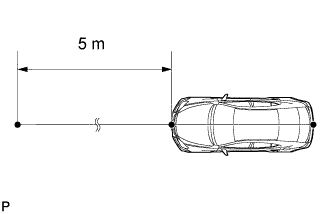
Place the reflector.
-
Hang the string (with a weight) from the center of the vehicle rear emblem. Mark the vehicle rear center point on the ground. Repeat the same procedure for the front of the vehicle.
-
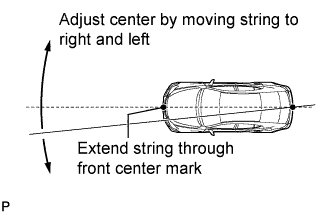
Set one end of the 10 m (32.82 ft.) string on the vehicle rear center point. Run the string over the vehicle front center point to a position 5 m (16.41 ft.) beyond the vehicle front center point, as shown in the illustration. Mark the 5 m (16.41 ft.) position.
-
Using the tape measure, measure 12 mm (0.47 in.) to the left of the 5 m (16.41 ft.) position. Place the reflector at that position.
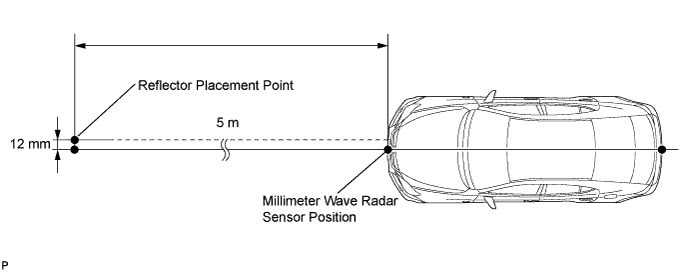
Note
Perform the operation as precisely as possible.
-
-
Adjust the radar beam axis.
-
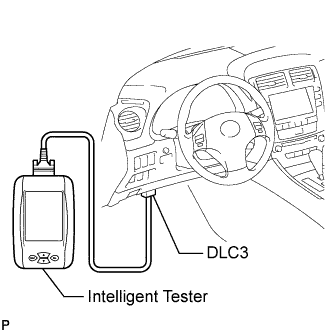
Connect the intelligent tester to the DLC3.
-
Turn the engine switch on (IG).
-
Turn the intelligent tester main switch on, and turn the cruise control main switch on.
Tech Tips
If an error message is displayed on the screen, initialization of the distance control ECU may not be completed. Initialize the distance control ECU Click here.
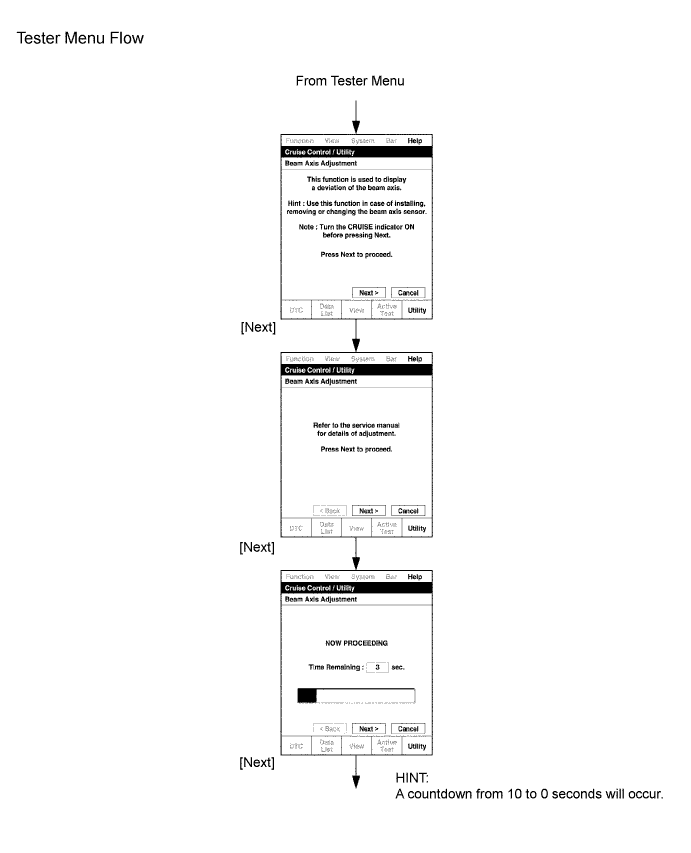
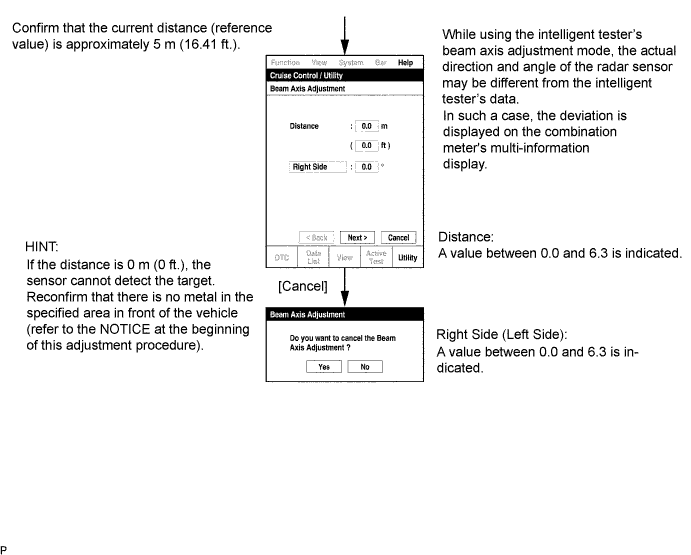
-
-
Check and adjust the horizontal direction of the radar sensor.
-
Check that the divergence of the radar beam axis is 0° .
Standard 0° (Both right and left) If the divergence is not as specified, use a screwdriver to adjust bolt B until the divergence of the radar beam axis is 0°. -
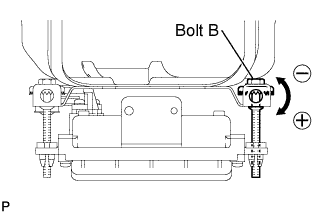
Based on the measured divergence of the beam axis, turn and adjust bolt B for horizontal adjustment of the millimeter wave radar sensor using a screwdriver.
Result Adjustment Direction Adjustment Procedure Adjustment Angle Horizontal adjustment
-
Right direction: Turn bolt B to positive (+) side
-
Left direction: Turn bolt B to negative (-) side
For every 18.6 rotations of adjustment bolt, sensor moves about 1° Tech Tips
-
If "LEFT SIDE: 1.0°" is displayed, the divergence is 1.0° to the left . Turn bolt B approximately 3 turns to the negative (-) side.
-
If the value does not change to 0°, it is possible that the sensor is aiming at something different. Reconfirm that there are no reflective materials in the surrounding area.
-
-
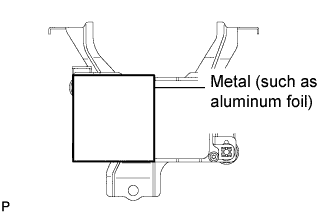
Reset the radar sensor's driving learning values. Prepare a piece of metal that can block radio waves, such as aluminum foil. Cover the radar sensor's right half with the aluminum foil for 10 seconds.
Note
Be sure to keep the reflector in place and make sure that there is nothing between the sensor's left half and the reflector.
Tech Tips
When the reset is completed, the buzzer sounds for 10 seconds.
-
Disconnect the intelligent tester from the DLC3.
-
-
Recheck and readjust the vertical direction of the radar sensor.
-
Set a level on the radar sensor's level rack.
-
Check that the air bubble is within the red frame on the level.
OK The air bubble is within the red frame on the level. If the bubble is not within the red frame, use a screwdriver to adjust bolt A until the air bubble is within the red frame. Tech Tips
-
The adjustable range within the red frame on the level is +/- 0.2°.
-
The target angle is +0.2° (upward angle of 0.2°).
Result Adjustment Direction Adjustment Procedure Adjustment Angle Vertical adjustment
-
Left direction: Turn bolt A to negative (-) side
-
Right direction: Turn bolt A to positive (+) side
For every 8.4 rotations of adjustment bolt, sensor moves about 1° -
-
-