INJECTOR DRIVER INSTALLATION

-
INSTALL INJECTOR DRIVER
Note
-
Be careful not to drop or strike the injector drivers.
-
The injector drivers are grounded at the bolt and nut. To ensure that they are grounded, remove all oil and foreign matter from the installation areas of the injector drivers and engine before installing the injector drivers.
-
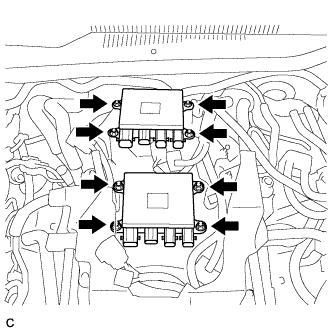
Install the 2 injector drivers to the intake air surge tank assembly with the 8 nuts.
- Torque:
- 7.5 N*m { 76 kgf*cm, 66 in.*lbf }
-
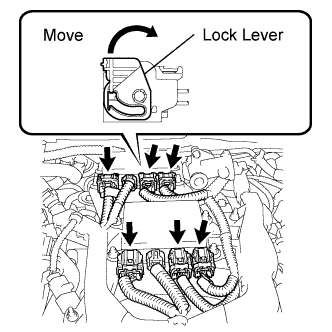
Connect the 8 injector driver connectors.
-
Connect the 6 connectors with wire harness locks and the 2 connectors without wire harness locks to the 2 injector drivers.
Note
Connect the connectors securely.
Tech Tips
Move the lock lever in the direction indicated by the arrow to lock the connectors.
-
-
-
INSTALL V-BANK COVER SUB-ASSEMBLY
-
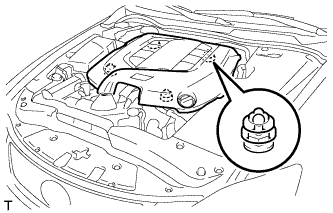
Engage the 4 clips to install the V-bank cover sub-assembly.
Note
-
Be sure to engage the clips securely.
-
Do not apply excessive force or hit the cover to engage the clips. This may cause the cover to break.
-
-
-
CONNECT CABLE TO NEGATIVE BATTERY TERMINAL
Note
When disconnecting the cable, some systems need to be initialized after the cable is reconnected Click here.