REPAIR INSTRUCTION INITIALIZATION
-
PROCEDURES NECESSARY WHEN BATTERY TERMINAL IS DISCONNECTED/RECONNECTED
Necessary Procedure Procedure Detail Effects/Inoperative Functions When Necessary Procedures are not Performed Note Correction of the steering angle neutral point Turn the steering wheel fully to the right, and left. Steering angle neutral point in memory Drive the vehicle at more than 20 km/h (12 mph) for more than 5 minutes on a straight road and with as little traffic congestion as possible. Reset power window regulator motor
-
Turn the engine switch on (IG).
-
Halfway open the power window by pressing the power window switch.
-
Fully pull up the switch until the power window is fully closed and continue to hold the switch for approx. 1 second after the power window is fully closed.
-
AUTO UP / DOWN function
-
Power window operation function
-
Transmitter-linked function
-
Key-linked function
-
Jam protection function
Be sure to reset the power window regulator motors using the power window switch on each door because the motors cannot be reset by remote operation using the multiplex network master switch assembly. Note
It may not be possible to release the steering lock or start the engine when the battery voltage is low. If this occurs, initialization of the steering lock system is required. Click here
-
-
PROCEDURES NECESSARY WHEN ECU OR OTHER PARTS ARE REPLACED
Replacement Part Necessary Procedure Effect / Inoperative Function when Necessary Procedure is not Performed Note ECM
-
Reset memory (Automatic transmission system)
-
Perform road test to allow TCM to learn (Automatic transmission system)
-
Initialize distance control ECU (Dynamic radar cruise control system)
-
Large shift shock
-
The deterioration of fuel efficiency
-
Dynamic radar cruise control system
-
Pre-Crash safety System
- Code registration Engine start See the Service Bulletin for the registration method Engine assembly
-
Reset memory (Automatic transmission system)
-
Perform road test to allow TCM to learn (Automatic transmission system)
-
Large shift shock
-
The deterioration of fuel efficiency
- Distance control ECU Initialize distance control ECU (Dynamic radar cruise control system)
-
Dynamic radar cruise control system
-
Pre-Crash safety System
Do not turn the headlight dimmer switch on at this time because the optical axis automatic adjustment mode has already started Otherwise, the optical axis will be set incorrectly. If the headlight dimmer switch is turned on by mistake, readjust the optical axis. Millimeter wave radar sensor assembly Adjust millimeter wave radar sensor assembly (Dynamic radar cruise control system)
-
Dynamic radar cruise control system
-
Pre-Crash safety System
- Automatic transmission assembly
-
Set transmission compensation code (step 1) (Automatic transmission system) *1
-
Perform road test to allow TCM to learn (Automatic transmission system)
-
Large shift shock
-
The deterioration of fuel efficiency
-
-
Valve body assembly
-
Shift solenoid valve SL1, 2, 3, 4 and 5
Perform road test to allow TCM to learn (Automatic transmission system)
-
Large shift shock
-
The deterioration of fuel efficiency
- TCM (If possible, read the transmission compensation code from the previous TCM)
-
Transfer transmission compensation code (step 2) (Automatic transmission system) *2
-
Perform road test to allow TCM to learn (Automatic transmission system)
-
Large shift shock
-
The deterioration of fuel efficiency
- TCM (If impossible, read the transmission compensation code from the previous TCM)
-
Set transmission compensation code (step 1) (Automatic transmission system) *3
-
Perform road test to allow TCM to learn (Automatic transmission system)
-
Large shift shock
-
The deterioration of fuel efficiency
- Skid control ECU Perform yaw rate and acceleration sensor zero point calibration and store system information (Vehicle Stability Control system)
-
Master caution indicator light illumination
-
VSC warning display of multi-information display
-
ABS warning light illumination
-
VSC disabled or malfunctioning
Perform yaw rate and acceleration sensor zero point calibration and store system information with the engine switch on (IG) (engine stopped).
-
Yaw rate and acceleration sensor
-
Front wheel alignment adjustment
-
Clearing zero point calibration data and system information (Vehicle Stability Control system)
-
Perform yaw rate and acceleration sensor zero point calibration and store system information (Vehicle Stability Control system)
-
Master caution indicator light illumination
-
VSC warning display of multi-information display
-
ABS warning light illumination
-
VSC disabled or malfunctioning
Perform yaw rate and acceleration sensor zero point calibration and store system information with the engine switch on (IG) (engine stopped).
-
Power steering ECU
-
Power steering gear assembly
Rotation angle sensor value initialization and torque sensor zero point calibration (Power steering system)
-
Steering wheel off-center
-
Difference in amount of steering assist between left and right
-
DTC output
-
EPS control
-
-
Certification ECU (smart key ECU assembly)
-
ID code box (immobiliser code ECU)
-
Steering lock ECU
-
Key
Code registration
-
Wireless door lock control system
-
Entry and Start System
-
Engine start
See the Service Bulletin for the registration method Seat belt control ECU Initialization (Pre-Crash safety System) Pre-Crash safety System -
-
Multiplex network master switch assembly
-
Multiplex network switch assembly
-
Wire harness
-
Power window regulator motor
Reset (initialize) power window regulator motor (Power window control system)
-
AUTO UP / DOWN function
-
Power window operation function
-
Transmitter-linked function
-
Key-linked function
-
Jam protection function
Initialization is also necessary if a power window fuse is removed or the wiring harness is disconnected.
-
Sliding roof drive gear (Sliding roof ECU)
-
Sliding roof housing
-
Sliding roof drive cable
Reset sliding roof drive gear sub-assembly (Sliding roof system)
-
AUTO operation
-
Sliding roof operation after engine switch is turned off
-
Jam protection function
-
Transmitter-linked operation function
-
Key-linked operation function (Driver's door only)
-
Entry lock switch-linked function
Necessary when removed and installed (Not necessary when the sliding roof drive gear (sliding roof ECU) is removed and installed together with the sliding roof housing). *1: New automatic transmission's compensation code.
*2: Read the compensation code from the previous TCM, then transfer it to the new TCM.
*3: Set the transmission compensation code of the current automatic transmission.
-
-
RESET MEMORY (Automatic transmission system)
Note
-
Perform Reset Memory (AT initialization) when replacing the engine assembly or ECM.
-
Reset Memory can be performed only with the intelligent tester.
-
Reset Memory cannot be completed by only disconnecting and reconnecting the cable to the negative (-) battery terminal.
Tech Tips
The TCM (ECT) memorizes the vehicle conditions when controlling the automatic transmission assembly and engine assembly.
-
The "Reset Memory" procedure is as follows:
-
Turn the engine switch off.
-
Connect the intelligent tester to the DLC3.
-
Turn the engine switch on (IG).
-
Turn the intelligent tester on.
-
Enter the following menus: Powertrain / ECT / Utility / Reset Memory.
Note
After performing the Reset Memory, be sure to perform the Road Test described previously Click here.
-
-
-
PERFORM ROAD TEST TO ALLOW TCM TO LEARN (Automatic transmission system)
CAUTION:
-
Perform the following procedures while strictly observing all traffic laws and speed limits.
-
Do not accelerate or decelerate rapidly.
-
"Road test" procedure is as follows:
-
Warm up the engine.
-
According to the replaced parts, perform the road test shown below.
Replaced Part Road Test
-
Automatic transmission assembly
-
TCM
-
Valve body assembly
-
Shift solenoid valve SL3
-
Engine assembly
-
ECM
Perform pattern 1, 2 and 3
-
With shift lever in D, after gradually accelerating to 50 km/h (31 mph) or more, gradually decelerate to approx. 30 km/h (19 mph)
Pattern 1:*1
-
When driving at approximately 50 km/h (31 mph) with the D4 range selected, release the accelerator pedal to allow the vehicle to decelerate gradually to approximately 10 km/h (6 mph).
Pattern 2:
-
With shift lever in M and 5th gear selected, accelerate to a speed higher than 50 km/h (31 mph). While gradually decelerating, downshift to 4th gear at approx. 50 km/h (25 mph), to 3rd gear at approx. 40 km/h (25 mph), and to 2nd gear at approx. 30 km/h (19 mph).
Pattern 3:*2
-
Shift solenoid valve SL1
-
Shift solenoid valve SL2
-
Shift solenoid valve SL4
-
Shift solenoid valve SL5
Perform pattern 1 and 3
-
With shift lever in D, after gradually accelerating to 50 km/h (31 mph) or more, gradually decelerate to approx. 30 km/h (19 mph)
Pattern 1:*1
-
With shift lever in M and 5th gear selected, accelerate to a speed higher than 50 km/h (31 mph). While gradually decelerating, downshift to 4th gear at approx. 50 km/h (25 mph), to 3rd gear at approx. 40 km/h (25 mph), and to 2nd gear at approx. 30 km/h (19 mph).
Pattern 3:*2
Tech Tips
-
*1: After gradually accelerating for a distance of approximately 130 m (426.4 ft.) for a period of approximately 15 seconds, gradually decelerate for a distance of approximately 45 m (147.6 ft.) for a period of approximately 5 seconds.
-
*2: Accelerate the vehicle to a speed slightly higher than 50 km/h (31 mph).
Move the shift lever to M and select 5th gear.
Release the accelerator pedal and allow the vehicle to decelerate gradually.
When the vehicle decelerates to approximately 50 km/h (31 mph), downshift to 4th gear.
When the vehicle decelerates to approximately 40 km/h (25 mph), downshift to 3rd gear.
When the vehicle decelerates to approximately 30 km/h (19 mph), downshift to 2nd gear.
-
When decelerating, apply the brakes as necessary to adjust the vehicle speed.
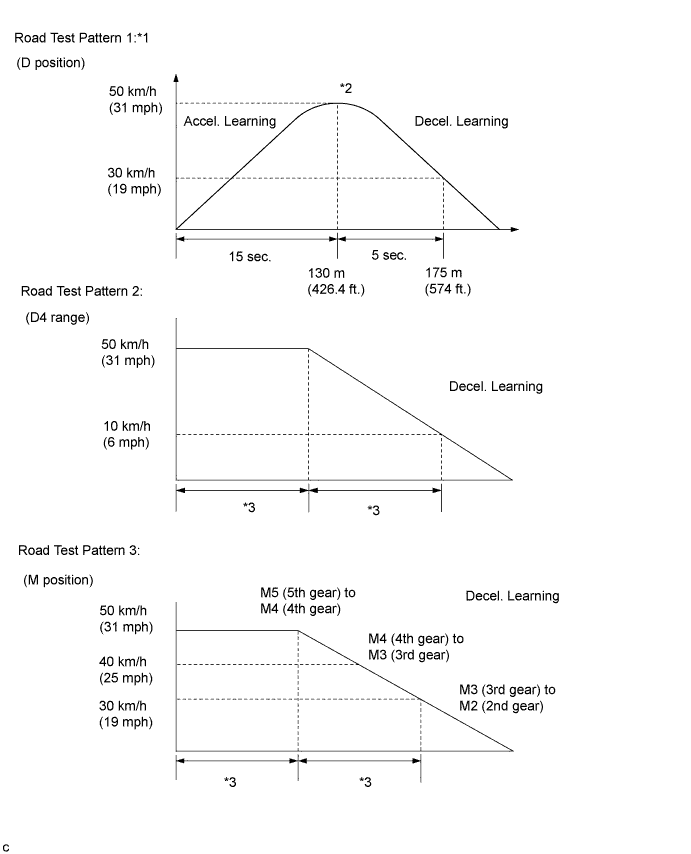
Tech Tips
-
*1: The speed, time and distance values are approximate values.
-
*2: After accelerating, the deceleration does not need to be performed immediately.
-
*3: There is no specified time or distance.
-
-
Repeat the road tests until the shift shock and engine speed overrun (engine speed flare when shifting) reach an acceptable level.
Note
When repeating the acceleration/deceleration cycle of a road test pattern, bring the vehicle to a complete stop before accelerating again.
-
-
-
INITIALIZE DISTANCE CONTROL ECU (Dynamic radar cruise control system)
Note
When replacing the distance control ECU, perform the following procedure so that the ECU can the specification
-
Be sure to perform the following procedure after replacing the distance control ECU.
-
Turn the engine switch on (IG).
-
Turn the cruise control main switch on.
-
With the brake pedal depressed, push the cruise control main switch to RES/ACC 3 times within 3 seconds. Check that the buzzer sounds at this time.
-
-
Perform any of the following to cancel beam axis adjustment mode.
-
Turn the cruise control main switch off.
-
Turn the engine switch off.
-
Accelerate the vehicle to 10 km/h or more.
-
-
-
ADJUST MILLIMETER WAVE RADAR SENSOR ASSEMBLY (Dynamic radar cruise control system)
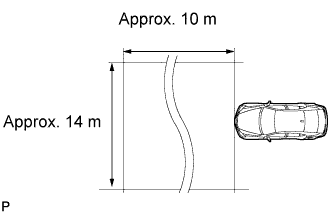
CAUTION:
Exposure to radio frequency emissions is hazardous to your health. It is hazardous to your health to be within 20 cm (7.87 in.) of the device's radio frequency aperture.
Note
-
This device complies with FCC radio frequency emission regulations.
-
Perform measurements on a level surface.
-
Make sure that no large pieces of metal are within a 10 m (32.81 ft.) x 14 m (45.93 ft.) area in front of the vehicle. If possible, the surrounding area should also be free of large metal objects.
-
Before adjusting the radar beam axis, prepare the vehicle as follows:
-
Check the tire pressure and adjust it if necessary.
-
Remove all excess weight from the vehicle (luggage, heavy objects, etc.).
-
-
Check and adjust the vertical direction of the radar sensor.
-
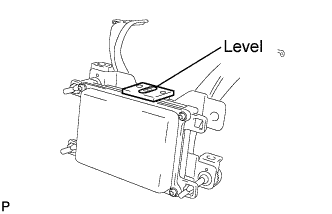
Remove dust, oil, and foreign matter from the radar sensor's level rack.
-
Set a level on the radar sensor's level rack.
-
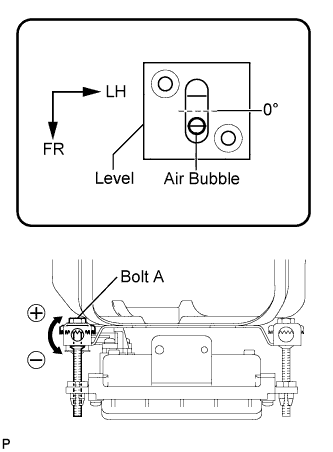
Check that the air bubble is within the red frame on the level.
Tech Tips
-
The adjustable range within the red frame on the level is +/- 0.2°.
-
The target angle is +0.2° (upward angle of 0.2°).
-
-
-
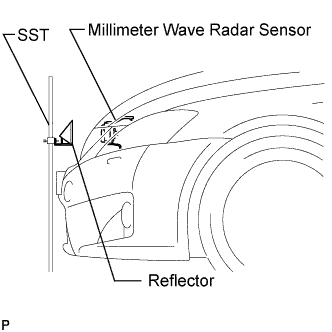
Adjust the reflector height.
-
Adjust the reflector so that the center of the SST reflector is the same height as the millimeter wave radar sensor.
- SST
- 09870-60000 ( 09870-60010 )
- 09870-60040
Tech Tips
Prepare a 10 m (32.81 ft.) string, a string with a sharp-pointed weight (plumb bob), and a 5 m (16.41 ft.) tape measure.
-
-
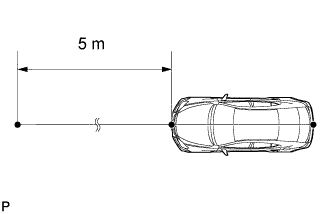
Place the reflector.
-
Hang the string (with a weight) from the center of the vehicle rear emblem. Mark the vehicle rear center point on the ground. Repeat the same procedure for the front of the vehicle.
-
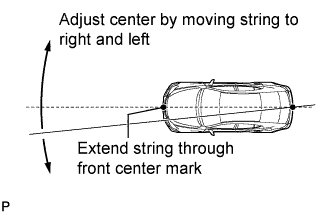
Set one end of the 10 m (32.82 ft.) string on the vehicle rear center point. Run the string over the vehicle front center point to a position 5 m (16.41 ft.) beyond the vehicle front center point, as shown in the illustration. Mark the 5 m (16.41 ft.) position.
-
Using the tape measure, measure 12 mm (0.47 in.) to the left of the 5 m (16.41 ft.) position. Place the reflector at that position.
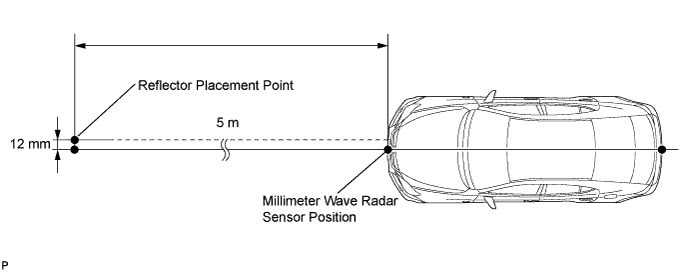
Note
Perform the operation as precisely as possible.
-
-
Adjust the radar beam axis.
-
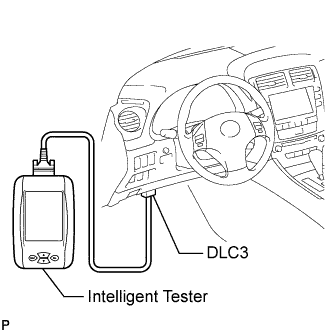
Connect the intelligent tester to the DLC3.
-
Turn the engine switch on (IG).
-
Turn the intelligent tester main switch on, and turn the cruise control main switch on.
Tech Tips
If an error message is displayed on the screen, initialization of the distance control ECU may not be completed. Initialize the distance control ECU Click here.
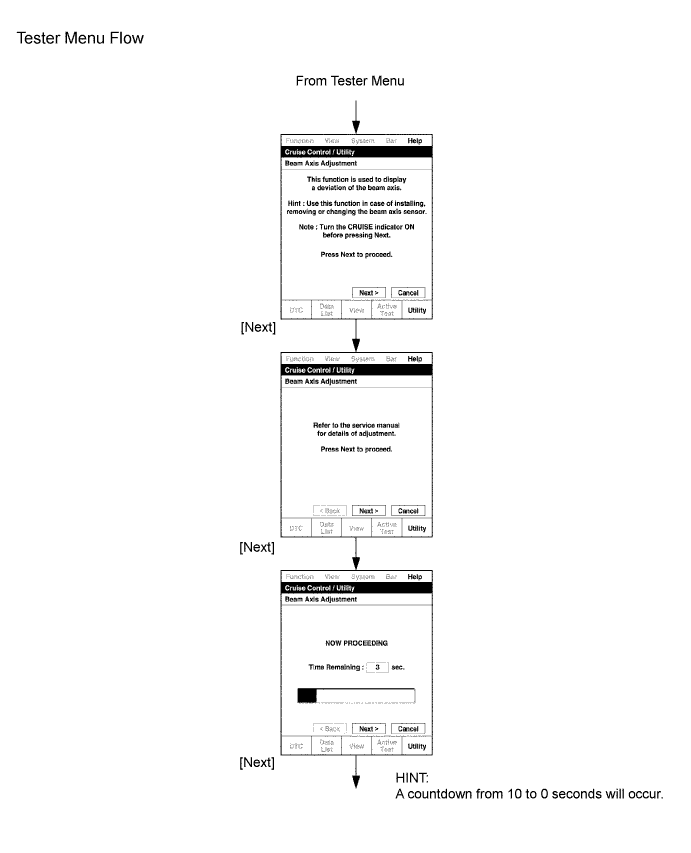
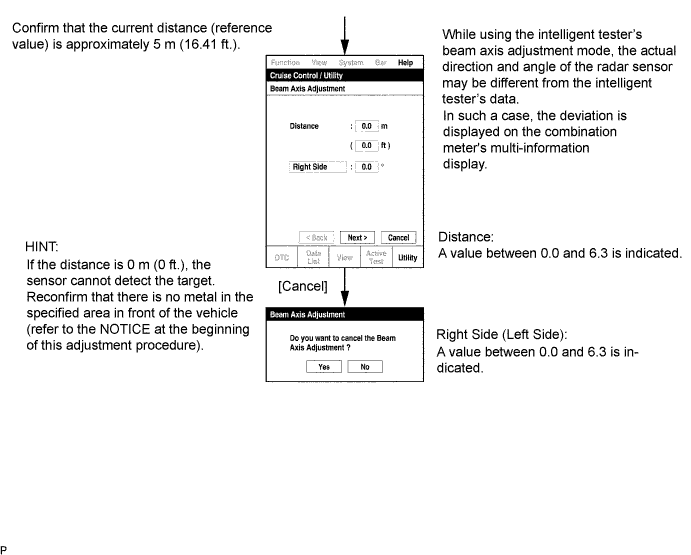
-
-
Check and adjust the horizontal direction of the radar sensor.
-
Check that the divergence of the radar beam axis is 0° .
-
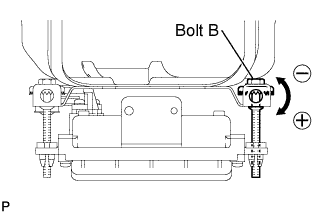
Based on the measured divergence of the beam axis, turn and adjust bolt B for horizontal adjustment of the millimeter wave radar sensor using a screwdriver.
Tech Tips
-
If "LEFT SIDE: 1.0°" is displayed, the divergence is 1.0° to the left . Turn bolt B approximately 3 turns to the negative (-) side.
-
If the value does not change to 0°, it is possible that the sensor is aiming at something different. Reconfirm that there are no reflective materials in the surrounding area.
-
-
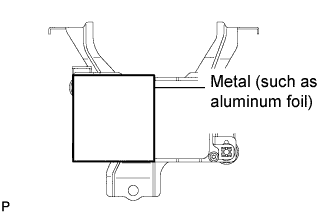
Reset the radar sensor's driving learning values. Prepare a piece of metal that can block radio waves, such as aluminum foil. Cover the radar sensor's right half with the aluminum foil for 10 seconds.
Note
Be sure to keep the reflector in place and make sure that there is nothing between the sensor's left half and the reflector.
Tech Tips
When the reset is completed, the buzzer sounds for 10 seconds.
-
Disconnect the intelligent tester from the DLC3.
-
-
Recheck and readjust the vertical direction of the radar sensor.
-
Set a level on the radar sensor's level rack.
-
Check that the air bubble is within the red frame on the level.
Tech Tips
-
The adjustable range within the red frame on the level is +/- 0.2°.
-
The target angle is +0.2° (upward angle of 0.2°).
-
-
-
-
SET TRANSMISSION COMPENSATION CODE INTO TCM (step 1) (Automatic transmission system)
Note
Transmission compensation codes are unique, 60-digit alphanumeric values printed on a QR label on the transmission. If an incorrect transmission compensation code is input into the TCM, shift shock may occur.
-
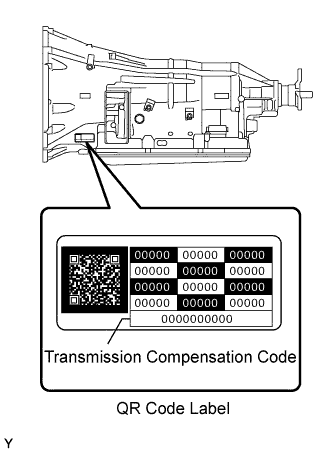
Record the transmission compensation code specified on the QR label.
Tech Tips
The transmission compensation code is a 60-digit alphanumeric value imprinted on the QR label.
-
Move the shift lever to N or P.
-
Connect the intelligent tester to the DLC3.
-
Turn the engine switch on (IG).
Note
Do not start the engine.
-
Turn the intelligent tester on.
-
Enter the following menus: Powertrain / ECT / Utility / A/T Code Registration.
-
Select "Set Compensation Code".
-
Register the compensation code.
-
Manually input the transmission compensation code.
-
Check that the compensation code displayed on the screen is correct by comparing it with the 60-digit alphanumeric value on the QR label.
Note
If an incorrect transmission compensation code is input into the TCM, shift shock will occur.
Tech Tips
Input letters and numbers using the intelligent tester.
-
Set the compensation code to the TCM.
-
-
TRANSFER TRANSMISSION COMPENSATION CODE (step 2) (Automatic transmission system)
Note
Transmission compensation codes are unique, 60-digit alphanumeric values printed on a QR label on the transmission. If an incorrect transmission compensation code is input into the TCM, shift shock may occur.
Tech Tips
The following operation is available for use when a TCM that is being replaced can still transmit its registered transmission compensation code to the intelligent tester.
-
Read the transmission compensation code.
-
Move the shift lever to N or P.
-
Connect the intelligent tester to the DLC3.
-
Turn the engine switch on (IG).
Note
Do not start the engine.
-
Turn the intelligent tester on.
-
Enter the following menus: Powertrain / ECT / Utility / A/T Code Registration.
-
Select "Read Compensation Code".
Note
Do not use the code specified on the transmission QR label even if the transmission compensation code cannot be read using the intelligent tester. The code printed on an in-service transmission may not match its current characteristics. Replace the TCM with a new one and perform a road test to allow the TCM to learn the transmission characteristics.
-
Turn the engine switch off.
-
Replace the TCM.
-
-
Set the transmission compensation code.
-
Turn the engine switch on (IG).
Note
Do not start the engine.
-
Turn the intelligent tester on.
-
Enter the following menus: Powertrain / ECT / Utility / A/T Code Registration.
-
Select "Set Compensation Code".
-
Press "Open".
-
Select "Open".
-
Set the compensation code to the TCM.
-
-
-
PERFORM YAW RATE AND ACCELERATION SENSOR ZERO POINT CALIBRATION AND STORE SYSTEM INFORMATION (Vehicle Stability Control system)
Note
-
Stored system information can not be overwritten unless it is cleared. Clear the stored information and then store new system information.
-
While obtaining the zero points, keep the vehicle stationary and do not vibrate, tilt, move, or shake it. (Do not start the engine.)
-
Be sure to perform this procedure on a level surface (with an inclination of less than 1 degree).
-
Clear the zero point calibration data and system information.
Note
Performing the following procedure will clear the zero points of the yaw rate and acceleration sensor and system information simultaneously.
-
Turn the engine switch off.
-
Check that the steering wheel is centered.
-
Check that the shift lever is in P.
-
Connect the intelligent tester to the DLC3.
-
Turn the engine switch on (IG).
-
Turn the intelligent tester on.
-
Select the skid control ECU to clear the zero point calibration data using the intelligent tester. Enter the following menus: Chassis / ABS/VSC/TRC / Reset Memory.
-
Turn the engine switch off.
Note
-
If the vehicle is driven after the zero point of the yaw rate and acceleration sensor and system information are cleared, DTCs will be stored.
-
If the engine switch is turned on (IG) for more than 15 seconds with the shift lever in P after the zero points of the yaw rate and acceleration sensor have been cleared, only the zero point of the yaw rate sensor will be stored. If the vehicle is driven under these conditions, the skid control ECU will store the zero point calibration for the acceleration sensor as not being completed. The skid control ECU will then also indicate this as a malfunction of the VSC system using the indicator lights and the multi-information display.
-
-
-
Perform the yaw rate and acceleration sensor zero point calibration and store system information.
Note
Performing the following procedure will perform the yaw rate and acceleration sensor zero point calibration and store system information simultaneously.
-
Turn the engine switch off.
-
Check that the steering wheel is centered.
-
Check that the shift lever is in P.
Note
-
DTCs C1210 (Zero Point Calibration of Yaw Rate Sensor Undone) and C1336 (Zero Point Calibration of Acceleration Sensor Undone) will be recorded if the shift lever is not in P.
-
If a DTC is stored that indicates zero point calibration is incomplete, repeat the procedure starting at the step for clearing the zero point calibration data and system information.
-
-
Connect the intelligent tester to the DLC3.
-
Turn the engine switch on (IG).
-
Turn the intelligent tester on.
-
Switch the skid control ECU to Test Mode using the intelligent tester. Enter the following menus: Chassis / ABS/VSC/TRC / Test Mode.
-
After Test Mode has been entered, keep the vehicle stationary on a level surface for 2 seconds or more.
-
Check that the master caution indicator light comes on for several seconds and then blinks in Test Mode and the VSC test mode message is displayed on the multi-information display.
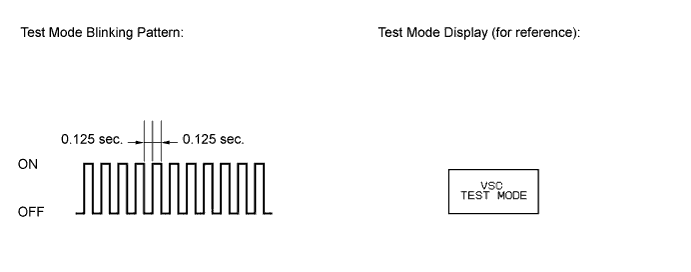
Tech Tips
-
If the master caution indicator light does not blink and/or the VSC test mode message is not displayed on the multi-information display, perform zero point calibration again.
-
Illustrations may differ from the actual screen displayed depending on the specifications of the vehicle and customized settings.
-
The zero point calibration is performed only once after the system enters Test Mode.
-
Calibration cannot be performed again until the stored data is cleared.
-
-
Turn the engine switch off and disconnect the intelligent tester.
-
-
-
CLEAR THE ZERO POINT CALIBRATION DATA AND SYSTEM INFORMATION (Vehicle Stability Control system)
-
Clear the zero point calibration data and system information.
Note
Performing the following procedure will clear the zero points of the yaw rate and acceleration sensor and system information simultaneously.
-
Turn the engine switch off.
-
Check that the steering wheel is centered.
-
Check that the shift lever is in P.
-
Connect the intelligent tester to the DLC3.
-
Turn the engine switch on (IG).
-
Turn the intelligent tester on.
-
Select the skid control ECU to clear the zero point calibration data using the intelligent tester. Enter the following menus: Chassis / ABS/VSC/TRC / Reset Memory.
-
Turn the engine switch off.
Note
-
If the vehicle is driven after the zero point of the yaw rate and acceleration sensor and system information are cleared, DTCs will be stored.
-
If the engine switch is turned on (IG) for more than 15 seconds with the shift lever in P after the zero points of the yaw rate and acceleration sensor have been cleared, only the zero point of the yaw rate sensor will be stored. If the vehicle is driven under these conditions, the skid control ECU will store the zero point calibration for the acceleration sensor as not being completed. The skid control ECU will then also indicate this as a malfunction of the VSC system using the indicator lights and the multi-information display.
-
-
-
-
ROTATION ANGLE SENSOR VALUE INITIALIZATION AND TORQUE SENSOR ZERO POINT CALIBRATION (Power steering system)
Note
Clear the rotation angle sensor calibration value, initialize the rotation angle sensor value, and calibrate the torque sensor zero point if any of the following has occurred:
-
The power steering ECU assembly has been replaced.
-
The power steering gear assembly has been replaced.
-
Steering effort differs between left and right.
-
Inspection before calibration
-
Turn the engine switch off.
-
Connect the intelligent tester to the DLC3.
-
Turn the engine switch on (IG).
-
Turn the intelligent tester on.
-
Check the IG power supply voltage on the intelligent tester. Enter the following menus: Chassis / EMPS / Data List.
EMPS Tester Display Measurement Item/Range Normal Condition Diagnostic Note IG Power Supply ECU power source voltage/
Min.: 0 V
Max.: 20.1531 V
11 to 14 V Engine switch on (IG) Note
If the IG power supply voltage is less than 11 V, calibration cannot be performed. In this case, charge or replace the battery, and then perform calibration.
-
-
Rotation angle sensor calibration value clear, rotation angle sensor value initialization, and torque sensor zero point calibration.
Note
-
If DTC C1516 (Torque Sensor Zero Point Adjustment Incomplete) is stored, the torque sensor zero point cannot be calibrated. Clear the DTC before starting calibration.
-
If DTC C1526 (Rotation Angle Sensor Initialization Incomplete) is stored, the rotation angle sensor value cannot be initialized. Clear the DTC before starting initialization.
-
Turn the engine switch off.
-
Connect the intelligent tester to the DLC3.
-
Turn the engine switch on (IG).
-
Turn the intelligent tester on.
-
Follow the procedures on the intelligent tester to clear the rotation angle sensor calibration value, initialize the rotation angle sensor value, and calibrate the torque sensor zero point. Enter the following menus: Chassis / EMPS / Utility / Torque Sensor Adjustment.
Note
-
When initializing the rotation angle sensor value, observe the following to stabilize sensor voltage:
After turning the engine switch on (IG), wait for at least 2.5 seconds before turning the steering wheel. Do not turn the steering wheel quickly.
-
The steering wheel will vibrate during torque sensor zero point calibration. Do not touch the steering wheel while it is vibrating or for 2 seconds after it stops.
-
-
-
-
INITIALIZATION (Pre-crash safety system) (Precautions for Seat Belt Control ECU Replacement)
The seat belt control ECU operates the pre-crash safety system based on the stored data that informs that the vehicle is LHD or RHD model. LHD or RHD refers to the seating position of the driver, not which side of the road the vehicle is driven on.
Therefore, when replacing the seat belt control ECU, it is necessary to store the information about whether the vehicle is a LHD or RHD model. This can be performed by following these steps:
-
Turn the engine switch on (IG).
-
The PCS warning light comes on for at least 3 seconds after turning the engine switch on (IG). Make sure that the warning light does not remain on.
-
At this time, the seat belt control ECU receives vehicle configuration (LHD/RHD) information from the gateway ECU and stores it in memory.
-
Connect the intelligent tester to the DLC3.
-
Turn the engine switch on (IG).
-
Turn the tester on.
-
Enter the following menus: Body / Pre-Crash / Active Test.
-
Perform Active Test according to the display on the tester.
Pre-Crash Tester Display Test Part Control Range Diagnostic Note Driver Seat Belt Motor Driver's seat belt motor ON: Seat belt motor operate
OFF: Seat belt motor does not operate
Seat belt (driver side) is fastened Passenger Seat Belt Motor Passenger's seat belt motor ON: Seat belt motor operate
OFF: Seat belt motor does not operate
Seat belt (passenger side) is fastened
-
-
-
RESET (INITIALIZE) POWER WINDOW REGULATOR MOTOR (Power window control system)
Note
-
Resetting the power window regulator motor (initializing the pulse sensor) is necessary when the cable is disconnected from the negative (-) battery terminal; when a multiplex network master switch assembly, multiplex network switch assembly, wire harness, power window regulator motor is replaced or removed/installed; or when the fuses are replaced. The auto operation function, jam protection function and remote operation function via the multiplex network master switch assembly do not operate without resetting.
-
Be sure to reset the power window regulator motors using the power window switch on each door because the motors cannot be reset by remote operation using the multiplex network master switch assembly.
-
In order to prevent a large amount of current from flowing in the wires, do not simultaneously reset 2 or more power window regulator motors.
-
If the power window switch is continuously operated for a long time, the power window regulator motor will stop so that no additional load will be applied to the motor. Continuing to operate the switch even after the motor has stopped will cause the switch to blink while restricting the auto up/down function and the remote up/down function. If this happens, reset the motor again after several minutes have passed.
-
When disconnecting the cable from the negative (-) battery terminal, initialize the following system after the cable is reconnected.
-
Turn the engine switch on (IG).
-
Halfway open the power window by pressing the power window switch.
-
Fully pull up the switch until the power window is fully closed and continue to hold the switch for approx. 1 second after the power window is fully closed.
-
Check that the auto up/down function operates normally.
If the auto up/down function operates normally, reset operations have been completed at this time. If not normal, follow the steps below.
-
Disconnect the cable from the negative (-) battery terminal for 10 seconds.
-
Connect the cable from the negative (-) battery terminal.
-
Turn the engine switch on (IG).
-
Halfway open the power window by pressing the power window switch.
-
If the auto up/down function operates normally, reset operations have been completed at this time.
If not normal, follow the steps below.
-
Turn the engine switch on (IG).
-
Halfway open the power window by pressing the power window switch.
-
Fully pull up the switch until the power window is fully closed and continue to hold the switch for approx. 12 seconds after the power window is fully closed.
-
Check that the auto up/down function operates normally.
-
-
-
INITIALIZING SLIDING ROOF DRIVE GEAR SUB-ASSEMBLY (Sliding roof system)
Note
After the sliding roof drive gear is replaced, the pulse sensor of the sliding roof drive gear needs to be initialized. If a initializing is not executed, the sliding roof cannot be tilted or controlled by turning the switch to position [2] to [8].
-
Turn the engine switch on (IG).
-
Press and hold the sliding roof push switch until the following operations are completed:
-
The sliding roof moves to the tilt fully open position and remains for 1 second.
-
Tilt down operation starts. After the roof is fully closed, it starts sliding to open.
-
After the roof slides to the fully open operation, the operation stops and then the roof closes to the fully closed position.
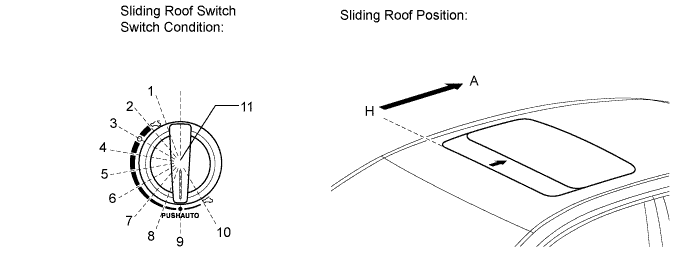
Switch Condition Sliding Roof Position [1] Over stroke position [2] Slide fully open position [A] [3] Slide stop position [B] (Comfort stop position) [4] Slide stop position [C] [5] Slide stop position [D] [6] Slide stop position [E] [7] Slide stop position [F] [8] Slide stop position [G] [9] Fully closed position [H] [10] Tilt fully open position [11] Fully closed → comfort stop position
Open position → fully closed
-
-
Check that the operation works normally with auto operation.
Note
-
If the battery voltage changes during initialization, the sliding roof ECU may not be initialized normally.
-
Do not apply excessive loads to the vehicle during initialization by performing operations such as locking the doors or cranking the engine.
-
Do not turn the engine switch off during initialization.
-
Do not move the vehicle during initialization.
-
Do not apply strong impacts to the vehicle during initialization by performing operations such as closing the doors forcefully.
-