NAVIGATION SYSTEM (for DVD) Illumination for Panel Switch does not Come on with Tail Switch ON
INSPECTION PROCEDURE
PROCEDURE
-
CHECK VEHICLE SIGNAL (OPERATION CHECK)
-
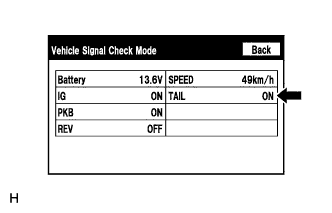
Enter the "Vehicle Signal Check Mode" screen. Refer to Check Vehicle Signal in Operation Check Click here.
-
Check that the display changes between ON and OFF according to the light control switch operation.
OK Light Control Switch Display Tail or On ON Off OFF Tech Tips
This display is updated once per second. As a result, it is normal for the display to lag behind the actual switch operation.
NG 
PROCEED TO NEXT SUSPECTED AREA SHOWN IN PROBLEM SYMPTOMS TABLE Click here
OK 
REPLACE DISPLAY AND NAVIGATION MODULE DISPLAY Click here
-