NAVIGATION SYSTEM Vehicle Speed Signal Circuit between Navigation ECU and Multi-Display
DESCRIPTION
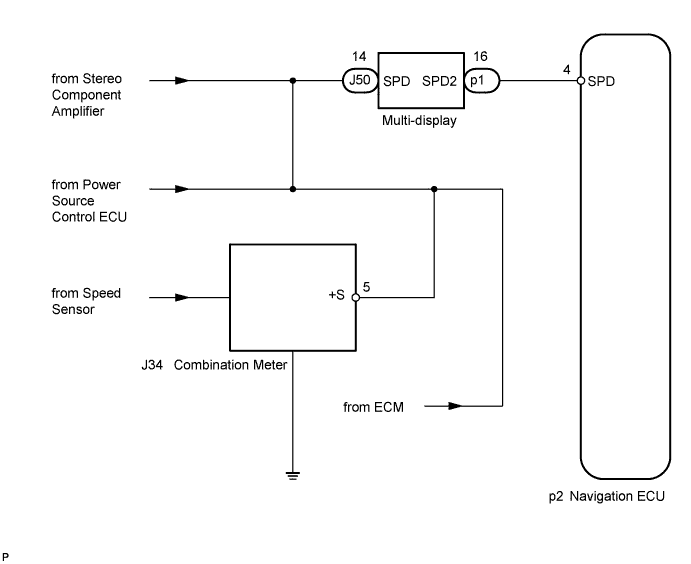
The navigation ECU receives a vehicle speed signal from the multi-display and information from the GPS antenna, and then adjusts vehicle position.
Tech Tips
-
A voltage of 12 V or 5 V is output from each ECU and then input to the combination meter. The signal is changed to a pulse signal at the transistor in the combination meter. Each ECU controls the respective system based on the pulse signal.
-
If a short occurs in an ECU, all systems in the diagram below will not operate normally.
WIRING DIAGRAM
INSPECTION PROCEDURE
PROCEDURE
-
CHECK VEHICLE SIGNAL (DISPLAY CHECK MODE)
-
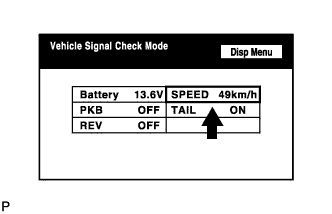
Enter the "Display Check Mode (Vehicle Signal Check Mode)" Click here.
-
While driving, compare the "SPEED" indicator to the reading on the speedometer. Check if these readings are almost the same.
OK The readings are almost the same.
NG 
GO TO "VEHICLE SPEED SIGNAL CIRCUIT BETWEEN MULTI-DISPLAY AND COMBINATION METER" Click here
OK 
-
-
INSPECT NAVIGATION ECU
-
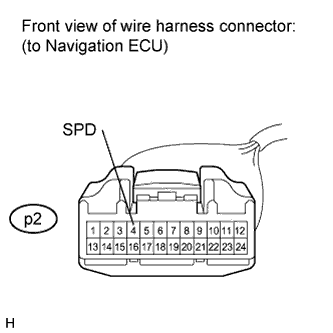
Disconnect the navigation ECU connector.
-
Measure voltage.
-
Jack up either one of the drive wheels.
-
Move the shift lever to N.
-
Turn the engine switch on (IG).
-
Measure the voltage between terminal SPD of the navigation ECU and body ground when the drive wheels are turned slowly.
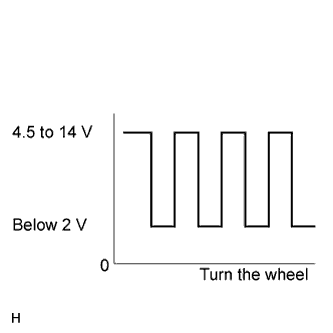
OK Voltage pulses as shown in the illustration.
-
NG 
CHECK HARNESS AND CONNECTOR (NAVIGATION ECU - MULTI-DISPLAY) Click here
OK 
REPLACE NAVIGATION ECU Click here
-
-
CHECK HARNESS AND CONNECTOR (NAVIGATION ECU - MULTI-DISPLAY)
-
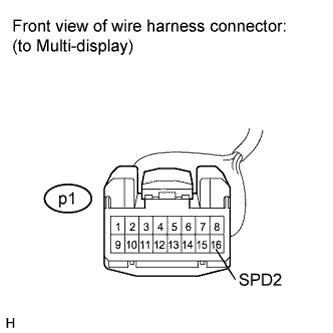
Disconnect the multi-display connector and navigation ECU connector.
-
Measure the resistance according to the value(s) in the table below.
Standard Resistance Tester Connection Condition Specified Condition p1-16 (SPD2) - p2-4 (SPD) Always Below 1 Ω p1-16 (SPD2) - Body ground Always 10 kΩ or higher
NG
REPAIR OR REPLACE HARNESS OR CONNECTOR
OK
REPLACE MULTI-DISPLAY Click here
-