NAVIGATION SYSTEM Cannot Call in a Certain Place
INSPECTION PROCEDURE
PROCEDURE
-
CHECK SURROUNDING CONDITIONS
-
Check if the cellular phone can make calls in a certain place.
OK The cellular phone can make calls.
NG 
END (CELLULAR PHONES CAN ONLY FUNCTION IN CELLULAR SERVICE AREAS)
OK 
-
-
CHECK RECEPTION
-
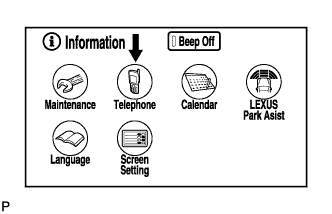
Enter the "Information" screen by pressing the "INFO" switch.
-
Select "Telephone".
-
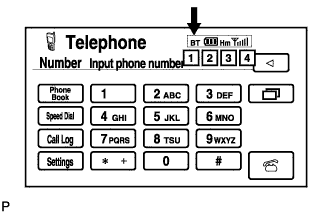
Check the Bluetooth connection indicator (BT indicator).
Result Condition Procedure Yellow color Bring the cellular phone to a location where the BT mark turns blue. Blue color Replace multi-display Click here.
No connection mark is displayed Select a registered cellular phone or register a Bluetooth compatible phone.
NEXT 
END
-