MULTI-MEDIA INTERFACE ECU (for LHD) INSTALLATION

-
INSTALL MULTI-MEDIA INTERFACE ECU
-
INSTALL NO. 1 MULTI-MEDIA INTERFACE BRACKET
-
Install the No. 1 multi-media interface bracket with the 2 screws.
-
-
INSTALL NO. 2 MULTI-MEDIA INTERFACE BRACKET
-
Install the No. 2 multi-media interface bracket with the 2 screws.
-
-
INSTALL MULTI-MEDIA INTERFACE ECU WITH BRACKET
-
Install the multi-media interface ECU with bracket with the 2 screws.
-
Connect each connector.
-
-
INSTALL NO. 2 INSTRUMENT PANEL UNDER COVER SUB-ASSEMBLY
-
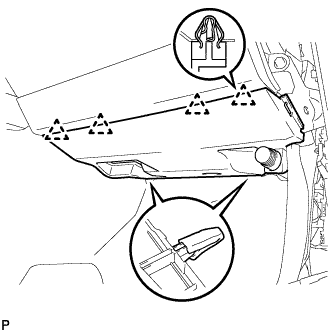
Engage the 4 clips to install the No. 2 instrument panel under cover sub-assembly.
-
-
INSTALL SIDE INSTRUMENT PANEL
-
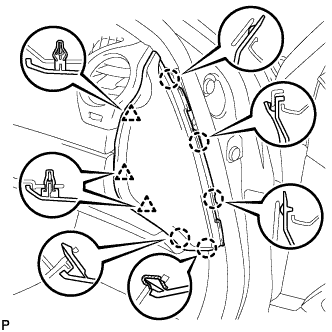
Engage the 5 claws and 3 clips to install the side instrument panel RH.
-
-
INSTALL FRONT DOOR OPENING TRIM COVER
Tech Tips
Use the same procedure for the RH side and LH side Click here.
-
INSTALL FRONT DOOR SCUFF PLATE
Tech Tips
Use the same procedure for the RH side and LH side Click here.