NAVIGATION RECEIVER INSTALLATION

-
PRECAUTION
Note
When installing the hard disk drive, eliminate static electricity by touching the vehicle body to prevent components from being damaged.
-
INSTALL MULTI-MEDIA MODULE RECEIVER ASSEMBLY
-
INSTALL HARD DISK DRIVE
-
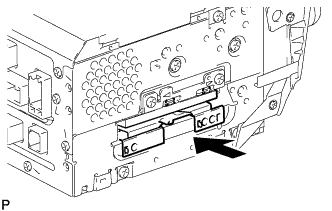
Insert the hard disk drive in the direction shown by the arrow in the illustration to install it.
-
Engage the 2 guides to temporarily install the cover.
-
Install the cover with the 2 screws.
-
-
INSTALL MULTI-DISPLAY ASSEMBLY WITH CLOCK
-
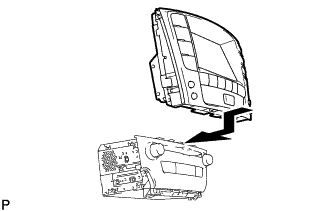
Install the multi-display assembly with clock as shown in the illustration.
-
-
INSTALL NO. 2 RADIO BRACKET
-
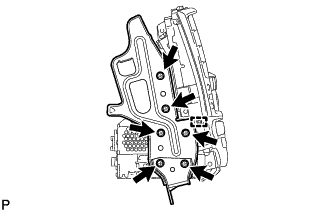
Engage the guide and install the No. 2 radio bracket with the 6 screws.
-
-
INSTALL NO. 1 RADIO BRACKET
-
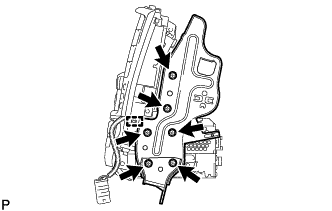
Engage the guide and install the No. 1 radio bracket with the 6 screws.
-
Engage the connector clamp.
-
-
INSTALL MULTI-MEDIA MODULE RECEIVER ASSEMBLY WITH DISPLAY
-
Connect each connector.
-
Install the the multi-media module receiver assembly with display with the 4 bolts.
-
-
INSTALL CENTER LOWER INSTRUMENT CLUSTER FINISH PANEL
-
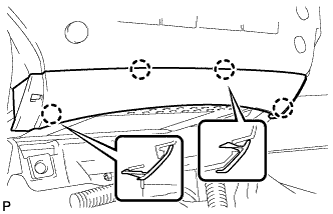
Engage the 4 claws to install the center lower instrument cluster finish panel.
-
-
INSTALL NO. 3 INSTRUMENT PANEL REGISTER ASSEMBLY
-
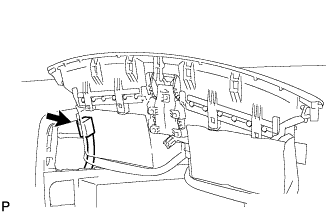
for LHD:
-
Connect the connector.
-
-
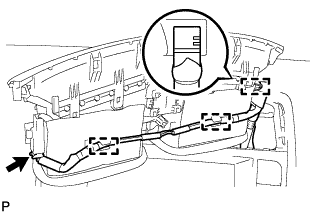
for RHD:
-
Connect the connector.
-
Engage the 3 clamps.
-
-
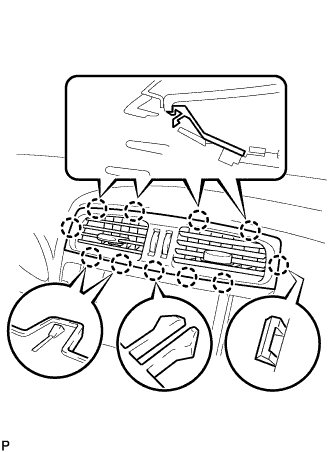
Engage the 11 claws to install the No. 3 instrument panel register assembly.
-
-
INSTALL FRONT ASH RECEPTACLE BOX SUB-ASSEMBLY (w/ Ashtray)
-
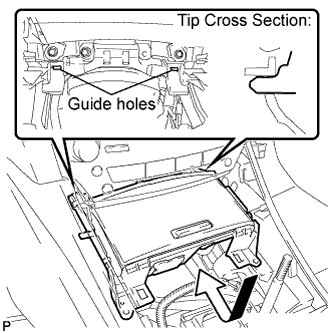
Connect the connectors.
-
Insert the protruding parts of the front ash receptacle box sub-assembly into the 2 guide holes as shown in the illustration.
-
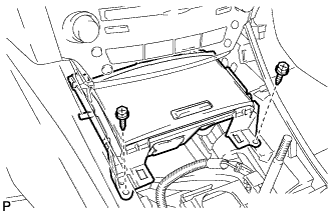
Install the front ash receptacle box sub-assembly with the 2 screws <E>.
-
-
INSTALL INSTRUMENT PANEL BOX ASSEMBLY (w/o Ashtray)
-
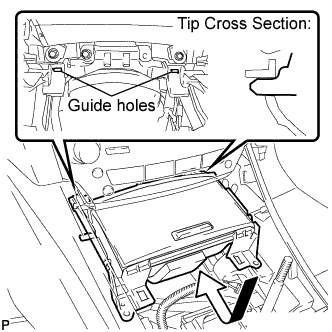
Connect the connectors.
-
Insert the protruding parts of the instrument panel box assembly into 2 guide holes as shown in the illustration.
-
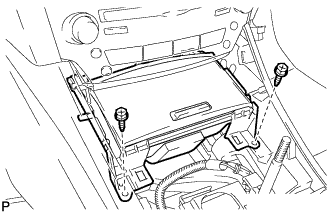
Install the instrument panel box assembly with the 2 screws <E>.
-
-
INSTALL CONSOLE PANEL SUB-ASSEMBLY
-
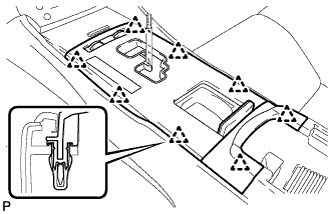
Connect the connectors.
-
Engage the 8 clips to install the console panel sub-assembly.
-
-
INSTALL UPPER NO. 2 CONSOLE PANEL GARNISH
-
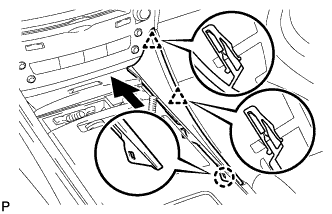
Engage the claw and 2 clips to install the upper No. 2 console panel garnish as shown in the illustration.
-
-
INSTALL UPPER NO. 1 CONSOLE PANEL GARNISH
-
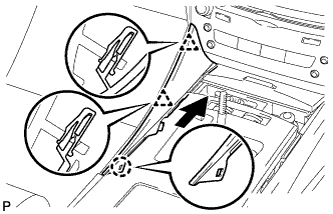
Engage the claw and 2 clips to install the upper No. 1 console panel garnish as shown in the illustration.
-
-
INSTALL SHIFT LEVER KNOB SUB-ASSEMBLY
-
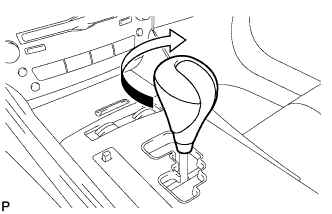
Turn the shift lever knob clockwise and install the shift lever knob sub-assembly.
-
-
CONNECT CABLE TO NEGATIVE BATTERY TERMINAL
Note
When disconnecting the cable, some systems need to be initialized after the cable is reconnected Click here.
-
INSPECT HARD DISK DRIVE
-
PERFORM FOR MULTI-MEDIA MODULE RECEIVER ASSEMBLY INITIALIZATION (w/ Parking Assist Monitor System)
Tech Tips
When replacing the multi-media module receiver assembly, perform parking assist monitor system initialization Click here.
-
ADJUST CLOCK