- Click here
INSTALL FRONT POWER WINDOW REGULATOR MOTOR ASSEMBLY (for Front Door)
Note:The regulator arm must be below the intermediate position when installing the power window regulator motor.
-
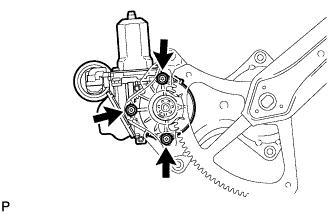
Using a "TORX" driver (T25), install the front power window regulator motor sub-assembly with the 3 screws.
5.4 N*m 55 kgf*cm 48 in.*lbf Tip:A new front window regulator adopts a self-tapping method. The installation position of the regulator will be threaded when the self-tapping screw is inserted.
-
- Click here
INSTALL FRONT DOOR WINDOW REGULATOR SUB-ASSEMBLY (for Front Door)
-
Apply MP grease to the sliding parts of the front door window regulator sub-assembly.
-

Install the temporary bolt to the front door window regulator sub-assembly.
-
Temporarily install the window regulator.
-
Tighten the 6 bolts in the order shown in the illustration to install the front window regulator.
8.0 N*m 82 kgf*cm 71 in.*lbf
-
- Click here
INSTALL FRONT DOOR GLASS SUB-ASSEMBLY (for Front Door)
-
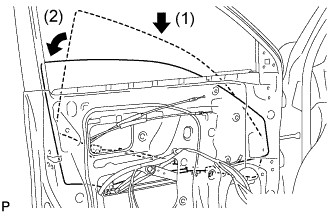
Insert the front door glass sub-assembly into the front door panel along the front door glass run as indicated in the order of the arrows in the illustration.
-
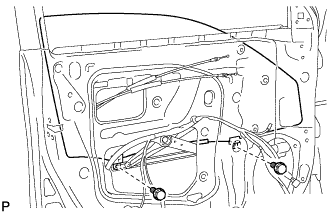
Install the front door glass sub-assembly with the 2 bolts.
8.0 N*m 82 kgf*cm 71 in.*lbf -
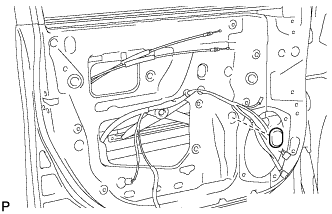
Install the hole plug.
-
- Click here
INSTALL FRONT DOOR SERVICE HOLE COVER (for Front Door)
-
Apply butyl tape to the front door panel.
-
Pass the front door lock remote control cable and rear door inside the locking cable through a new front door service hole cover.
-
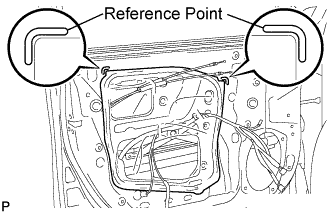
Attach the front door service hole cover according to the reference points on the front door panel.
Note:Securely install the front door service hole cover avoiding wrinkles and air bubbles.
-
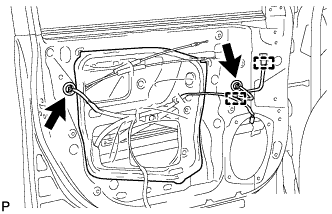
Connect each connector.
-
Engage the 2 clamps.
-
- Click here
INSTALL FRONT DOOR INNER GLASS WEATHERSTRIP (for Front Door)
-
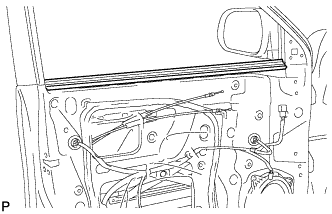
Install the front door inner glass weatherstrip.
-
- Click here
INSTALL FRONT DOOR TRIM BOARD SUB-ASSEMBLY (for Front Door)
-
Connect the connector.
-
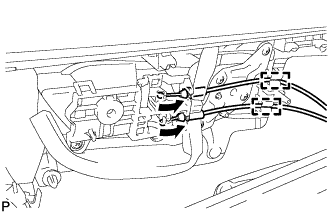
Connect the front door lock remote control cable and front door inside locking cable to the front door inside handle sub-assembly.
-
Engage the 2 clamps.
-
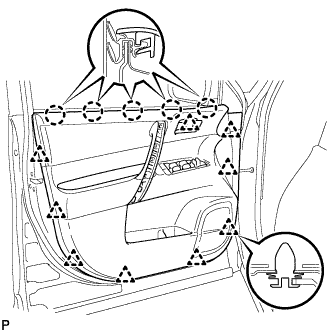
Engage the front door trim board with the 5 claws on the front door inner glass weatherstrip.
-
Engage the 9 clips.
-
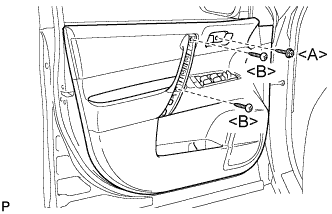
Install the 2 screws <B>.
-
Install the screw <A> and front door trim board to the front door panel.
3.5 N*m 36 kgf*cm 31 in.*lbf
-
- Click here
INSTALL COURTESY LIGHT ASSEMBLY (for Front Door)
-
Connect the connector.
-
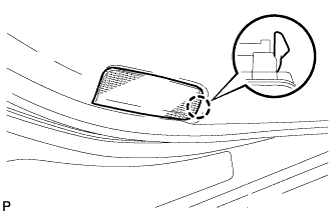
Engage the claw and install the courtesy light assembly.
-
- Click here
INSTALL ASSIST GRIP COVER (for Front Door)
-
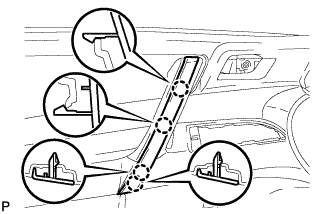
Engage the 4 claws and install the assist grip cover.
-
- Click here
INSTALL FRONT ARMREST UPPER BASE PANEL (for Front Door)
-
Connect the connector.
-
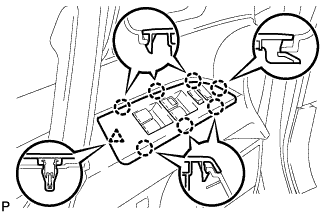
Engage the 7 claws and clip and install the front armrest upper base panel.
-
- Click here
INSTALL FRONT DOOR INSIDE HANDLE BEZEL PLUG (for Front Door)
-
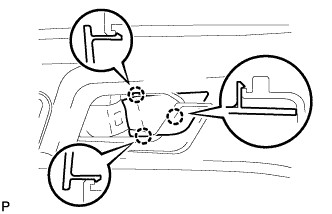
Engage the 3 claws and install the front door inside handle bezel plug.
-
- Click here
INSTALL FRONT DOOR LOWER FRAME BRACKET GARNISH (for Front Door)
-
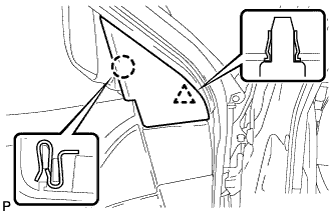
Engage the clip and claw, and install the front door lower frame bracket garnish.
-
- Click here
INSTALL REAR POWER WINDOW REGULATOR MOTOR ASSEMBLY (for Rear Door)
Note:The regulator arm must be below the intermediate position when installing the rear power window regulator motor assembly.
-
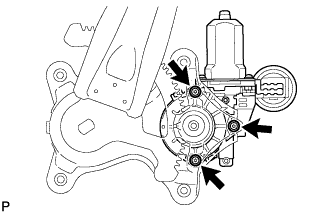
Using a "TORX" driver (T25), install the rear power window regulator motor assembly with the 3 screws.
5.4 N*m 55 kgf*cm 48 in.*lbf Tip:A new rear window regulator uses self-tapping screws to thread new installation holes when the self-tapping screws are inserted.
-

Connect the positive (+) lead of the battery to terminal 1, and the negative (-) lead to terminal 2 of the rear power window regulator motor assembly to move the lift arm to the position shown in the illustration.
-
- Click here
INSTALL REAR DOOR WINDOW REGULATOR SUB-ASSEMBLY (for Rear Door)
-
Apply MP grease to the sliding parts of the rear door window regulator sub-assembly.
-

Install the temporary bolt to the rear door window regulator sub-assembly.
-
Temporarily install the window regulator.
-
Tighten the 4 bolts in the order shown in the illustration to install the rear door window regulator.
8.0 N*m 82 kgf*cm 71 in.*lbf -
Connect the connector.
-
- Click here
INSTALL REAR DOOR GLASS SUB-ASSEMBLY (for Rear Door)
-
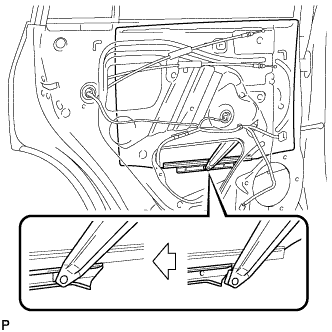
Slide the rear door glass sub-assembly to install it as shown in the illustration.
-
- Click here
INSTALL REAR DOOR QUARTER WINDOW GLASS (for Rear Door)
-
Install the rear door quarter window glass to the rear door quarter window weatherstrip.
-
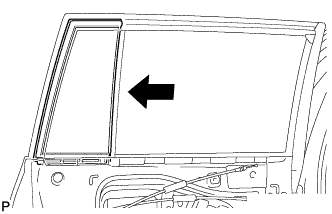
Install the rear door quarter window glass together with the rear door quarter window weatherstrip in the direction indicated by the arrow in the illustration.
-
- Click here
INSTALL REAR DOOR WINDOW DIVISION BAR SUB-ASSEMBLY (for Rear Door)
-
Insert the rear door window division bar sub-assembly from above.
-
Install the rear door glass run to the rear door lower window frame sub-assembly.
-
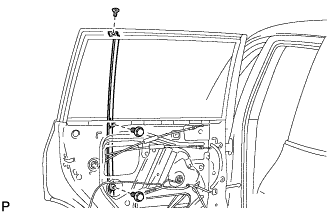
Install the rear door window division bar sub-assembly with the 2 bolts and screw.
-
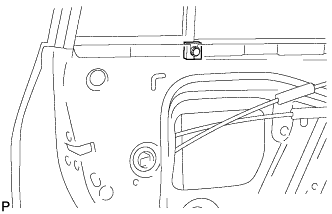
Install the rear door vent seal.
-
- Click here
INSTALL REAR DOOR GLASS RUN (for Rear Door)
-
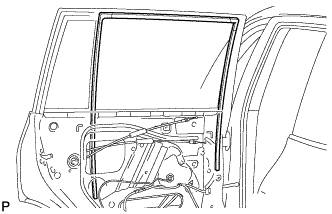
Install the rear door glass run.
-
- Click here
INSTALL REAR DOOR WEATHERSTRIP (for Rear Door)
-
Install the front door weatherstrip.
-
- Click here
INSTALL REAR DOOR SERVICE HOLE COVER (for Rear Door)
-
Apply butyl tape to the rear door panel.
-
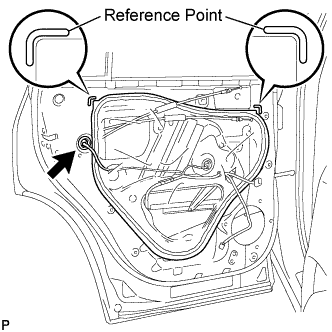
Pass the rear door lock remote control cable, rear door inside locking cable and each connector through a new rear door service hole cover.
-
Attach the rear door service hole cover according to the reference points on the rear door panel.
Note:Securely install the rear door service hole cover avoiding wrinkles and air bubbles.
-
Connect the connector.
-
- Click here
INSTALL REAR DOOR INNER GLASS WEATHERSTRIP (for Rear Door)
-
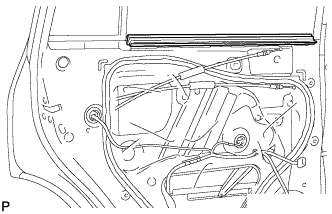
Install the rear door inner glass weatherstrip.
-
- Click here
INSTALL REAR DOOR TRIM BOARD SUB-ASSEMBLY (for Rear Door)
-
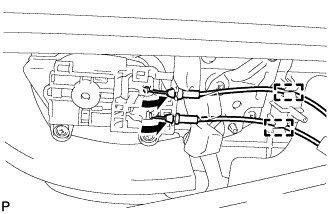
Connect the rear door lock remote control cable and rear door inside locking cable to the rear door inside handle sub-assembly.
-
Engage the 2 clamps.
-
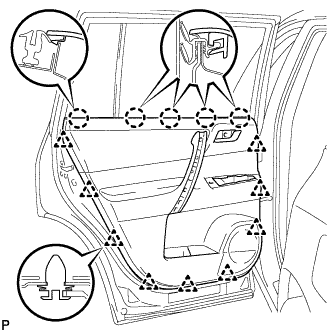
Engage the rear door trim board with the 5 claws on the rear door inner glass weatherstrip.
-
Engage the 9 clips and install the rear door trim board to the rear door panel.
-
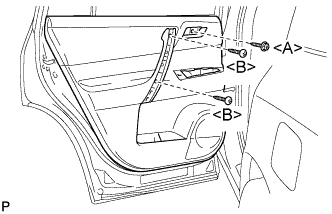
Install the 2 screws <B>.
-
Install the screw <A>.
3.5 N*m 36 kgf*cm 31 in.*lbf
-
- Click here
INSTALL DOOR ASSIST GRIP COVER (for Rear Door)
-
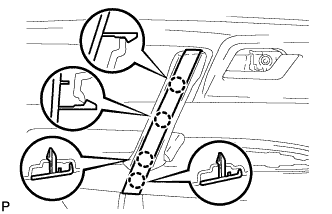
Engage the 4 claws and install the door assist grip cover.
-
- Click here
INSTALL REAR DOOR ARMREST UPPER BASE PANEL (for Rear Door)
-
Connect the connector.
-
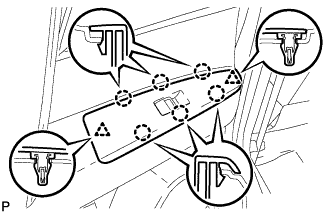
Engage the 6 claws and 2 clips and install the rear door armrest upper base panel.
-
- Click here
INSTALL REAR DOOR INSIDE HANDLE BEZEL PLUG (for Rear Door)
-
Engage the 3 claws to install the rear door inside handle bezel plug.
-
- Click here
CONNECT NEGATIVE BATTERY TERMINAL
Note:When disconnecting the cable, some systems need to be initialized after the cable is reconnected (Click here).
- Click here
INITIALIZE POWER WINDOW CONTROL SYSTEM (for Driver Side)
(See PageClick here)