- Click here
REMOVE CENTER INSTRUMENT PANEL REGISTER ASSEMBLY
-
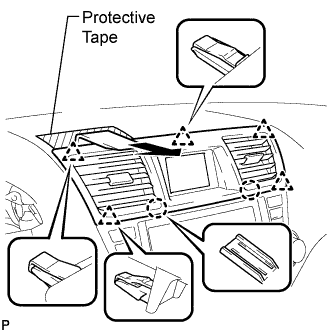
Apply protective tape to the areas shown in the illustration.
-
Using a moulding remover, disengage the 2 claws and 5 clips, and then remove the center instrument panel register assembly as shown in the illustration.
-
- Click here
REMOVE CENTER INSTRUMENT CLUSTER FINISH PANEL ASSEMBLY
-
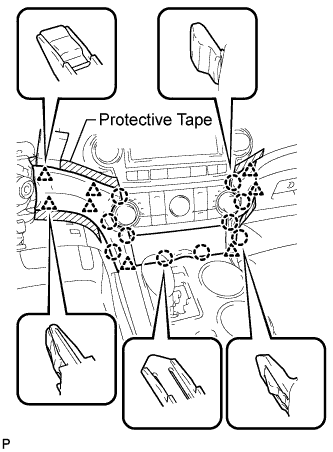
Apply protective tape to the areas shown in the illustration.
-
Using a moulding remover, disengage the 10 claws and 8 clips starting from the upper part of the center instrument cluster finish panel assembly.
Note:Do not pull on the small storage compartment lid. Doing so may cause damage.
-
Disconnect each connector and remove the center instrument cluster finish panel assembly.
-
- Click here
REMOVE HEATER CONTROL AND ACCESSORY ASSEMBLY
-
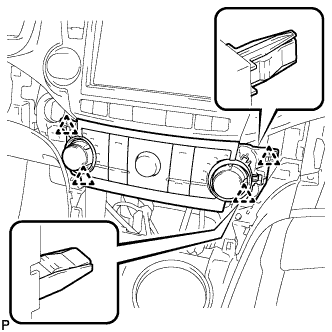
Disengage the 4 clips and remove the heater control and accessory assembly.
-
Disconnect the connector.
-
- Click here
REMOVE RADIO RECEIVER ASSEMBLY WITH BRACKET
-
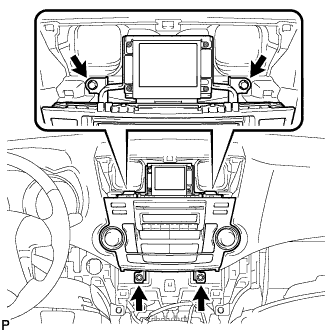
Remove the 4 bolts.
-
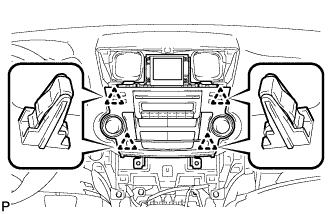
Pull the radio receiver assembly with bracket toward the rear of the vehicle and disengage the 4 clips.
-
Disconnect each connector and remove the radio receiver assembly with bracket.
-
- Click here
REMOVE NO. 1 RADIO BRACKET
-
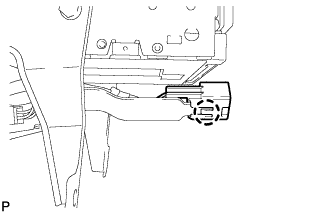
Disengage the claw and remove the connector.
-
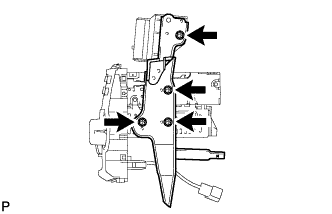
Remove the 4 screws and No. 1 radio bracket.
-
- Click here
REMOVE NO. 2 RADIO BRACKET
-
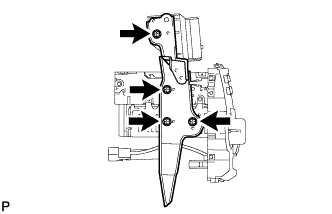
Remove the 4 screws and No. 1 radio bracket.
-
- Click here
REMOVE CLOCK ASSEMBLY