Click here
-
CLOCK ASSEMBLY
-
w/o Multi-information Display:
Item Detail Clock display The time is always displayed. In addition, the clock display dims according to the signal from the combination meter assembly. Adjustment display Keep DISP switch pressed for 1 second or more to enter the clock adjustment mode. -
w/ Multi-information Display:
Item Detail Clock and outside temperature display The clock and outside temperature are always displayed. Adjustment display Keep DISP switch pressed for 1 second or more to enter the clock adjustment and display adjustment modes. Cruise information display Five types of information can be displayed. For detail, refer to the meter/gauge system (Click here).
Warning display Interrupts the multi-information display immediately when a warning occurs. For detail, refer to the meter/gauge system (Click here).
Air conditioning display Interrupts the multi-information display immediately when air conditioning is operated. For detail, refer to the air conditioning system (Click herefor Automatic Air Conditioning System,Click herefor Manual Air Conditioning System).
Rear view monitor display (*) Interrupts the multi-information display immediately when the A/T shift position is moved to R. For detail, refer to the rear view monitor system (Click here).
DTC (Diagnostic Trouble Code) display Displays the DTCs pertaining to the VSC function. For detail, refer to the vehicle stability control system (Click here).
*: w/ Rear View Monitor System
-
-
DISPLAY FLOW CHART (w/ Multi-information Display
-
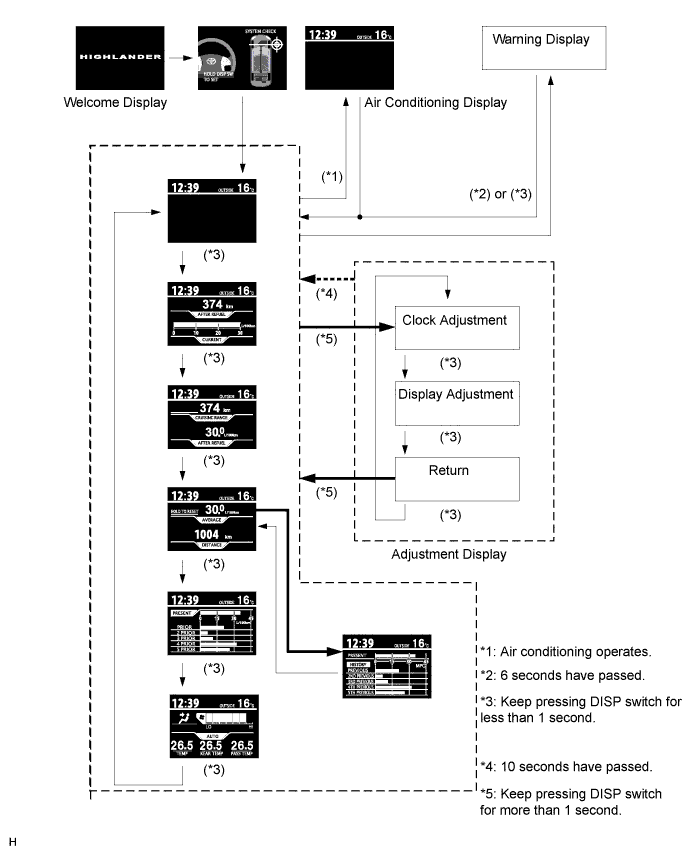
Display flow chart:
Tip:Illustrations may differ from the actual screen displayed depending on the specifications of the vehicle and customized settings.
-