| DTC Code | DTC Name |
|---|---|
| Route cannot be Calculated |
INSPECTION PROCEDURE
PROCEDURE
- Click here
CHECK HARD DISK DRIVE (OPERATION CHECK)
-
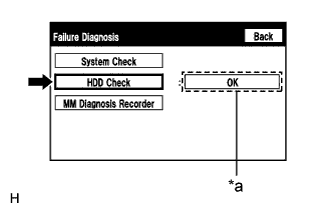
Enter the "Failure Diagnosis" screen. Refer to Check Hard Disk Drive in Operation Check (Click here).
-
Select "HDD Check" and check the result.
OK "OK" is displayed. Tip:After "HDD Check" is selected, it may take a while until the result is displayed.
Table 1. Text in Illustration *a Result
- OKClick here
- NGClick here
-
- Click here
CHECK CABIN
-
Check that condensation is not likely to occur in the cabin, and that the temperature is not high or extremely low in the cabin.
Tip:
-
A humid cabin and a rapid change in temperature may lead to condensation. Condensation in the cabin may cause a short circuit.
-
The navigation system may not operate normally when the temperature is -20°C (-4°F) or lower, or 65°C (149°F) or higher.
OK Condensation is not likely being produced and the temperature is not high or extremely low. -
- OKClick here
- NGClick here
-
- Click here
SET DESTINATION
-
Set another destination and check if the system can calculate the route correctly.
OK Route can be correctly calculated.
- OKClick here
- NGClick here
-
- Click here
NORMAL OPERATION
- Click here
REPLACE NAVIGATION RECEIVER ASSEMBLYClick here
- Click here
SET CABIN TO APPROPRIATE TEMPERATURE
- Click here
PROCEED TO NEXT SUSPECTED AREA SHOWN IN PROBLEM SYMPTOMS TABLEClick here