| DTC Code | DTC Name |
|---|---|
| Vehicle Position Mark Deviates Greatly |
INSPECTION PROCEDURE
PROCEDURE
- Click here
CHECK GPS MARK
-
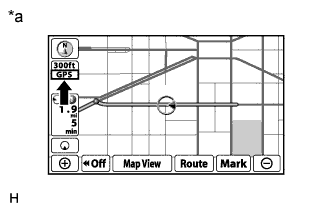
Check that the GPS mark is displayed.
OK GPS mark is displayed. Table 1. Text in Illustration *a Example
- OKClick here
- NGClick here
-
- Click here
GO TO "GPS MARK IS NOT DISPLAYED" IN PROBLEM SYMPTOMS TABLEClick here
- Click here
CHECK VEHICLE SENSOR (OPERATION CHECK)
-
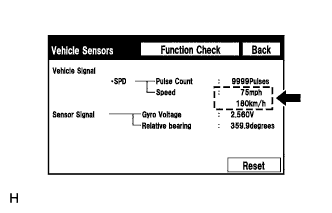
Enter the "Vehicle Sensors" screen. Refer to Check GPS & Vehicle Sensors in Operation Check (Click here).
-
While driving the vehicle, compare the "Speed" indicator to the reading on the speedometer. Check that these readings are almost equal.
OK The readings are almost equal.
- OKClick here
- NGClick here
-
- Click here
CHECK DTC OUTPUTClick here
- Click here
CHECK VEHICLE SIGNAL (OPERATION CHECK)
-
Enter the "Vehicle Signal Check Mode" screen. Refer to Check Vehicle Signal in Operation Check (Click here).
-
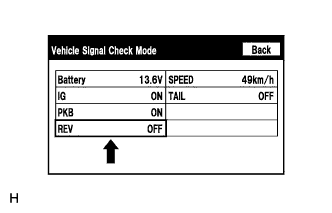
Check that the display changes between ON and OFF according to the shift lever operation.
OK Shift Lever Position Display Except R OFF R ON Tip:The display is updated once per second. It is normal for the display to lag behind the actual switch operation.
- OKClick here
- NGClick here
-
- Click here
GO TO "REVERSE SIGNAL DOES NOT CHANGE IN VEHICLE SIGNAL CHECK MODE" IN PROBLEM SYMPTOMS TABLEClick here
- Click here
PROCEED TO NEXT SUSPECTED AREA SHOWN IN PROBLEM SYMPTOMS TABLEClick here