Click here
| DTC Code | DTC Name |
|---|---|
| Illumination for Panel Switch does not Come on with Tail Switch ON |
Click here
INSPECTION PROCEDURE
Click here
PROCEDURE
- Click here
CHECK VEHICLE SIGNAL (OPERATION CHECK)
-
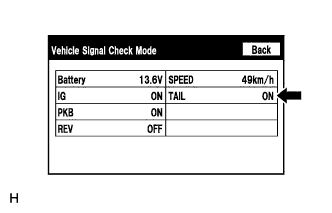
Enter the "Vehicle Signal Check Mode" screen. Refer to Check Vehicle Signal in Operation Check (Click here).
-
Check that the display changes between ON and OFF according to the light control switch operation.
OK Light Control Switch Display tail or on ON off OFF Tip:This display is updated once per second. As a result, it is normal for the display to lag behind the actual switch operation.
- OKClick here
- NGClick here
-
- Click here
REPLACE NAVIGATION RECEIVER ASSEMBLYClick here
- Click here
PROCEED TO NEXT SUSPECTED AREA SHOWN IN PROBLEM SYMPTOMS TABLEClick here