| DTC Code | DTC Name |
|---|---|
| Radio Broadcast cannot be Received or Poor Reception |
INSPECTION PROCEDURE
PROCEDURE
- Click here
CHECK NAVIGATION RECEIVER ASSEMBLY
-
Check the radio automatic station search function.
-
Check the radio automatic station search function by activating it.
Result Result Proceed to Automatic station search function does not stop A Automatic station search function stops on a station B
-
-
- Click here
CHECK OPTIONAL COMPONENTS
-
Check optional components (sun-shade film, telephone antenna, etc.).
-
Check if any optional components that may decrease reception capacity, such as sunshade film or a telephone antenna, are installed.
Result Result Proceed to Optional components are installed A Optional components are not installed B Note:Do not remove optional components without the permission of the customer.
-
-
- Click here
REMOVE OPTIONAL COMPONENTS AND CHECK AGAIN (SEE NOTICE ABOVE)
- Click here
REPLACE NAVIGATION RECEIVER ASSEMBLYClick here
- Click here
CHECK NAVIGATION RECEIVER ASSEMBLY
-
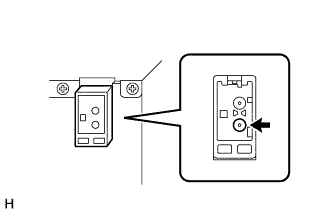
Preparation for check
-
Remove the antenna connector from the navigation receiver assembly.
-
-
Check for noise
-
Turn the ignition switch ACC with the navigation receiver assembly connector connected.
-
Turn the radio on and tune into AM mode.
-
Place a screwdriver, thin wire, or other metal object on the navigation receiver assembly antenna jack and check that noise can be heard from the speaker.
OK Noise occurs.
-
- OKClick here
- NGClick here
-
- Click here
CHECK WINDOW GLASS ANTENNA WIRE
-
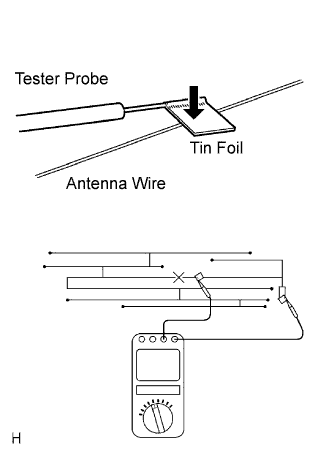
Check for continuity in the antenna.
Tip:Check for continuity at the center of each antenna wire as shown in the illustration.
Note:When cleaning the glass, wipe it in the direction of the wire with a soft dry cloth. Take care not to damage the wire. Do not use detergents or glass cleaners with abrasive ingredients. When measuring resistance, wrap a piece of tin foil around the tip of the negative probe and press the foil against the wire with your finger, as shown in the illustration.
OK There is continuity in the antenna.
-
- Click here
INSPECT NAVIGATION RECEIVER ASSEMBLY
-
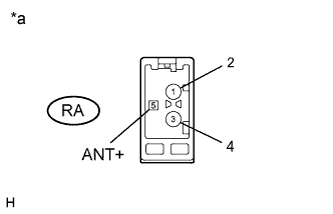
Disconnect the RA navigation receiver assembly connector.
-
Measure the voltage according to the value(s) in the table below.
Standard Voltage Tester Connection Condition Specified Condition RA-5 (ANT) - Body ground Ignition switch ON
Radio switch on
8 V or higher Table 1. Text in Illustration *a Component without harness connected
(Navigation Receiver Assembly)
- OKClick here
- NGClick here
-
- Click here
CHECK ANTENNA CORD
-
Remove the antenna connector of the navigation receiver assembly and antenna.
-
Measure the resistance between the antenna and navigation receiver assembly to check for an open circuit in the antenna cord.
Standard Resistance Below 1 Ω -
Measure the resistance between the antenna cord and body ground to check for a short circuit in the antenna cord.
Standard Resistance 10 kΩ or higher
- OKClick here
- NGClick here
-
- Click here
REPLACE AMPLIFIER ANTENNA ASSEMBLY
-
Replace the amplifier antenna assembly and check if radio broadcasts can be received normally (Click here).
OK Radio broadcasts can be received.
- OKClick here
- NGClick here
-
- Click here
NORMAL OPERATION
- Click here
REPLACE NAVIGATION RECEIVER ASSEMBLYClick here
- Click here
REPAIR WINDOW GLASS ANTENNA WIREClick here
- Click here
REPLACE NAVIGATION RECEIVER ASSEMBLYClick here
- Click here
REPLACE ANTENNA CORDClick here
- Click here
REPLACE NAVIGATION RECEIVER ASSEMBLYClick here