NAVIGATION SYSTEM (for DVD) Voice Guidance does not Function
INSPECTION PROCEDURE
PROCEDURE
-
CHECK NAVIGATION SETTING
-
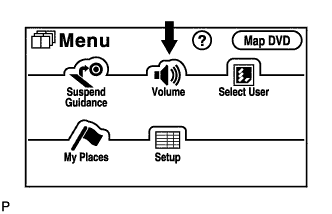
Enter the "Menu" screen by pressing the "MENU" switch.
-
Select "Volume".
-

Check that "OFF" is not selected.
OK "OFF" is not selected.
NG 
TURN AUTO VOICE GUIDANCE "ON"
OK 
-
-
CHECK NAVIGATION SETTING
-
Enter the "Menu" screen by pressing the "MENU" switch.
-
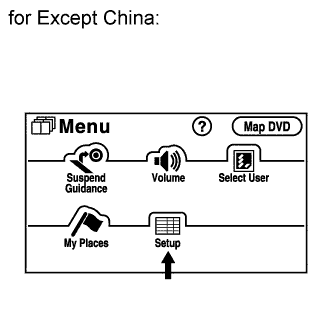
for Except China:
-
Select "Set up".
-
Check that "Voice Guidance in All Modes" is not OFF.
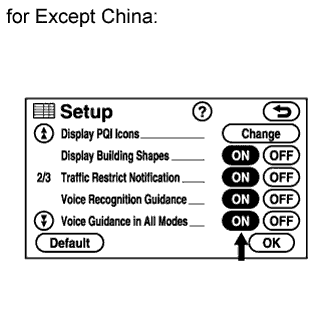
OK Voice guidance in all modes is not OFF.
-
-
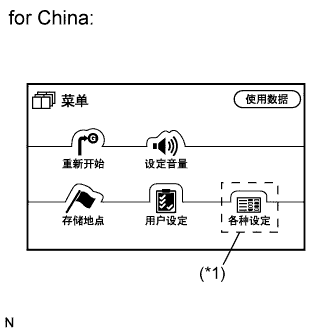
for China:
-
Select "*1" switch.
-
Select "*1" switch.
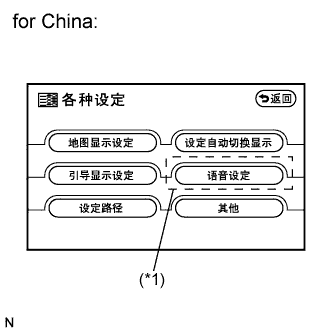
-
Check that "Voice Guidance in All Modes" is not OFF.
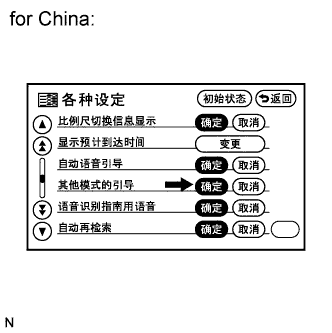
OK Voice guidance in all modes is not OFF.
-
NG
TURN VOICE GUIDANCE IN ALL MODES "ON"
OK
-
-
CHECK NAVIGATION SETTING
-
Enter the "Menu" screen by pressing the "MENU" switch.
-
for Except China:
-
Select "Setup".
-
Check that "Auto Voice Guidance" is not OFF.
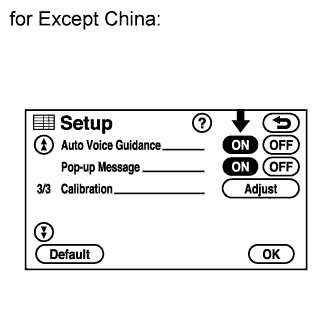
OK Auto voice guidance is not OFF.
-
-
for China:
-
Select "*1" switch.
-
Select "*1" switch.
-
Check that "Auto Voice Guidance" is not OFF.

OK Auto voice guidance is not OFF.
-
NG
REPLACE NAVIGATION RECEIVER ASSEMBLY Click here
OK
-
-
CHECK MAP DISC
-
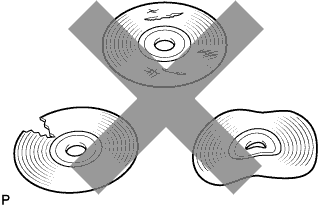
Check that the map disc is not deformed or cracked.
OK No deformations or cracks on the map disc.
NG
REPLACE MAP DISC
OK
-
-
CHECK NAVIGATION RECEIVER ASSEMBLY
-
Check that audio can be heard from the driver side speaker.
OK Audio can be heard.
NG
PROCEED TO NEXT CIRCUIT INSPECTION SHOWN IN PROBLEM SYMPTOMS TABLE Click here
OK 
REPLACE NAVIGATION RECEIVER ASSEMBLY Click here
-