Click here
| DTC Code | DTC Name |
|---|---|
| Current Position Display does not Appear |
Click here
INSPECTION PROCEDURE
Click here
PROCEDURE
- Click here
CHECK NAVIGATION RECEIVER ASSEMBLY
-
Check if a map disc is inserted into the map disc slot.
OK A map disc is inserted.
- OKClick here
- NGClick here
-
- Click here
INSERT MAP DISC IN MAP SIDE SLOT
- Click here
CHECK MAP DISC
-
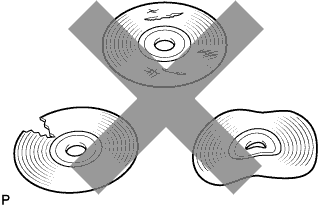
Check that the map disc is not deformed or cracked.
OK No deformations or cracks on the map disc.
- OKClick here
- NGClick here
-
- Click here
REPLACE MAP DISC
- Click here
PROCEED TO NEXT CIRCUIT INSPECTION SHOWN IN PROBLEM SYMPTOMS TABLEClick here