NAVIGATION SYSTEM (for DVD) Poor Sound Quality in All Modes (Low Volume)
INSPECTION PROCEDURE
PROCEDURE
-
CHECK AUDIO SETTINGS
-
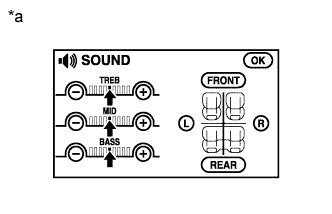
Text in Illustration *a Example Enter the sound quality adjustment screen.
-
Set "BASS", "MID" and "TREB" to the initial values and check that sound is normal.
OK Malfunction disappears. Tech Tips
Sound quality adjustment measures vary according to the type of the amplifier.
NG 
COMPARE WITH ANOTHER VEHICLE OF SAME MODEL Click here
OK 
END
-
-
COMPARE WITH ANOTHER VEHICLE OF SAME MODEL
-
Compare with another vehicle of the same model.
-
Compare with another vehicle of the same model which does not have trouble to see if there is any difference in the sound quality.
OK No difference is found.
-
NG 
PROCEED TO NEXT SUSPECTED AREA SHOWN IN PROBLEM SYMPTOMS TABLE Click here
OK
END
-