| DTC Code | DTC Name |
|---|---|
| Screen Flicker or Color Distortion |
INSPECTION PROCEDURE
PROCEDURE
- Click here
CHECK DISPLAY SETTING
-
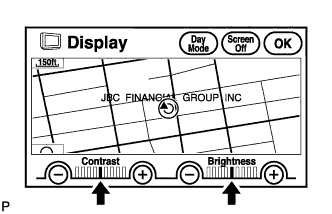
Enter the display adjustment screen by pressing the "DISP" switch.
-
Reset display settings (contrast, brightness) and check that the screen appears normal.
-
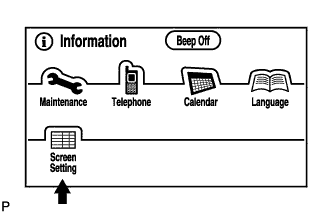
Press the "INFO" switch and then select "Screen Setting."
-
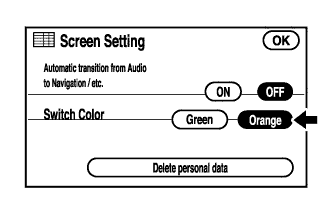
Set "Switch Color" to initial color and check if the display returns to normal.
Initial color for China: Orange color for Except China: Green color OK The display returns to normal.
- OKClick here
- NGClick here
-
- Click here
END
- Click here
CHECK CABIN
-
Check that the cabin temperature is higher than -20°C (-4.0°F).
OK The cabin temperature is higher than -20°C (-4.0°F).
- OKClick here
- NGClick here
-
- Click here
HEAT CABIN AND RECHECK TEMPERATURE
- Click here
CHECK COLOR BAR (DISPLAY CHECK MODE)
-
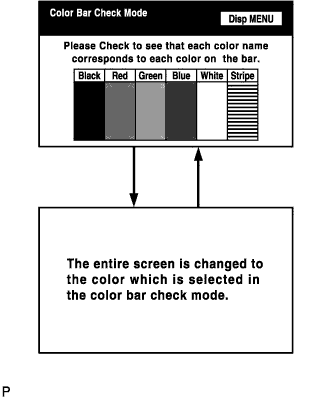
Enter the "Display Check" mode (Color Bar Check) (Click here).
-
Check that the color bars match the displayed names.
OK Color bars match the displayed names.
- OKClick here
- NGClick here
-
- Click here
REPLACE NAVIGATION RECEIVER ASSEMBLYClick here
-
Click here
CHECK NAVI COLOR BAR (NAVIGATION CHECK MODE)
-
Enter the "Navigation Check" mode (NAVI Color Bar Check) (Click here).
-
Check that the color bars match the displayed names.
OK Color bars match the displayed names.
- OKClick here
- NGClick here
-
- Click here
PROCEED TO NEXT CIRCUIT INSPECTION SHOWN IN PROBLEM SYMPTOMS TABLEClick here