Click here
| DTC Code | DTC Name |
|---|---|
| CD Sound Skips |
Click here
INSPECTION PROCEDURE
Click here
PROCEDURE
- Click here
CHECK CD
-
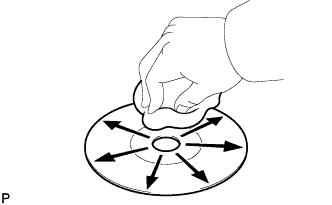
Check the CD.
OK The CD is clean. Tip:If dirt is on the CD surface, wipe it clean with a soft cloth from the inside to the outside in a radial direction.
Note:Do not use a conventional record cleaner or anti-static preservative.
- OKClick here
- NGClick here
-
- Click here
CHECK CD
-
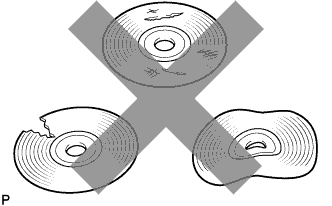
Check that the CD is not deformed or cracked.
OK No deformation or cracks on the CD.
- OKClick here
- NGClick here
-
- Click here
CHECK OPERATION OF ANOTHER CD
-
Check using another CD.
-
Check if the problem recurs using another CD.
OK The problem does not occur.
-
- OKClick here
- NGClick here
-
- Click here
CHECK NAVIGATION RECEIVER ASSEMBLY
-
Check the navigation receiver assembly installation condition.
-
Check that the navigation receiver assembly is properly installed.
OK The navigation receiver assembly is properly installed.
-
- OKClick here
- NGClick here
-
- Click here
CLEAN CD
- Click here
CD IS FAULTY
- Click here
REPLACE NAVIGATION RECEIVER ASSEMBLYClick here
- Click here
REINSTALL NAVIGATION RECEIVER ASSEMBLYClick here