METER / GAUGE SYSTEM Meter Illumination is Always Dark
DESCRIPTION
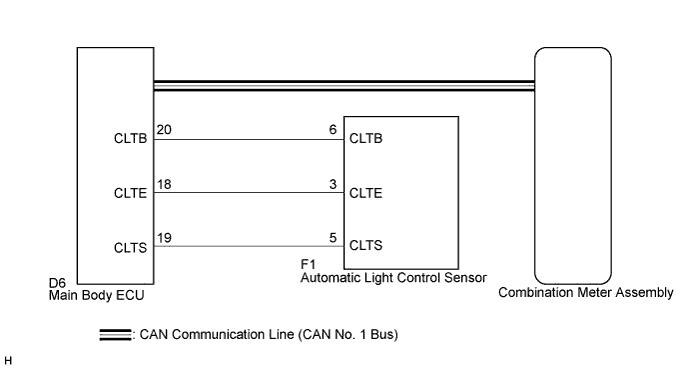
In this circuit, the meter CPU receives auto dimmer signals from the main body ECU using the CAN communication lines (CAN MS Bus). When the meter CPU receives an auto dimmer signal, it dims the meter illumination. The main body ECU determines whether it is daytime, twilight, or nighttime based on the waveform transmitted from the automatic light control sensor. If the main body ECU determines that it is daytime, the ECU does not send auto dimmer signals. Therefore, the meter illumination (warning and indicator lights) will not dim even if the driver accidentally turns the light control switch to the TAIL or HEAD position in daytime.
Tech Tips
When the meter illumination is always dark, or the meter illumination does not dim at night, there may be a malfunction in the automatic light control sensor, main body ECU, CAN communication system, harness or connector, or combination meter assembly, a wire harness, or connector.
WIRING DIAGRAM
INSPECTION PROCEDURE
PROCEDURE
-
CHECK CAN COMMUNICATION SYSTEM
-
Check if a CAN communication DTC is output Click here.
Result Result Proceed to CAN communication DTC is not output. A CAN communication DTC is output. B
B 
GO TO CAN COMMUNICATION SYSTEM Click here
A 
-
-
CHECK DTC
-
Check if DTC B1244 is output Click here.
Result Result Proceed to B1244 is not output. A B1244 is output. B
B
GO TO LIGHTING SYSTEM Click here
A
-
-
READ VALUE USING INTELLIGENT TESTER
-
Connect the intelligent tester to the DLC3.
-
Ignition switch on (IG).
-
Turn the tester on.
-
Turn the light control switch to the TAIL or HEAD position.
-
Enter the following menus: Body Electrical / Main Body / Data List.
-
Check the meter illumination.
Main Body: Tester Display Measurement Item/Range Normal Condition Diagnostic Note Illumination Rate Info Illumination rate information / 0 ms. to 99.99 ms. 0.8 to 22.0 ms. (Value is output according to outside illuminance) - OK Normal condition listed above is displayed. Tech Tips
Meter illumination is adjusted by the automatic light control system and controlled according to the outside light level. The automatic light control sensor sensitiveness can be customized. Therefore, when the Data List value is normal, confirm the sensitivity setting in the customization table of the automatic light control system Click here.
NG 
REPLACE COMBINATION METER ASSEMBLY Click here
OK 
CHECK LIGHTING SETTING Click here
-
-
REPLACE COMBINATION METER ASSEMBLY
-
Replace the combination meter assembly with a new or a normal one Click here.
OK The operation of the combination meter assembly returns to normal.
NG
REPLACE MAIN BODY ECU
OK
END
-