FRONT CONSOLE BOX (for 5-Passenger with Ottoman) REASSEMBLY

Tech Tips
A bolt without a torque specification is shown in the standard bolt chart Click here
-
INSTALL CONSOLE BOX PLATE
-
Attach the 6 claws to install the console box plate.
-
Install the 2 screws.
-
-
INSTALL NO. 1 INTERIOR ILLUMINATION LIGHT ASSEMBLY
-
Attach the 2 claws to install the No. 1 interior illumination light assembly.
-
Connect the connector.
-
-
INSTALL CONSOLE BOX WIRE (for Console Box Rear Side)
-
For lower console box side:
-
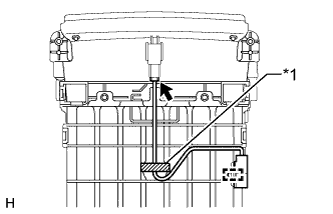
Text in Illustration *1 Tape Attach the wire harness clamp to install the console box wire.
-
Apply a new tape to the lower console box as shown in the illustration.
-
Connect the connector.
-
-
For upper console box sub-assembly side:
-
Attach the wire harness clamp to install the console box wire.
-
Connect the 2 connectors.
-
-
-
INSTALL UPPER CONSOLE BOX SUB-ASSEMBLY
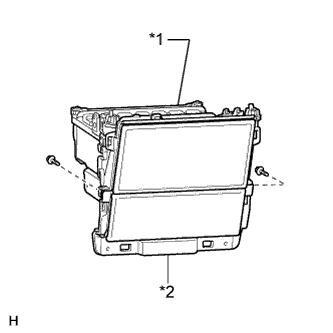
Text in Illustration *1 Upper Console Box Sub-assembly *2 Lower Console Box
-
Install the upper console box sub-assembly to the lower console box with the 2 screws.
-
-
INSTALL NO. 2 CONSOLE BOX MOUNTING BRACKET
-
Install the No. 2 console box mounting bracket with the 6 screws and 4 bolts.
-
-
INSTALL REAR CONSOLE BOX DAMPER
-
Install the rear console box damper to the No. 2 console box mounting bracket with the 2 bolts.
-
-
INSTALL DISC PLAYER ASSEMBLY
-
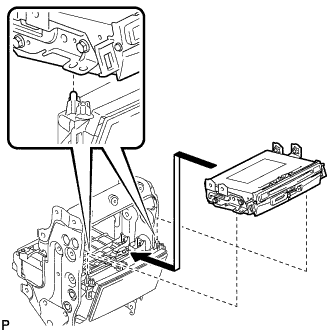
Align the disc player assembly with the 2 guides on the console box and temporarily install the disc player assembly as shown in the illustration.
-
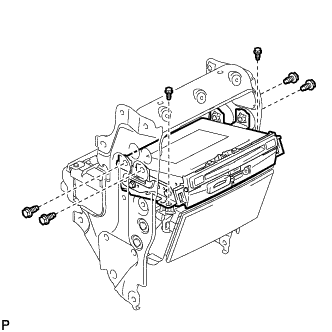
Install the disc player assembly with the 6 bolts.
- Torque:
- 8.5 N*m { 87 kgf*cm, 75 in.*lbf }
-
Connect each connector.
-
-
INSTALL CONSOLE BOX REGISTER ASSEMBLY
-
Attach the 10 claws to install the console box register assembly.
-
-
INSTALL REAR CONSOLE END PANEL SUB-ASSEMBLY
-
Attach the 2 clips to install the rear console end panel sub-assembly.
-
Install the 3 screws.
-
-
INSTALL TELEVISION DISPLAY ASSEMBLY
-
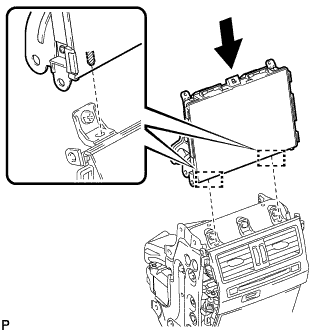
Align the 2 guides with the console box and install the television display assembly to the console box.
-
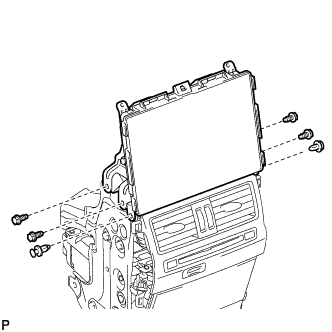
Install the 2 clips and 4 bolts.
- Torque:
- 8.5 N*m { 87 kgf*cm, 75 in.*lbf }
-
Connect each connector.
-
-
INSTALL FRONT NO. 1 CONSOLE BOX LENS
-
Attach the 2 claws to install the front No. 1 console box lens.
-
-
INSTALL CONSOLE BOX ILLUMINATION LIGHT ASSEMBLY
-
Attach the 2 claws to install the console box illumination light assembly.
-
Connect the connector.
-
-
INSTALL CONSOLE BOX WIRE (for Console Box Front Side)
-
Attach the 2 wire harness clamps to install the console box wire.
-
Connect the connector.
-
-
INSTALL CONSOLE COMPARTMENT DOOR HINGE SUB-ASSEMBLY
-
Install the console compartment door hinge sub-assembly with the 4 screws.
-
Attach the 8 claws to install the console compartment door lock.
-
Install the 4 screws.
-
Install 4 new seals.
-
-
INSTALL REAR CONSOLE ARMREST ASSEMBLY
-
Install the rear console armrest assembly together with the bracket with the 6 screws.
-
Attach the wire harness clamp.
-
-
INSTALL LOWER CONSOLE BOX POCKET
-
Attach the 6 claws to install the lower console box pocket.
-