REAR BUMPER REMOVAL

-
REMOVE UPPER REAR BUMPER COVER LH
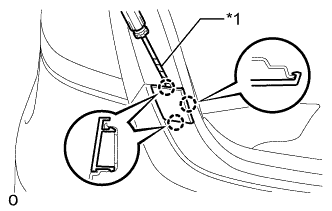
Text in Illustration *1 Protective Tape
-
Using a screwdriver, detach the 3 claws and remove the upper rear bumper cover LH.
Tech Tips
Tape the screwdriver tip before use.
-
-
REMOVE UPPER REAR BUMPER COVER RH
Tech Tips
Use the same procedure described for the LH side.
-
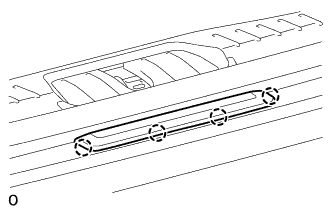
REMOVE CENTER REAR BUMPER PLATE (w/ Dynamic Radar Cruise Control System)
-
Detach the 4 claws and remove the rear bumper center plate.
-
-
REMOVE REAR BUMPER COVER
-
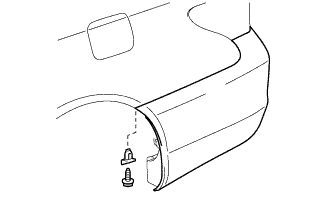
Remove the screw, and then remove the rear bumper seal bracket.
Tech Tips
Use the same procedure for both screws and rear bumper seal brackets.
-
Remove the 2 screws.
-
Put protective tape around the rear bumper cover.
-
Using a clip remover, remove the 6 clips.
-
Remove the 2 screws.
-
Detach the 14 claws and 4 guides.
-
Disconnect the No. 3 floor wire connector.
-
Remove the rear bumper cover.
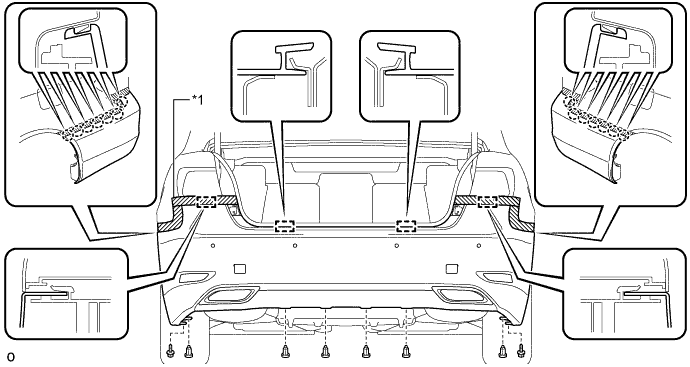
Text in Illustration *1 Protective Tape - -
-
-
REMOVE REAR BUMPER ENERGY ABSORBER
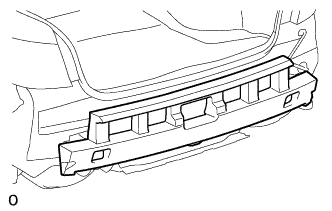
-
Remove the rear bumper energy absorber.
-
-
REMOVE REAR BUMPER NO. 1 REINFORCEMENT
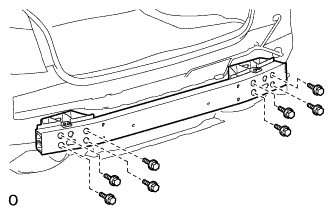
-
Remove the 8 bolts and rear bumper No. 1 reinforcement.
-
-
REMOVE LUGGAGE TRIM SERVICE HOLE COVER
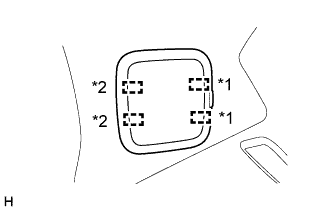
Text in Illustration *1 Fastener *2 Guide
-
Detach the 2 fasteners and guides and remove the luggage trim service hole cover.
-
-
REMOVE REAR COMBINATION LIGHT ASSEMBLY LH
-
Put protective tape around the rear combination light assembly LH.
-
Disconnect the connector.
-
Remove the 3 nuts.
-
Move the rear combination light assembly LH in the direction of the arrow in the illustration, detach the clip, 2 claws and 2 guides to remove the rear combination light assembly LH.
Tech Tips
The clips remain on the vehicle body.
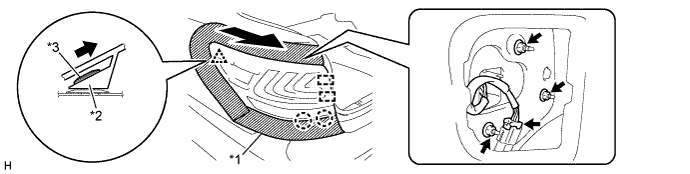
Text in Illustration *1 Protective Tape *2 Rear Combination Light Assembly LH *3 Clip - -
-
-
REMOVE REAR COMBINATION LIGHT ASSEMBLY RH
Tech Tips
Use the same procedure described for the LH side.
-
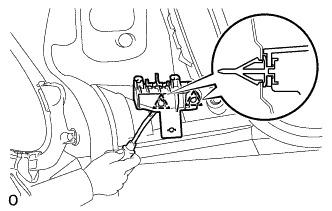
REMOVE REAR BUMPER UPPER RETAINER LH
-
Using a clip remover, detach the 2 clips and remove the rear bumper upper retainer.
-
-
REMOVE REAR BUMPER UPPER RETAINER RH
Tech Tips
Use the same procedure described for the LH side.
-
REMOVE BLIND SPOT MONITOR SENSOR
-
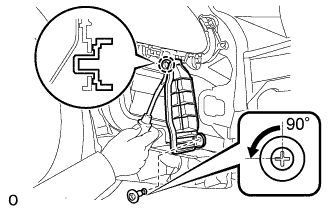
REMOVE REAR BUMPER LOWER SIDE RETAINER LH
-
Using a screwdriver, turn the clip 90° and remove the clip.
-
Using a clip remover, detach the claw and remove the rear bumper lower side retainer LH.
-
-
REMOVE REAR BUMPER LOWER SIDE RETAINER RH
Tech Tips
Use the same procedure described for the LH side.
-
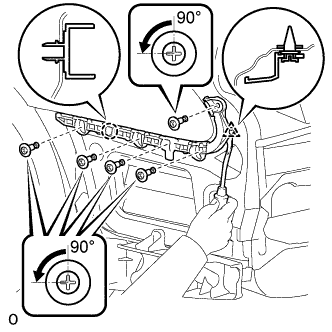
REMOVE REAR BUMPER SIDE SUPPORT LH
-
Using a screwdriver, turn the 5 clips 90° and remove the 5 clips.
-
Using a clip remover, detach the clip and claw and remove the rear bumper side support.
-
-
REMOVE REAR BUMPER SIDE SUPPORT RH
Tech Tips
Use the same procedure described for the LH side.
-
REMOVE REAR TIRE PRESSURE MONITOR INITIATOR
-
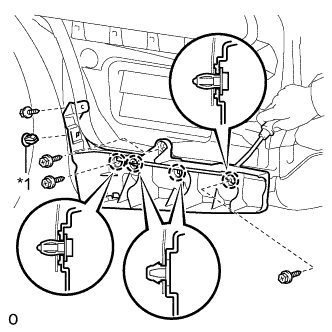
REMOVE REAR BUMPER LOWER RETAINER LH
Text in Illustration *1 Grommet
-
Remove the 4 screws and grommet.
-
Using a clip remover, detach the 4 claws and remove the rear bumper lower retainer LH.
-
-
REMOVE REAR BUMPER LOWER RETAINER RH
Tech Tips
Use the same procedure described for the LH side.