POWER MIRROR CONTROL SYSTEM Driver Side Power Mirror cannot be Adjusted with Power Mirror Switch
SYSTEM DESCRIPTION
This circuit detects the conditions of the mirror control switch.
The outer mirror switch assembly sends information about the operating condition of the mirror switch (switch input signals) through the CAN communication line. Then the switch input signals are sent to the front door ECU (for driver side). Mirror adjustment is controlled by the front door ECU (for driver side).
WIRING DIAGRAM
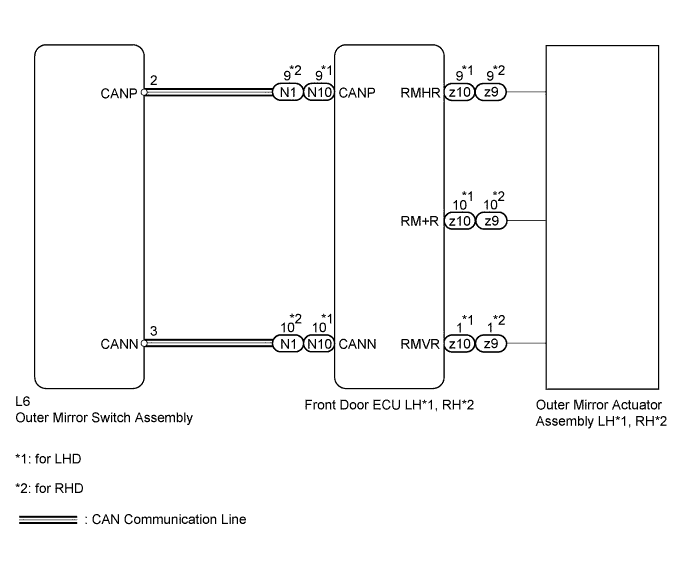
INSPECTION PROCEDURE
PROCEDURE
-
CHECK DTC
-
Use the intelligent tester to check if the CAN communication system is functioning normally.
Result: Result Proceed to CAN DTC is not output A CAN DTC is output (for LHD) B CAN DTC is output (for RHD) C
B 
GO TO CAN COMMUNICATION SYSTEM Click here
C
GO TO CAN COMMUNICATION SYSTEM Click here
A 
-
-
READ VALUE USING INTELLIGENT TESTER (MIRROR MASTER SWITCH AND MIRROR CONTROL SWITCH)
-
Check the Data List for proper functioning of the mirror master switch and mirror control switch.
D-SEAT SW: Tester Display Measurement Item/Range Normal Condition Diagnostic Note Mirror selection SW (Left)*1 Mirror master switch signal for LH mirror / ON or OFF ON: Mirror master switch is in L position
OFF: Mirror master switch is OFF or in R position
- Mirror selection SW (Right)*2 Mirror master switch signal for RH mirror / ON or OFF ON: Mirror master switch is in R position
OFF: Mirror master switch is OFF or in L position
- Mirror Adjustment Right Mirror control switch signal (RIGHT) / ON or OFF ON: RIGHT switch is ON
OFF: Any switch except RIGHT is ON or all switches are OFF
- Mirror Adjustment Left Mirror control switch signal (LEFT) / ON or OFF ON: LEFT switch is ON
OFF: Any switch except LEFT is ON or all switches are OFF
- Mirror Adjustment Up Mirror control switch signal (UP) / ON or OFF ON: UP switch is ON
OFF: Any switch except UP is ON or all switches are OFF
- Mirror Adjustment Down Mirror control switch signal (DOWN) / ON or OFF ON: DOWN switch is ON
OFF: Any switch except DOWN is ON or all switches are OFF
- Tech Tips
-
*1: for LHD
-
*2: for RHD
OK On tester screen, each item changes between ON and OFF according to above chart. -
NG
REPLACE OUTER MIRROR SWITCH ASSEMBLY Click here
OK
-
-
PERFORM ACTIVE TEST USING INTELLIGENT TESTER (POWER MIRROR CONTROL FUNCTION)
-
Select the Active Test, use the intelligent tester to generate a control command, and then check the power mirror control function.
Driver Door Tester Display Test Part Control Range Mirr Up / Down Mirror vertical operation UP / DOWN Mirr Right / Left Mirror horizontal operation RIGHT / LEFT Result: Result Proceed to Outer rear view mirror (for driver side) does not operate normally A Outer rear view mirror (for driver side) operates normally B
B
REPLACE OUTER MIRROR SWITCH ASSEMBLY Click here
A
-
-
INSPECT OUTER REAR VIEW MIRROR ASSEMBLY (for Driver Side) (LEFT / RIGHT MOTOR, UP / DOWN MOTOR)
-
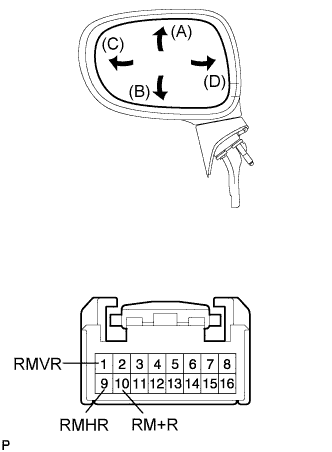
for LHD:
-
Remove the outer rear view mirror LH Click here.
-
Apply battery voltage and check the operation of the power mirror.
OK Measurement Condition Specified Condition Battery positive (+) → Terminal 1 (RMVR)
Battery negative (-) → Terminal 10 (RM+R)
Turns upward (A) Battery negative (-) → Terminal 1 (RMVR)
Battery positive (+) → Terminal 10 (RM+R)
Turns downward (B) Battery positive (+) → Terminal 9 (RMHR)
Battery negative (-) → Terminal 10 (RM+R)
Turns left (C) Battery negative (-) → Terminal 9 (RMHR)
Battery positive (+) → Terminal 10 (RM+R)
Turns right (D)
-
-
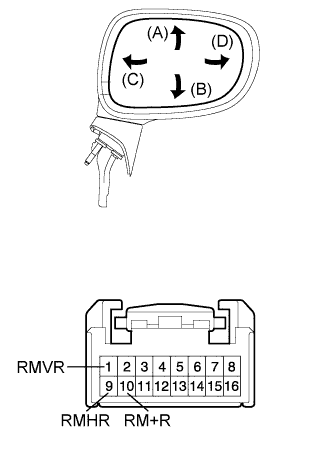
for RHD:
-
Remove the outer rear view mirror RH Click here.
-
Apply battery voltage and check the operation of the power mirror.
OK Measurement Condition Specified Condition Battery positive (+) → Terminal 1 (RMVR)
Battery negative (-) → Terminal 10 (RM+R)
Turns upward (A) Battery negative (-) → Terminal 1 (RMVR)
Battery positive (+) → Terminal 10 (RM+R)
Turns downward (B) Battery positive (+) → Terminal 9 (RMHR)
Battery negative (-) → Terminal 10 (RM+R)
Turns left (C) Battery negative (-) → Terminal 9 (RMHR)
Battery positive (+) → Terminal 10 (RM+R)
Turns right (D)
-
NG
REPLACE OUTER MIRROR ACTUATOR ASSEMBLY (for Driver Side) Click here
OK 
REPLACE FRONT DOOR ECU (for Driver Side) Click here
-