CLEARANCE WARNING ECU INSTALLATION

Tech Tips
A bolt without a torque specification is shown in the standard bolt chart Click here.
-
INSTALL CLEARANCE WARNING ECU ASSEMBLY
-
for LHD:
-
Attach the guide to install the clearance warning ECU assembly.
Note
-
Avoid any impact to the clearance warning ECU assembly.
-
Do not drop the ECU. If it is dropped, replace it with a new one.
-
-
Install the nut.
-
Install the ECU integration bracket with the nut and bolt.
-
Connect each connector.
-
-
for RHD:
-
Install the clearance warning ECU assembly with the nut.
Note
-
Avoid any impact to the clearance warning ECU assembly.
-
Do not drop the ECU. If it is dropped, replace it with a new one.
-
-
Install the ECU integration bracket with the nut and bolt.
-
Connect each connector.
-
-
-
INSTALL GLOVE COMPARTMENT DOOR ASSEMBLY
-
Connect each connector and each wire harness clamp.
-
Install the glove compartment door assembly with the 5 screws <C>.
-
-
INSTALL FRONT PASSENGER SIDE KNEE AIRBAG ASSEMBLY
-
Check that the engine switch is off.
-
Check that the cable is disconnected from the negative (-) battery terminal.
CAUTION:
Wait at least 90 seconds after disconnecting the cable from the negative (-) battery terminal to disable the SRS system.
-
Push in the lock to connect the airbag connector.
-
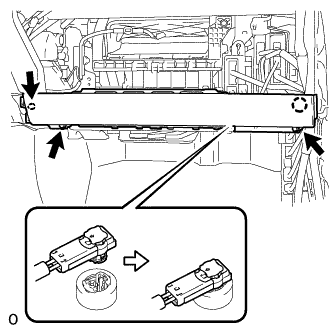
Connect the airbag connector to the front passenger side knee airbag assembly.
Note
When connecting airbag connector, take care not to damage the airbag wire harness.
-
Attach the claw to install the front passenger side knee airbag assembly.
-
Install the 3 bolts.
- Torque:
- 10 N*m { 102 kgf*cm, 7 ft.*lbf }
Note
Confirm that the front passenger side knee airbag assembly is installed securely without any excessive gaps and is not protruding outward.
-
-
INSTALL LOWER INSTRUMENT PANEL
-
Attach the 2 claws and clip to install the lower instrument panel.
-
-
INSTALL NO. 2 INSTRUMENT PANEL UNDER COVER SUB-ASSEMBLY
-
Connect the connector.
-
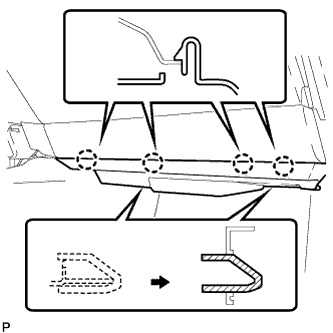
Insert the 2 guides.
-
Attach the 4 claws to install the No. 2 instrument panel under cover sub-assembly.
-
-
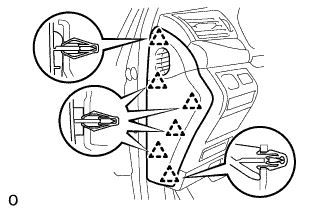
INSTALL INSTRUMENT SIDE PANEL LH (for RHD)
-
Attach the 6 clips to install the instrument side panel LH.
-
-
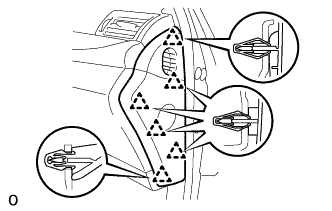
INSTALL INSTRUMENT SIDE PANEL RH (for LHD)
-
Attach the 6 clips to install the instrument side panel RH.
-
-
INSTALL INSTRUMENT PANEL FINISH PANEL END LH (for RHD)
-
Attach the rear part of the instrument panel finish panel end LH 3 clips.
-
Attach the front part of the instrument panel finish panel end LH 6 clips to install the instrument panel finish panel end LH.
-
-
INSTALL INSTRUMENT PANEL FINISH PANEL END RH (for LHD)
Tech Tips
Use the same procedure described for the LH side.
-
CONNECT CABLE TO NEGATIVE BATTERY TERMINAL
Note
When disconnecting the cable, some systems need to be initialized after the cable is reconnected Click here.
-
INSTALL COWL TOP VENTILATOR LOUVER RH
-
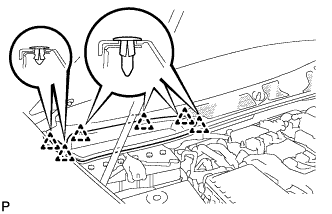
Install the 6 clips and cowl top ventilator louver RH.
Note
If the cowl top ventilator louver RH is not properly installed, water may leak into the engine room and cause malfunctions. Therefore, make sure the cowl top ventilator louver RH is installed properly.
-
-
CHECK SRS WARNING LIGHT