NIGHT VIEW SYSTEM, Diagnostic DTC:B2824

| DTC Code | DTC Name |
|---|---|
| B2824 | Driving Support ECU Received Invalid Flag |
DESCRIPTION
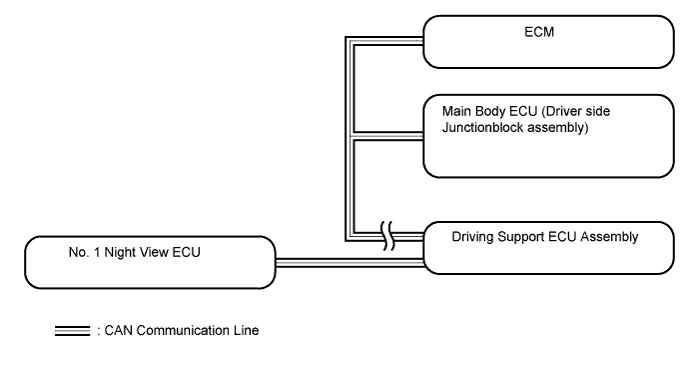
The No. 1 night view ECU communicates with the driving support ECU assembly, the ECM and the main body ECU (driver side junction block assembly) via CAN communication. This DTC is stored when a malfunction in the communication with the driving support ECU assembly is detected.
Tech Tips
While DTCs are stored, the night view system does not operate and a warning message is displayed on the accessory meter assembly.
| DTC Code | DTC Detection Condition | Trouble Area |
|---|---|---|
| B2824 | The driving support ECU assembly cannot receive CAN communication signals normally. |
|
WIRING DIAGRAM
INSPECTION PROCEDURE
Note
-
When the No. 1 night view ECU is replaced, perform object recognition camera (night view camera) adjustment Click here.
-
When replacing the driving support ECU, always replace it with a new one and be sure to perform initialization Click here.
PROCEDURE
-
CHECK CAN COMMUNICATION SYSTEM
-
Use the GTS to check if the CAN communication system is functioning normally.
-
for LHD: Click here.
-
for RHD: Click here.
OK CAN communication system is functioning normally. Result Result Proceed to OK A NG (for LHD) B NG (for RHD) C -
B 
GO TO CAN COMMUNICATION SYSTEM Click here
C
GO TO CAN COMMUNICATION SYSTEM Click here
OK 
-
-
REPLACE ECM
-
Temporarily replace the ECM with a new one Click here.
NEXT
-
-
INITIALIZE DRIVING SUPPORT ECU ASSEMBLY
-
Initialize the driving support ECU assembly Click here.
NEXT
-
-
CHECK FOR DTC
-
Clear the DTCs Click here.
-
Check for DTCs Click here.
OK No DTCs are output.
NG 
REPLACE MAIN BODY ECU (DRIVER SIDE JUNCTION BLOCK ASSEMBLY) Click here
OK 
END (ECM IS DEFECTIVE)
-
-
REPLACE MAIN BODY ECU (DRIVER SIDE JUNCTION BLOCK ASSEMBLY)
-
Temporarily replace the main body ECU (driver side junction block assembly) with a new one.
NEXT
-
-
INITIALIZE DRIVING SUPPORT ECU ASSEMBLY
-
Initialize the driving support ECU assembly Click here.
NEXT
-
-
CHECK FOR DTC
-
Clear the DTCs Click here.
-
Check for DTCs Click here.
OK No DTCs are output.
NG
CHECK DRIVING SUPPORT ECU ASSEMBLY Click here
OK
END (MAIN BODY ECU [DRIVER SIDE JUNCTION BLOCK ASSEMBLY] IS DEFECTIVE)
-
-
CHECK DRIVING SUPPORT ECU ASSEMBLY
-
Temporarily replace the driving support ECU assembly with a new one Click here.
-
Clear the DTCs Click here.
-
Check for DTCs Click here.
OK No DTCs are output.
NG
REPLACE NO. 1 NIGHT VIEW ECU Click here
OK
END (DRIVING SUPPORT ECU ASSEMBLY IS DEFECTIVE)
-