HARD DISK DRIVE INSTALLATION

-
PRECAUTION
-
INSTALL HARD DISC
-
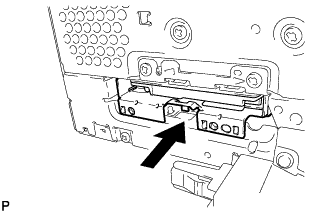
Push the hard disc in the direction of the arrow shown in the illustration to install it.
-
Attach the 2 claws to install the cover.
-
Install the 2 screws.
-
-
INSTALL NO. 2 RADIO BRACKET
-
Install the No. 2 radio bracket with the 3 bolts.
-
-
INSTALL MULTI-MEDIA MODULE RECEIVER ASSEMBLY
-
CONNECT CABLE TO NEGATIVE BATTERY TERMINAL
Note
When disconnecting the cable, some systems need to be initialized after the cable is reconnected Click here.
-
INSTALL COWL TOP VENTILATOR LOUVER RH
-
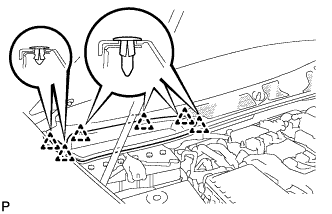
Install the 6 clips and cowl top ventilator louver RH.
Note
If the cowl top ventilator louver RH is not properly installed, water may leak into the engine room and cause malfunctions. Therefore, make sure the cowl top ventilator louver RH is installed properly.
-