TELEVISION DISPLAY (for Center Console Side) REMOVAL

-
REMOVE UPPER REAR CONSOLE PANEL GARNISH
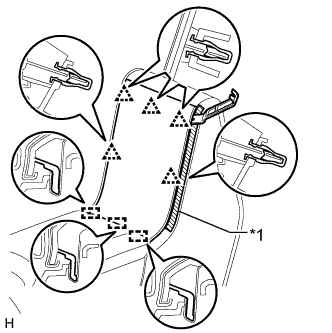
Text in Illustration *1 Protective Tape
-
Put protective tape as shown in the illustration.
-
Using moulding remover B, detach the 5 clips and 3 guides, and then remove the upper rear console panel garnish.
-
-
REMOVE REAR CONSOLE BOX GARNISH
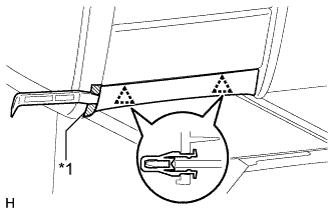
Text in Illustration *1 Protective Tape
-
Put protective tape as shown in the illustration.
-
Using moulding remover A, detach the 2 clips and remove the rear console box garnish.
-
-
REMOVE UPPER NO. 1 CONSOLE PANEL GARNISH
-
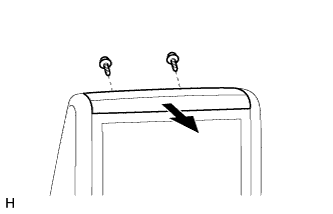
Remove the 2 screws and move the upper No. 1 console panel garnish in the direction of the arrow to remove it.
-
-
REMOVE REAR NO. 1 CONSOLE END PANEL GARNISH
-
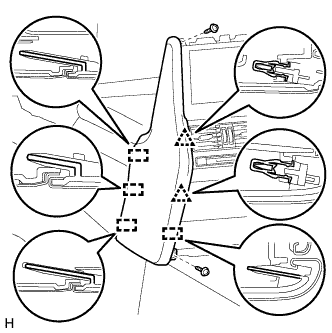
Remove the 2 screws.
-
Detach the 2 clips and 4 guides, and then remove the rear No. 1 console end panel garnish.
-
-
REMOVE REAR NO. 2 CONSOLE END PANEL GARNISH
Tech Tips
Use the same procedure described for the rear No. 1 console end panel garnish.
-
REMOVE TELEVISION DISPLAY ASSEMBLY
-
Disconnect each connector.
-
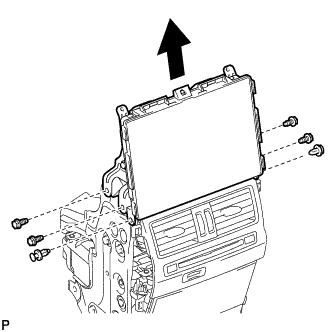
Remove the 2 clips, 4 bolts and television display.
-