INSTRUMENT PANEL SPEAKER INSTALLATION

Tech Tips
-
Use the same procedure for the RH and LH sides.
-
The procedure listed below is for the LH side.
-
A bolt without a torque specification is shown in the standard bolt chart Click here.
-
INSTALL FRONT NO. 2 SPEAKER ASSEMBLY
-
Connect the connector.
-
Temporarily install the front No. 2 speaker assembly by aligning the positioning pins of the front No. 2 speaker assembly with the instrument panel.
-
Install the front No. 2 speaker assembly with the 2 bolts.
Note
-
Do not touch the cone part of the speaker.
-
When installing the speaker to the instrument panel be careful so that the wires do not get caught between the parts.
-
-
-
INSTALL NO. 1 INSTRUMENT PANEL SPEAKER PANEL SUB-ASSEMBLY
-
Attach the 2 clips and 7 claws to install the No. 1 instrument panel speaker panel sub-assembly.
-
-
INSTALL FRONT PILLAR GARNISH LH
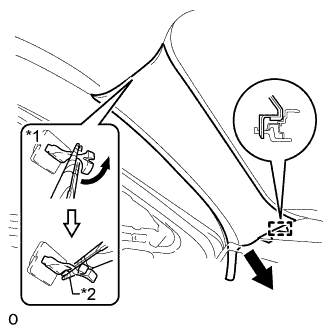
-
Attach the guide.
-
Turn the end of the front pillar garnish clip 90° with needle-nose pliers and install it to the front pillar garnish LH.
Tech Tips
Tape the tips of the needle-nose pliers before use.
Text in Illustration *1 Front Pillar Garnish Clip *2 Protective Tape -
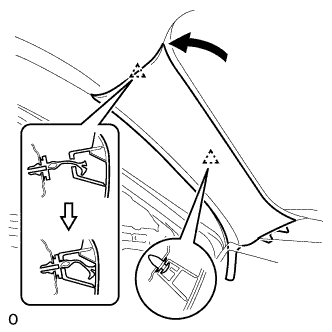
Attach the 2 clips to install the front pillar garnish LH.
Note
After installing the front pillar garnish LH, make sure that the lip of the front door opening trim weatherstrip LH is not pinched.
-
-
INSTALL FRONT NO. 3 SPEAKER ASSEMBLY
-
Connect the connector.
-
Temporarily install the front No. 3 speaker assembly by aligning the positioning pins of the front No. 3 speaker assembly with the instrument panel.
-
Install the front No. 3 speaker assembly with the 2 bolts.
Note
-
Do not touch the cone of the speaker.
-
When installing the speaker to the instrument panel be careful so that the wires do not get caught between the parts.
-
-
-
INSTALL NO. 1 SPEAKER HOLE COVER
-
Attach the 4 clips, claw and clamp to install the hole cover.
-