RAIN SENSOR REMOVAL

-
PRECAUTION
Note
After turning the engine switch off, waiting time may be required before disconnecting the cable from the battery terminal. Therefore, make sure to read the disconnecting the cable from the battery terminal notice before proceeding with work ( Click here).
-
REMOVE COWL TOP VENTILATOR LOUVER RH
-
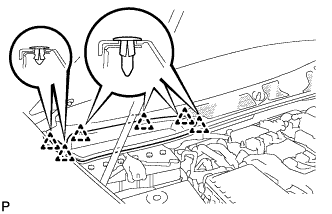
for LHD:
Remove the 6 clips and cowl top ventilator louver RH.
-
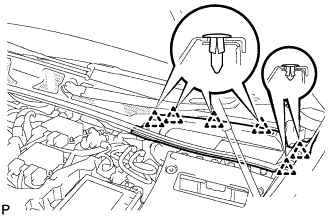
for RHD:
Remove the 6 clips and cowl top ventilator louver LH.
-
-
DISCONNECT CABLE FROM NEGATIVE BATTERY TERMINAL
Note
When disconnecting the cable, some systems need to be initialized after the cable is reconnected Click here.
-
REMOVE RAIN SENSOR COVER (w/o Lane Keeping Assist System)
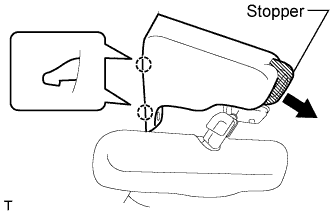
-
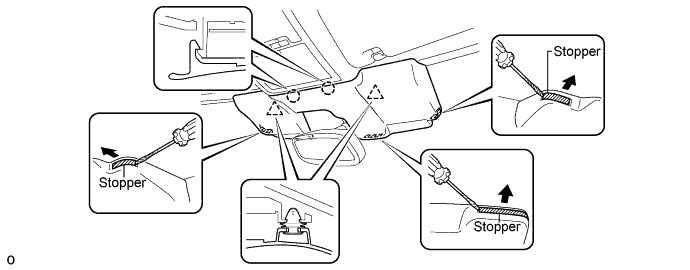
Pull the stopper in the direction shown in the illustration.
-
Detach the 2 claws and remove the rain sensor cover.
-
-
REMOVE RAIN SENSOR COVER (w/ Lane Keeping Assist System)
Note
When removing and installing the rain sensor cover, do not apply force to the object recognition camera areas labeled "X".
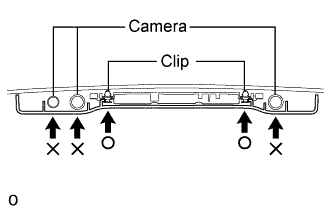
-
Pull the stopper in the direction shown in the illustration.
-
While being careful not to apply force to the camera area, detach the 2 clips and 2 claws and remove the rain sensor cover.
-
-
REMOVE INNER REAR VIEW MIRROR ASSEMBLY
-
w/o Automatic High Beam System, Adaptive High Beam System:
Remove the inner rear view mirror assembly Click here.
-
w/ Automatic High Beam System, Adaptive High Beam System:
Remove the inner rear view mirror assembly Click here.
-
-
REMOVE RAIN SENSOR
-
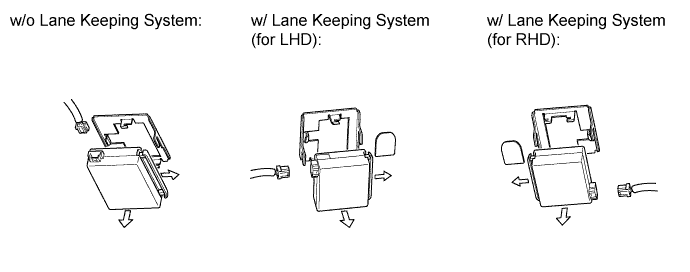
Pull the stopper in the direction shown in the illustration, and release the lock.
-
Disconnect the connector, and remove the rain sensor.
-